• Login
    • Search
    • Categories
    • Recent
    • Tags
    • Users
    • Groups
    • Rules
    • Help

    Do more on the web, with a fast and secure browser!

    Download Opera browser with:

    • built-in ad blocker
    • battery saver
    • free VPN
    Download Opera

    WebGL is not working with Opera one

    General
    4
    8
    535
    Loading More Posts
    • Oldest to Newest
    • Newest to Oldest
    • Most Votes
    Reply
    • Reply as topic
    Log in to reply
    This topic has been deleted. Only users with topic management privileges can see it.
    • L
      LeonidasA last edited by

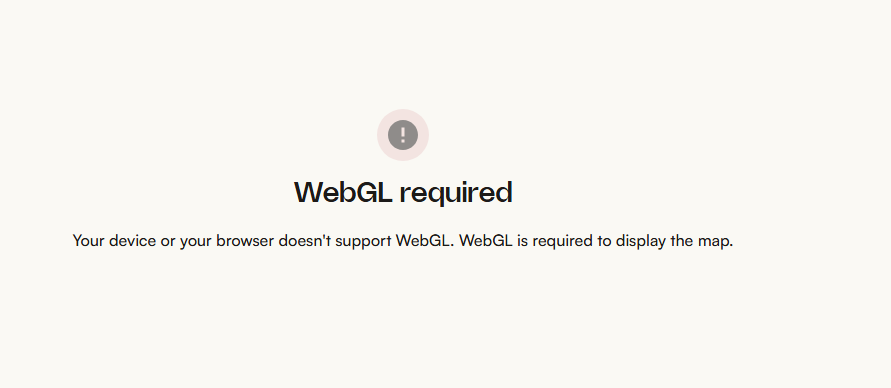
      After a couple of Opera "one" updates, WebGL is not supported anymore. I don´t remember when exactly i missed the train but i know half a year ago I had no issues. ce9cef5a-b615-4c52-bc15-26ad3d35f7fb-image.png I tried with edge and chrome, no issue whatsoever. Ì know this topic had severeal threads in the past, yet i could not find anything related to the newest opera one updates. I use:
      Opera One(Version: 133.0.5932.85)
      Windows 11 64-bit
      Chromium-Version:149.0.7827.201

      Has anyone solved this? Thanks in advance.

      Reply Quote 0
        leocg 1 Reply Last reply
      • leocg
        leocg Moderator Volunteer @LeonidasA last edited by

        @LeonidasA Any examples of pages where it's not working?

        Reply Quote 0
          L 1 Reply Last reply
        • L
          LeonidasA @leocg last edited by

          @leocg The Komoot routes and maps page for example.

          Reply Quote 0
            F 1 Reply Last reply
          • F
            fitzydj @LeonidasA last edited by

            @LeonidasA said in WebGL is not working with Opera one:

            Komoot routes and maps page

            No issue for me, Windows 11 Pro, Opera One (version: 134.0.5954.26)

            Reply Quote 0
              1 Reply Last reply
            • burnout426
              burnout426 Volunteer last edited by

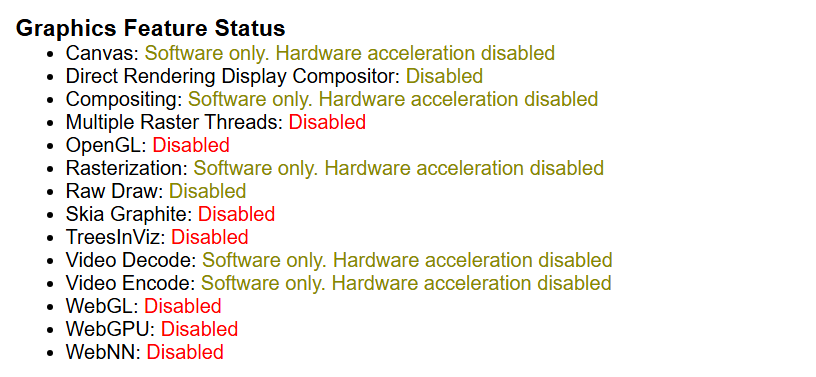
              When you goto the URL opera://gpu, what does it say at the top for all the graphic feature statuses?

              Reply Quote 0
                1 Reply Last reply
              • L
                LeonidasA last edited by

                8528bea3-5285-4952-9e4d-585450089289-image.png Why does it work with other explorers but not with opera?

                Reply Quote 0
                  leocg burnout426 2 Replies Last reply
                • leocg
                  leocg Moderator Volunteer @LeonidasA last edited by

                  @LeonidasA Hardware/graphics acceleration is turned on?

                  Reply Quote 0
                    1 Reply Last reply
                  • burnout426
                    burnout426 Volunteer @LeonidasA last edited by

                    @LeonidasA That shows that graphics acceleration is disabled at the URL opera://settings/system. Enable it, restart Opera and check opera://gpu again. If it still shows that, goto the URL opera://flags, reset your flags, restart Opera and check opera://gpu again.

                    Reply Quote 0
                      1 Reply Last reply
                    • First post
                      Last post

                    Computer browsers

                    • Opera for Windows
                    • Opera for Mac
                    • Opera for Linux
                    • Opera beta version
                    • Opera USB

                    Mobile browsers

                    • Opera for Android
                    • Opera Mini
                    • Opera Touch
                    • Opera for basic phones

                    • Add-ons
                    • Opera account
                    • Wallpapers
                    • Opera Ads

                    • Help & support
                    • Opera blogs
                    • Opera forums
                    • Dev.Opera

                    • Security
                    • Privacy
                    • Cookies Policy
                    • EULA
                    • Terms of Service

                    • About Opera
                    • Press info
                    • Jobs
                    • Investors
                    • Become a partner
                    • Contact us

                    Follow Opera

                    • Opera - Facebook
                    • Opera - Twitter
                    • Opera - YouTube
                    • Opera - LinkedIn
                    • Opera - Instagram

                    © Opera Software 1995-