• Login
    • Search
    • Categories
    • Recent
    • Tags
    • Users
    • Groups
    • Rules
    • Help

    Do more on the web, with a fast and secure browser!

    Download Opera browser with:

    • built-in ad blocker
    • battery saver
    • free VPN
    Download Opera

    [Suggestion] Add an option to always play the startup splash screen

    Opera GX
    3
    5
    362
    Loading More Posts
    • Oldest to Newest
    • Newest to Oldest
    • Most Votes
    Reply
    • Reply as topic
    Log in to reply
    This topic has been deleted. Only users with topic management privileges can see it.
    • TheBlackFurry
      TheBlackFurry last edited by

      Hello!

      I would like to suggest adding a new option that allows users to always play the startup splash screen when launching Opera GX.

      Currently, even with the Splash Screen option enabled, the animation only appears occasionally. This means that users who install custom GX Mods with unique startup animations and sounds don't get to enjoy them every time they open the browser.

      A simple setting could be added, for example:

      Never
      Automatic (current behavior)
      Always

      Why this would be useful?

      One of Opera GX's biggest strengths is its customization. GX Mods include custom startup animations, sounds, shaders, wallpapers and other visual effects, but the splash screen is one of the first things users see.

      Giving users the choice to always display it would:

      Let creators showcase their work every time the browser starts.
      Increase the value of GX Mods and encourage more people to create them.
      Improve the feeling of personalization without affecting users who prefer a faster startup (they could simply keep the current "Automatic" behavior).

      This would be a small quality-of-life improvement that gives users more control over their experience.

      Thank you for considering this suggestion! 😃

      Reply Quote 0
        1 Reply Last reply
      • dordob
        dordob Opera last edited by

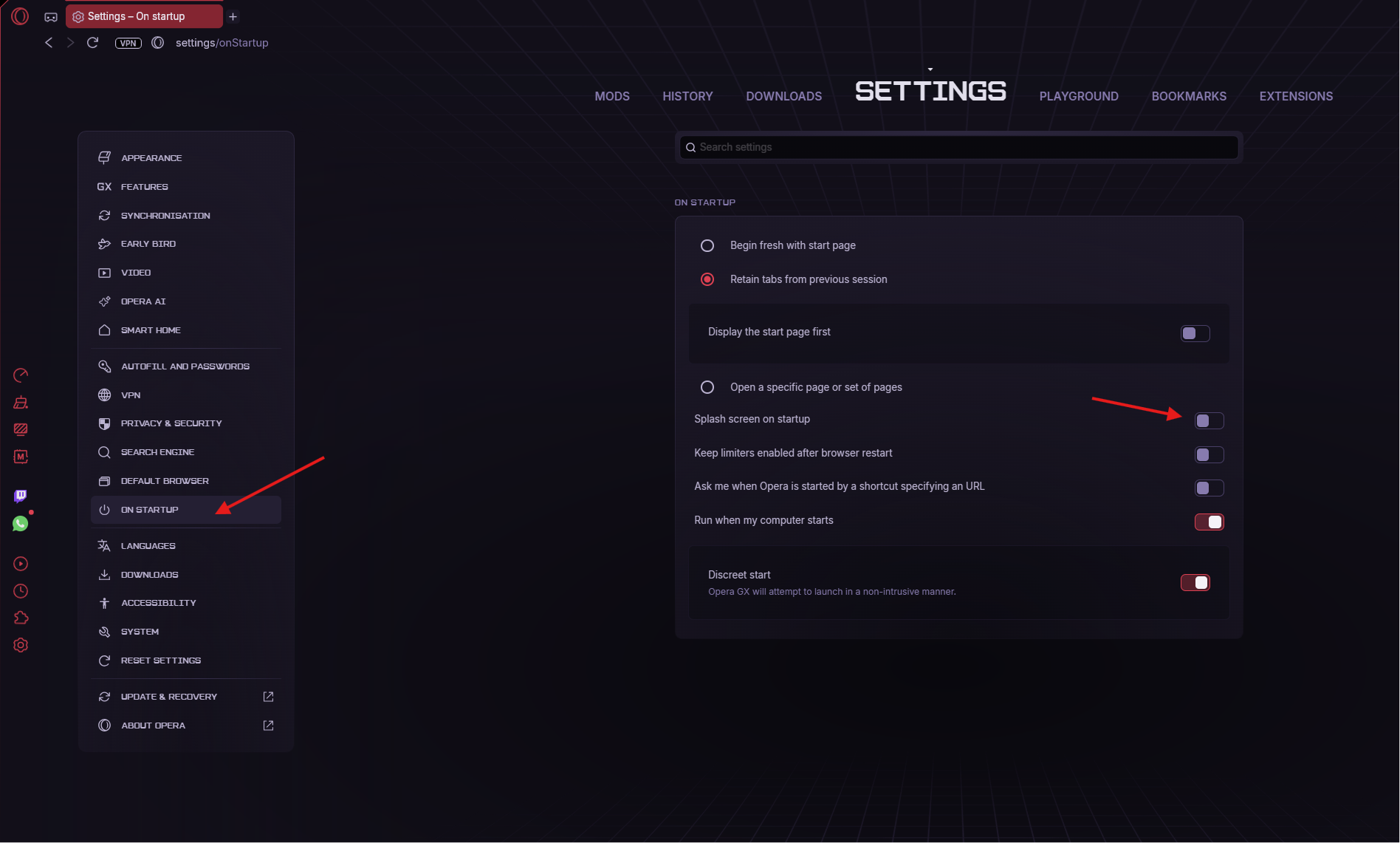
        Hi. It's in settings:
        e7cfcd6f-938f-4798-b1fc-965b075de4ca-image.png

        Reply Quote 0
          burnout426 TheBlackFurry 2 Replies Last reply
        • burnout426
          burnout426 Volunteer @dordob last edited by

          @dordob I think OP is saying that with it enabled, it only shows sometimes. If so, that sounds like a bug and might be only an issue with certain mods. Not sure.

          Reply Quote 0
            1 Reply Last reply
          • TheBlackFurry
            TheBlackFurry @dordob last edited by

            @dordob Ah yeah, thank you! I didn't saw it 🙂

            Reply Quote 1
              1 Reply Last reply
            • dordob
              dordob Opera last edited by

              To clarify the splash screen logic:

              1. The toggle on opera://configure/mods/interface/splash_screen page enables only splash screen customization.
              2. The "Splash screen on startup" toggle in opera://settings/onStartup (or the GX panel in sidebar) displays the splash screen after every restart (custom or not)
              3. Disabling "Splash screen on startup" shows the splash screen only once after each update.
              Reply Quote 0
                1 Reply Last reply
              • First post
                Last post

              Computer browsers

              • Opera for Windows
              • Opera for Mac
              • Opera for Linux
              • Opera beta version
              • Opera USB

              Mobile browsers

              • Opera for Android
              • Opera Mini
              • Opera Touch
              • Opera for basic phones

              • Add-ons
              • Opera account
              • Wallpapers
              • Opera Ads

              • Help & support
              • Opera blogs
              • Opera forums
              • Dev.Opera

              • Security
              • Privacy
              • Cookies Policy
              • EULA
              • Terms of Service

              • About Opera
              • Press info
              • Jobs
              • Investors
              • Become a partner
              • Contact us

              Follow Opera

              • Opera - Facebook
              • Opera - Twitter
              • Opera - YouTube
              • Opera - LinkedIn
              • Opera - Instagram

              © Opera Software 1995-