uBlock Origin
-
nefastseven last edited by nefastseven
il faut désinstaller u block origin,puis le réinstaller,suivre la méthode de @mantapp
et il faut désactiver le bloqueur d' opera,utiliser uniquement u block origin et ça fonctionne parfaitement.
mais pour ça,il aurait fallu lire les commentaires au dessus....... et vous seriez dépanné !!
-
fitzydj last edited by
I installed uBlock Origin Lite from the Chrome Web Store and it works fine on You Tube with Opera.
-
BlueCyberis7820 last edited by
@nefastseven: Thank you random french person, this did in fact work.. Merci beaucoup I think is how they say it
-
indirgen last edited by
The same issue happens again at Youtube. I removed ublock origins, re-installed, re-launched Opera again. Still the problem is continueing.
-
bovenbaas last edited by
Since yesterday "This extension was turned off because it is no longer supported". YouTube has been terrorizing me with adds since.
-
fitzydj last edited by fitzydj
uBlock Origin Version 1.72.2 updated July 8 has been working fine for me in Opera One Windows 11.
Check your Opera Settings /Privacy & security /Privacy protection Block ads and surf the web up to three times faster is Off as per the image, highlighted in the red frame. My understanding is the setting is part of the Opera AdBlocker and You Tube detects it.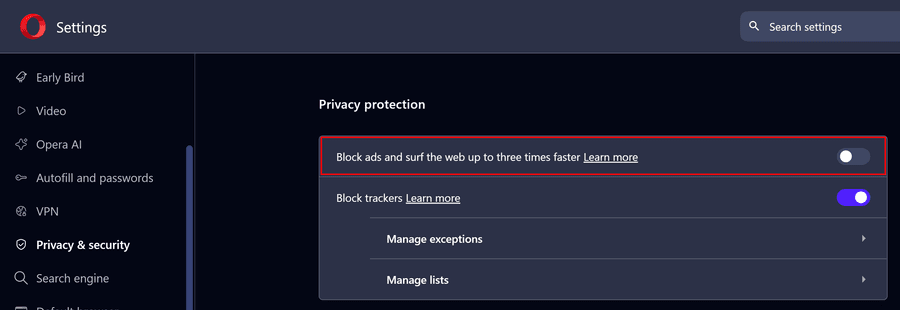
-

-
BoomBoxBudy last edited by
@bovenbaas just wanted to share with you that this extension has been the only one to reliably reduce ads it takes a different approach can pretty much clicks the skip button for you but it also skips the video to the part when the skip button comes up so it's able to skip through the video so it's almost instantaneous it's able to skip through the ads. The name is "Autoskip for Youtube
 Ads". Not much creativity in the name but it works good. I will go ahead and attach a screenshot of what it looks like in my Opera GX see what the icon and stuff looks like.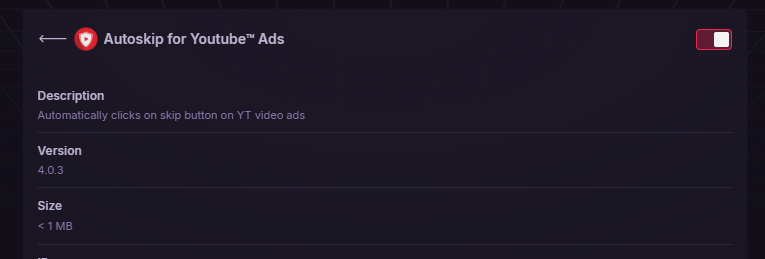
-
randomcatmom last edited by
Hi Greeting. I also get that annoying notification with Opera Developer version 135.0.5960.0, Every time it relaunches. I ended up every time delete uBlock Origin and reinstall, by bookmarking this page. Still worth the trouble! Thank you for the amazing app. I also use ublock DNS.
-
randomcatmom last edited by
As well, I didn't get other errors with this way though I tried the way @nefastseven and @mantapp are tought us here, and as for today, the version of ublock is 1.72.3.103 through github, 1.72.2 here. (Many thanks for you guys)
