• Login
    • Search
    • Categories
    • Recent
    • Tags
    • Users
    • Groups
    • Rules
    • Help

    Do more on the web, with a fast and secure browser!

    Download Opera browser with:

    • built-in ad blocker
    • battery saver
    • free VPN
    Download Opera

    access insecured local IP address

    Opera for Mac
    2
    3
    479
    Loading More Posts
    • Oldest to Newest
    • Newest to Oldest
    • Most Votes
    Reply
    • Reply as topic
    Log in to reply
    This topic has been deleted. Only users with topic management privileges can see it.
    • L
      linkerc last edited by

      How to unblock inscecured local ip address access?
      This is really dumb. I can't even get the "proceed with your own risk" to pop up anymore. The browser simply automatically block the local ip.
      I want to access my synology via local IP so the transfer is faster than via DDNS.
      But Opera is so anal about this. Any idea how to do this?

      Reply Quote 0
        B 1 Reply Last reply
      • B
        bmx666 @linkerc last edited by bmx666

        @linkerc MacOS blocks local network access. Go to System Settings -> Private & Security -> Local Network -> Find Opera and Enable it.

        Reply Quote 0
          L 1 Reply Last reply
        • L
          linkerc @bmx666 last edited by linkerc

          @bmx666 Thanks for the response.
          After more digging the past few days, it seems to be the case after OSX update. I am having an issue with Chrome as well. I have enabled local private access for Opera but still unable to connect to local address.
          The frustrating part is not the blocking. It's the page to allow me to continue at my own risk is not even showing up by default anymore.
          Safari works with the warning page which allows me to continue.
          Both Chrome and Opera simply block page stating unaccessible. This behavior is the main complain. I have tried so many config changes in Opera and it simply won't work.

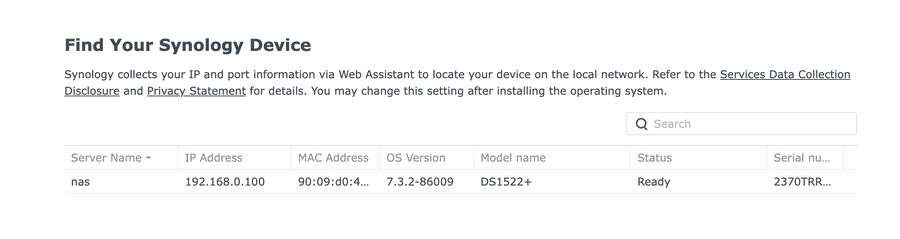
          finds.synolog.com can be able to find the device in Opera:
          5c02f4af-b48e-4ae7-a32a-d94072348615-image.png

          but clicking on it simply says:
          34df0f9f-d1eb-4c75-bdc5-c4ec65ad7b10-image.png
          Clicking on the "globe" icon next to the url bar get me to some browser configs, but nothing will trigger the "continue at your own risk" page to show up.

          Reply Quote 0
            1 Reply Last reply
          • First post
            Last post

          Computer browsers

          • Opera for Windows
          • Opera for Mac
          • Opera for Linux
          • Opera beta version
          • Opera USB

          Mobile browsers

          • Opera for Android
          • Opera Mini
          • Opera Touch
          • Opera for basic phones

          • Add-ons
          • Opera account
          • Wallpapers
          • Opera Ads

          • Help & support
          • Opera blogs
          • Opera forums
          • Dev.Opera

          • Security
          • Privacy
          • Cookies Policy
          • EULA
          • Terms of Service

          • About Opera
          • Press info
          • Jobs
          • Investors
          • Become a partner
          • Contact us

          Follow Opera

          • Opera - Facebook
          • Opera - Twitter
          • Opera - YouTube
          • Opera - LinkedIn
          • Opera - Instagram

          © Opera Software 1995-