Opera GX logging me out after PC restart
-
franconienaber last edited by
I'm on latest versions of Opera GX and on Windows 11. Whenever I restart my machine I am forced to log in to all my accounts. I don't close my tabs when shutting off, so I expect those tabs to be open when logging on to my pc again.
This was working for the longest time, but started failing the past few days.I've seen a few posts for resolutions, but mostly for Mac or normal Opera and I can't find the settings mentioned in those posts.
-
 leocg Moderator Volunteer last edited by
@franconienaber Regarding your previous session not being remembered, try deleting the content of the Sessions folder in the profile directory.
-
franconienaber last edited by
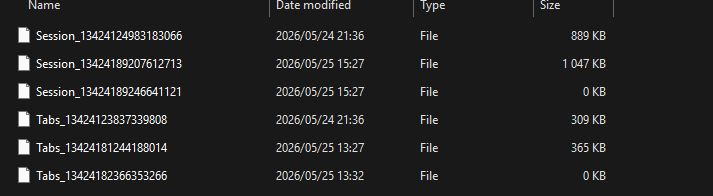
@leocg Can you be a bit more specific about the contents to delete? I've found the folder with these contents, but won't deleting them remove the tabs I would like to keep open?
-
leocg Moderator Volunteer last edited by
@franconienaber If you don't want to delete the content, you can move those files to somewhere else.
Then you start using Opera and seer if your sessions are kept when you restart Opera. if they are, then those files are probably broken.
-
franconienaber last edited by
@leocg Thanks I tried it, but it did not seem to work. I also noticed that it seems even my Opera Account is being logged out whenever I restart. I have to log in my GX.ME account every time
-
leocg Moderator Volunteer last edited by
@franconienaber So even after have removed the content of the Sessions folder, when you start Opera the opened tabs from last session aren't remembered?
-
franconienaber last edited by
@leocg Yes, I've tried this a few different times now, every time I open a new browser even after deleting those files I have to log in to all my accounts again, including my GX account for the browser
-
leocg Moderator Volunteer last edited by
@franconienaber That's a different issue, we are trying to see if your Opera starts with the tabs you left opened on the previous session.
-
franconienaber last edited by
@leocg Oh I misunderstood, my previous tabs are being remembered, just my sessions not being remembered
-
franconienaber last edited by
@franconienaber @leocg However, if I close my browser and then delete the contents of that folder, when I hope my browser again no tabs are being opened. Which is expected if I'm not mistaken
-
leocg Moderator Volunteer last edited by
@franconienaber That's the expected result when you remove the content of the Sessions folder.
-
leocg Moderator Volunteer last edited by
@franconienaber Try deleting the Cookies file on the profile directory.
-
franconienaber last edited by
@leocg It seems after my latest restart of my machine the issue is now resolved. I noticed I wasn't actually on latest version of the browser yesterday so I updated as well. Seems to be working for now, thanks