Malwarebytes says that brimoq4.fun os trying to load
-
DavidKnight last edited by leocg
When I open Opera, Malwarebytes comes up with brimoq4.fun is trying to load. What is this please.
-
Deleted by
 leocg
leocg -
Restored by leocg
-
-
-
DavidKnight last edited by
@leocg
Hi, Just Opera for Windows on my PC. I only open Opera with a clean page, no tabs open.
Thank you. -
DavidKnight last edited by
@DavidKnight said in Malwarebytes says that brimoq4.fun os trying to load:
@leocg
Hi, Just Opera for Windows on my PC. I only open Opera with a clean page, no tabs open.
Thank you.Whilst Opera was open I opened up a saved tab and the same message came up from Malwarebytes refering to brimoq4.fun is trying to load.
-
Moved from Opera for Windows by leocg
-
leocg Moderator Volunteer last edited by
@DavidKnight Any difference if you remove the content of the session folder on the profile directory?
-
DavidKnight last edited by
@leocg Where do I find the session folder on the profile directory please?
-
DavidKnight last edited by
@DavidKnight said in Malwarebytes says that brimoq4.fun os trying to load:
@leocg Where do I find the session folder on the profile directory please?
I think that I have found the sessions on Windows C drive and have deleted them.
-
leocg Moderator Volunteer last edited by
@DavidKnight You can check the path to the profile directory in opera://version or opera://about
-
DavidKnight last edited by DavidKnight
@leocg Good morning, I have removed the sessions from the folder. Have opened Opera a few times and some tabs, so far no messages from Malwarebytes. I'll keep you updated.
Thank you for your help. -
DavidKnight last edited by
@DavidKnight said in Malwarebytes says that brimoq4.fun os trying to load:
@leocg Good morning, I have removed the sessions from the folder. Have opened Opera a few times and some tabs, so far no messages from Malwarebytes. I'll keep you updated.
Thank you for your help.Just opened another tab and the message re brimoq4.fun trying to load popped up again?
-
-
DavidKnight last edited by
I just went to open this chat page and the message came up again. I have tried searching for brimoq4 on the PC drive but can't find it. Deleted sessions, caches etc. but it is still there.
-
leocg Moderator Volunteer last edited by
@DavidKnight Maybe it's just a link on a page you are opening? Or on a bookmark?
-
leocg Moderator Volunteer last edited by
@DavidKnight If you use any extensions, try disabling/uninstalling them.
-
DavidKnight last edited by DavidKnight
@leocg
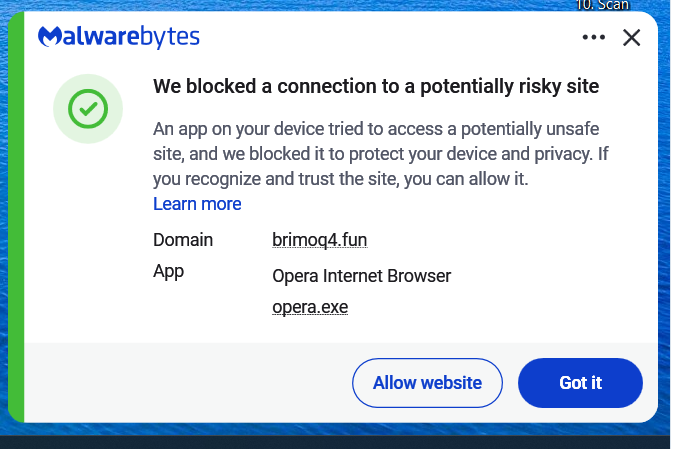
This is the message I get, it shows Opera is th app trying to access an unsafe site. Some times the message comes up when just opening Opera, even before I open any pages. -
leocg Moderator Volunteer last edited by
@DavidKnight What is the reason for Malwarebytes to consider the page as unsafe?
-
leocg Moderator Volunteer last edited by
@DavidKnight Go to settings page and enable the option to alert you when a third party app tries to open a link. It's in the On Startup section.
That way you can check if it isn't an app outside Opera trying to open the link.