• Login
    • Search
    • Categories
    • Recent
    • Tags
    • Users
    • Groups
    • Rules
    • Help

    Do more on the web, with a fast and secure browser!

    Download Opera browser with:

    • built-in ad blocker
    • battery saver
    • free VPN
    Download Opera

    Auto-Updater Crasher

    General
    3
    7
    387
    Loading More Posts
    • Oldest to Newest
    • Newest to Oldest
    • Most Votes
    Reply
    • Reply as topic
    Log in to reply
    This topic has been deleted. Only users with topic management privileges can see it.
    • D
      defiantance last edited by

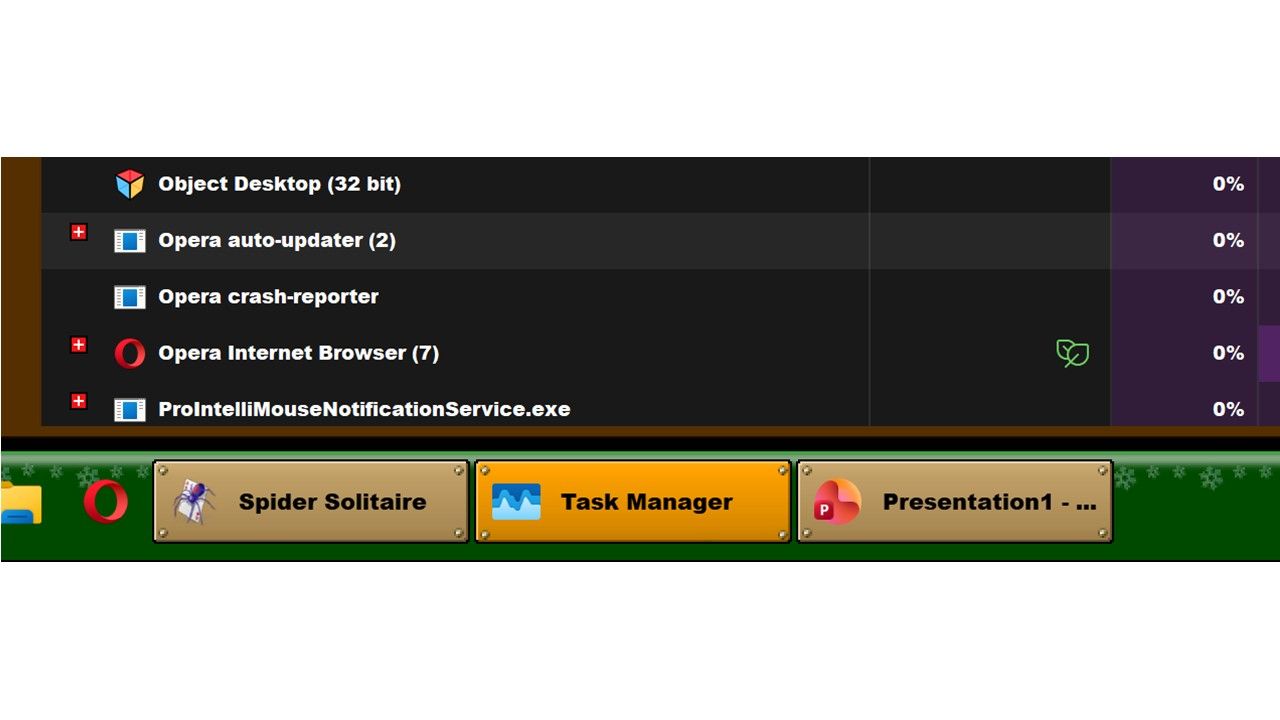
      Don't get me wrong. I love Opera Browser, but the Auto-Updater is a pain. It to the point that when I try to open Opera, and it doesn't, I know I can open the Task Manager, and see the Auto-Update process with the Crash Reporter process nearby.
      I have a simple request: Delete Auto-Update; and instead, let us know when there is a update to download. Or give us the option to disable Auto-Update, and let us know if there is a upcoming update so we can shut down anything that may cause crashes.

      And yes, I do have Windows 11 Pro delaying updates as well.

      Reply Quote 0
        leocg 1 Reply Last reply
      • leocg
        leocg Moderator Volunteer @defiantance last edited by

        @defiantance Opera One, Opera GX or Opera Air?

        Reply Quote 0
          D 1 Reply Last reply
        • D
          defiantance @leocg last edited by

          @leocg Opera One(version: 127.0.5778.76)

          Reply Quote 0
            D 1 Reply Last reply
          • D
            defiantance @defiantance last edited by

            @defiantance Really2.pptx.jpg

            Just happened.
            19 Feb 2026 0545

            Reply Quote 0
              D 1 Reply Last reply
            • Moved from Opera for Windows by  leocg leocg 
            • D
              defiantance @defiantance last edited by

              @defiantance Problem solved. It appears that when I had updated Opera to a newer version, the old verison stayed. I had to force delete both versions of Opera to fix the issue.

              Reply Quote 1
                1 Reply Last reply
              • burnout426
                burnout426 Volunteer last edited by

                Another cause of this is if you have duplicates of Opera's autoupdate tasks in the Windows Task Scheduler. One way to fix that is to uninstall Opera (but don't choose to delete your data when asked), delete the install folder, open the Windows Task Scheduler, select "Task Scheduler Library' and delete any Opera autoupdate tasks that remain for that Opera. There shouldn't be any, but if there is, delete them. Then, reinstall Opera.

                Reply Quote 0
                  1 Reply Last reply
                • burnout426
                  burnout426 Volunteer last edited by

                  If ever needed, to cripple updates in Opera, in the "autoupdate" folder in Opera's install folder, rename "opera_autoupdate.exe" to "opera_autoupdate.off". Then, in the Windows Task Scheduler, disable all of Opera's autoupdate tasks. Then, block Opera's autoupdate servers.

                  Then, monitor https://blogs.opera.com/desktop/ for new versions and download and install the new version when you want. Then, repeat the disabling of opera_autoupdate.exe and the autoupdate tasks.

                  There's even an RSS feed for that page you can subscribe to at https://blogs.opera.com/desktop/feed/. You can even follow https://social.vivaldi.net/@browserversiontracker on Mastadon to see when a new version of Opera one comes out.
                  Reply Quote 0
                    1 Reply Last reply
                  • First post
                    Last post

                  Computer browsers

                  • Opera for Windows
                  • Opera for Mac
                  • Opera for Linux
                  • Opera beta version
                  • Opera USB

                  Mobile browsers

                  • Opera for Android
                  • Opera Mini
                  • Opera Touch
                  • Opera for basic phones

                  • Add-ons
                  • Opera account
                  • Wallpapers
                  • Opera Ads

                  • Help & support
                  • Opera blogs
                  • Opera forums
                  • Dev.Opera

                  • Security
                  • Privacy
                  • Cookies Policy
                  • EULA
                  • Terms of Service

                  • About Opera
                  • Press info
                  • Jobs
                  • Investors
                  • Become a partner
                  • Contact us

                  Follow Opera

                  • Opera - Facebook
                  • Opera - Twitter
                  • Opera - YouTube
                  • Opera - LinkedIn
                  • Opera - Instagram

                  © Opera Software 1995-
