Discord Web is Stuck at "RTC Connecting" and Doesn't Allow Voice Chat
-
littlewireredneck last edited by
@Roachella are you an angel.... thank you god ive been stuck useing the xbox app or useing a phone call for months now...
-
skelzom last edited by
@xscalamity My Brother on Opera you frickin saved me thank you from the core of my heart was having the same issue for quite a time now and tried almost everything and was about to swtich to chrome but you saved meee
-
jasirj last edited by
@Roachella hi i had a question for u its solved by that method but like for me it shows me the option of webrtc but doesnt let me change the options
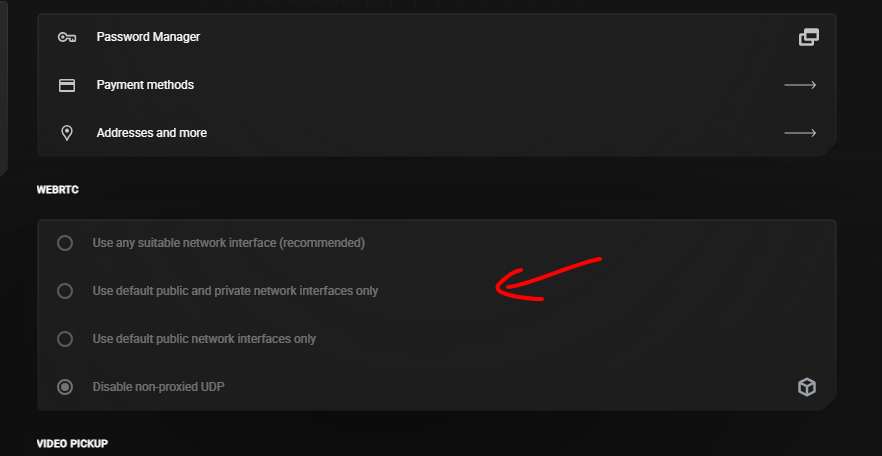
idk what to do please help -
nstinson778 last edited by
@Roachella I've had this problem for genuinely like 2 years your a life saver man

-
kimberleypreston last edited by
@nstinson778 It sounds like you’re running into a WebRTC connection issue between Discord Web and Opera GX — something that’s become more common recently due to browser-level network or privacy setting changes. Since you’ve already reinstalled drivers and Opera GX, try checking if WebRTC is being blocked: go to Opera GX settings and ensure that “VPN” and “Force WebRTC IP Handling Policy” are disabled, as these can prevent proper voice connections. Also, make sure Hardware Acceleration is enabled and that Discord has microphone permissions under Settings > Privacy & Security > Site Settings > Microphone. If that doesn’t help, testing in a private window or a fresh profile can rule out cached or profile-specific issues — or temporarily using Discord in another browser can confirm if it’s an Opera-specific bug.
-
ethelreiz Banned last edited by
It sounds really frustrating to deal with Discord web being stuck at RTC Connecting, especially after trying all the usual fixes and even switching browsers. Since the issue seems specific to Opera GX, it’s likely related to how the browser handles WebRTC or its network settings, which can interfere with voice chat. For now, using the Discord desktop app is the most reliable workaround, as it bypasses browser-related restrictions entirely.
-
ethelreiz Banned last edited by
@ethelreiz I've had this problem for genuinely like 2 years your a life saver.
-
ethelreiz Banned last edited by
Dealing with Discord web getting stuck at RTC Connecting sounds incredibly annoying, especially after using all the standard workarounds and even changing browsers. Given that the problem appears to be unique to Opera GX, it most likely has to do with the way the browser manages WebRTC or its network configurations, which might cause voice chat to malfunction. As of right present, the best dependable option is to use the Discord desktop software, which completely avoids browser-related limitations...
-
marykline last edited by
@nstinson778 You've really saved my life because I've been dealing with this issue for about two years...
-
ethelreiz Banned last edited by
@Roachella I ran into the exact same issue where Discord Web kept freezing on “RTC Connecting” and refused to start voice chat, even after flushing DNS, reinstalling network drivers, and even changing the server region — nothing helped at all. Strangely, the moment I switched from my usual browser to Opera (and even tested another browser just to be sure), voice chat worked instantly without any tweaks. It definitely feels like a browser-specific WebRTC or extension conflict rather than a pure network problem, so if anyone’s still stuck, trying a different browser is honestly the quickest workaround...
-
marykline last edited by
I can relate to this issue. I experienced the same “RTC Connecting” problem on Discord Web where voice chat simply refused to connect, even though everything else worked normally. After trying browser resets, driver updates, and extension checks without success, it seems more likely that a recent browser update or a WebRTC compatibility issue is causing the problem rather than anything on the user's end. Hopefully Opera GX and Discord can address this soon, because it’s frustrating when a feature that worked perfectly for years suddenly stops working.

-
ethelreiz Banned last edited by
@ethelreiz said in Discord Web is Stuck at "RTC Connecting" and Doesn't Allow Voice Chat:
It sounds really frustrating to deal with Discord web being stuck at RTC Connecting, especially after trying all the usual fixes and even switching browsers. Since the issue seems specific to netmirror Opera GX, it’s likely related to how the browser handles WebRTC or its network settings, which can interfere with voice chat. For now, using the Discord desktop app is the most reliable workaround, as it bypasses browser-related restrictions entirely.
I ran into the exact same issue on Opera GX—Discord Web stays stuck on RTC Connecting and voice chat never starts. I also tried reinstalling audio drivers, resetting the browser, and disabling extensions, but nothing fixed it. It really seems like a browser-related issue rather than a problem with individual PC settings. Hopefully a future Opera GX update resolves it soon.
-
michaelfriendly last edited by
@kimberleypreston said in Discord Web is Stuck at "RTC Connecting" and Doesn't Allow Voice Chat:
@nstinson778 It sounds like you’re running into a WebRTC connection issue between Discord Web and Opera GX — something that’s become more common recently due to browser-level network or privacy setting changes. Since you’ve already reinstalled drivers and Opera GX, try checking if WebRTC is being blocked: go to Opera GX settings and ensure that “VPN” and “Force WebRTC IP Handling Policy” are disabled, as these can prevent proper voice connections. Also, make sure Hardware Acceleration is enabled and that Discord has microphone permissions under Settings > Privacy & Security > Site Settings > Microphone. If that doesn’t help, testing in a private window or a fresh profile can rule out cached or profile-specific issues — or temporarily using Discord in another browser can confirm if it’s an Opera-specific bug.
I try this, but Opera returns to being disabled every time I shut it down or restart my machine. Is it possible to keep that configuration in place?
-
michaelfriendly last edited by
@Roachella said in Discord Web is Stuck at "RTC Connecting" and Doesn't Allow Voice Chat:
Discord RTC still connecting?
guys i have the solution!!!- Go to Opera Gx Settings
- Click Advanced
- Then click "Privacy and Security"
- Then scroll down until you see WebRTC, it's on top of VPN
- When you are on the WebRTC setting, you can see the it selected the "Disable non-proxied UDP" unselect playfy it and switch to "Use any suitable network interface (recommended)"
- You go back to Discord and it's now fixed
You're welcome!
@Ciccio07 My brother on Opera, you really saved me. I sincerely appreciate it. I've been experiencing this problem for a while, tried nearly everything, and was on the verge of switching to Chrome, but you saved me.
-
marykline last edited by
@skelzom said in Discord Web is Stuck at "RTC Connecting" and Doesn't Allow Voice Chat:
@xscalamity My Brother on Opera you frickin saved me thank you from the core of my heart was moviesda having the same issue for quite a time now and tried almost everything and was about to swtich to chrome but you saved meee
I've been having a lot of trouble with this for a while, so I'm happy that I can finally make voice calls while using Opera GX as my browser.