• Login
    • Search
    • Categories
    • Recent
    • Tags
    • Users
    • Groups
    • Rules
    • Help

    Do more on the web, with a fast and secure browser!

    Download Opera browser with:

    • built-in ad blocker
    • battery saver
    • free VPN
    Download Opera

    ⌘< shows settings? Blocks switching windows

    Opera for Mac
    keybinds configuration
    1
    1
    110
    Loading More Posts
    • Oldest to Newest
    • Newest to Oldest
    • Most Votes
    Reply
    • Reply as topic
    Log in to reply
    This topic has been deleted. Only users with topic management privileges can see it.
    • alexs77
      alexs77 last edited by alexs77

      I'm on:

      Opera One(Version: 125.0.5729.15) (arm64)
      
      Update-Stream:Stable
      
      Betriebssystem:macOS Version 26.1 (Build 25B78) 26.1.0 arm64
      
      Chromium-Version:141.0.7390.125
      

      When I hit ⌘< (Command + less than symbol), a new tab with opera://settings/ opens. Exactly the same as the system wide default of ⌘, (Command + comma) does.

      That's extremely bad, as ⌘< is the shortcut to switch between open windows of an app.

      While I guess that the main question "who tf came up with that "brilliant" idea?!?" won't lead anywhere 😉 - I will settle with the more proactive question:

      How do I turn off this "suboptimal" default key combination?

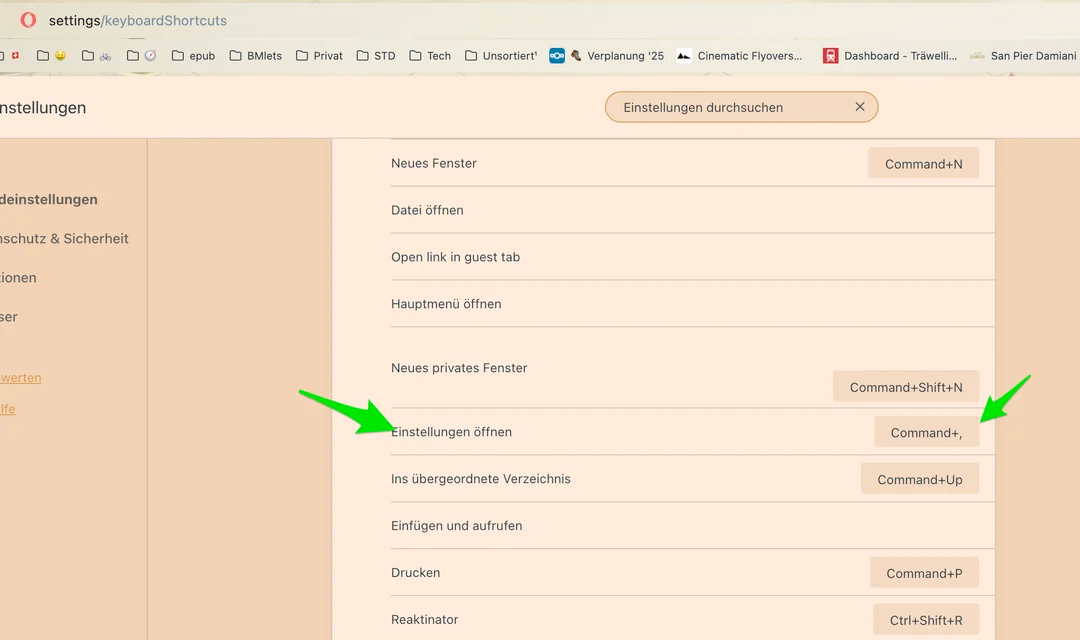
      Inopera://settings/keyboardShortcuts I found:

      75a57a4e-e574-42cf-ba8c-52b46dd5d0d8-grafik.png

      "Einstellungen öffnen" (Open settings?). Only assigned key combo: Command+,

      Happens on all of Opera "Normal", Opera GX, and Opera Air.

      Might be important: I'm using a Swiss German keyboard layout. For me, the < is to the left of the key "y", in the last row. It's to the right of the left shift key.

      578d3d8b-c9f6-4f7f-995b-7eb9e5198781-grafik.png

      Reply Quote 0
        1 Reply Last reply
      • First post
        Last post

      Computer browsers

      • Opera for Windows
      • Opera for Mac
      • Opera for Linux
      • Opera beta version
      • Opera USB

      Mobile browsers

      • Opera for Android
      • Opera Mini
      • Opera Touch
      • Opera for basic phones

      • Add-ons
      • Opera account
      • Wallpapers
      • Opera Ads

      • Help & support
      • Opera blogs
      • Opera forums
      • Dev.Opera

      • Security
      • Privacy
      • Cookies Policy
      • EULA
      • Terms of Service

      • About Opera
      • Press info
      • Jobs
      • Investors
      • Become a partner
      • Contact us

      Follow Opera

      • Opera - Facebook
      • Opera - Twitter
      • Opera - YouTube
      • Opera - LinkedIn
      • Opera - Instagram

      © Opera Software 1995-