• Login
    • Search
    • Categories
    • Recent
    • Tags
    • Users
    • Groups
    • Rules
    • Help

    Do more on the web, with a fast and secure browser!

    Download Opera browser with:

    • built-in ad blocker
    • battery saver
    • free VPN
    Download Opera

    Opera Ubuntu does not start after last snap update

    Opera for Linux
    10
    20
    752
    Loading More Posts
    • Oldest to Newest
    • Newest to Oldest
    • Most Votes
    Reply
    • Reply as topic
    Log in to reply
    This topic has been deleted. Only users with topic management privileges can see it.
    • iRozz
      iRozz last edited by

      The same error occurs here.

      Reply Quote 0
        1 Reply Last reply
      • hugogarro
        hugogarro last edited by

        SAME PROBLEM ON UBUNTU 25.10

        Reply Quote 0
          1 Reply Last reply
        • cybrsaylr
          cybrsaylr last edited by cybrsaylr

          Opera One(version: 124.0.5705.42) not playing many videos. Having other problems with it also. Doesn't retain passwords, have to sign-in on everything now. Doesn't retain past tabs of last session when reopening Opera. This last Opera update has to be the worst one experienced in years! Been using and liked Opera going back to Opera version 3.50. This newest version is just too quirky. Am tempted to move on to another browser If Opera can't fix things.

          The last Opera version worked great and was trouble free.

          Reply Quote 0
            1 Reply Last reply
          • punknegro98
            punknegro98 last edited by

            Hello, same problem here after the last update from snap v. 124.0.5705.42 (stable version).
            Trying to launch from terminal:

            usr/share/libdrm/amdgpu.ids: No such file or directory
            [16571:16571:1126/203407.739781:ERROR:ui/ozone/platform/wayland/host/wayland_connection.cc:197] Failed to connect to Wayland display: No such file or directory (2)
            [16571:16571:1126/203407.739864:ERROR:ui/ozone/platform/wayland/ozone_platform_wayland.cc:282] Failed to initialize Wayland platform
            [16571:16571:1126/203407.740030:ERROR:ui/aura/env.cc:257] The platform failed to initialize.  Exiting.
            

            So, i can't use opera anymore... u.u

            Reply Quote 0
              1 Reply Last reply
            • alexbcrow7
              alexbcrow7 last edited by

              It seems that its working on Xserver just fine. I ended up installing opera from the deb file downloaded from the site to use it with Wayland. The snap is not working on Wayland

              Reply Quote 0
                Malfet 1 Reply Last reply
              • UltraVio1et
                UltraVio1et @Malfet last edited by

                @Malfet

                use this:

                sudo snap revert opera

                this reverts to the last version and it works fine

                Reply Quote 0
                  Malfet otherob 2 Replies Last reply
                • cybrsaylr
                  cybrsaylr last edited by

                  @UltraVio1et

                  Thanks, ran 'sudo snap revert opera' and am now running Opera One(version: 123.0.5669.47) again that runs fine.

                  Reply Quote 0
                    1 Reply Last reply
                  • otherob
                    otherob @UltraVio1et last edited by

                    @UltraVio1et
                    sudo snap revert opera
                    error: cannot revert "opera": no revision to revert to

                    Reply Quote 0
                      1 Reply Last reply
                    • Malfet
                      Malfet @UltraVio1et last edited by

                      @UltraVio1et Thanks, I wish I knew this earlier! I already tried to re-install it, also using deb and flatpak, there is nothing to revert to anymore.

                      Reply Quote 0
                        UltraVio1et 1 Reply Last reply
                      • Malfet
                        Malfet @alexbcrow7 last edited by

                        @alexbcrow7 Also deb is not working for me. It gives installation errors. It seems to be ridiculous that a browser can not even be installed.

                        Reply Quote 0
                          1 Reply Last reply
                        • Malfet
                          Malfet last edited by

                          So I could download and install snap from 410 version. It's not ideal, but might work as a temporal solution

                          wget https://api.snapcraft.io/api/v1/snaps/download/AljMvoQbHtnnrka00lIoxHJ6Qhfn0X8m_410.snap
                          sudo snap install --dangerous AljMvoQbHtnnrka00lIoxHJ6Qhfn0X8m_410.snap
                          
                          Reply Quote 0
                            1 Reply Last reply
                          • Arno-Stein
                            Arno-Stein @Arno-Stein last edited by

                            @Arno-Stein said in Opera Ubuntu does not start after last snap update:

                            @karolek497 Same on my side, witz opera --ozone-platform=x11 I got it as a new installation
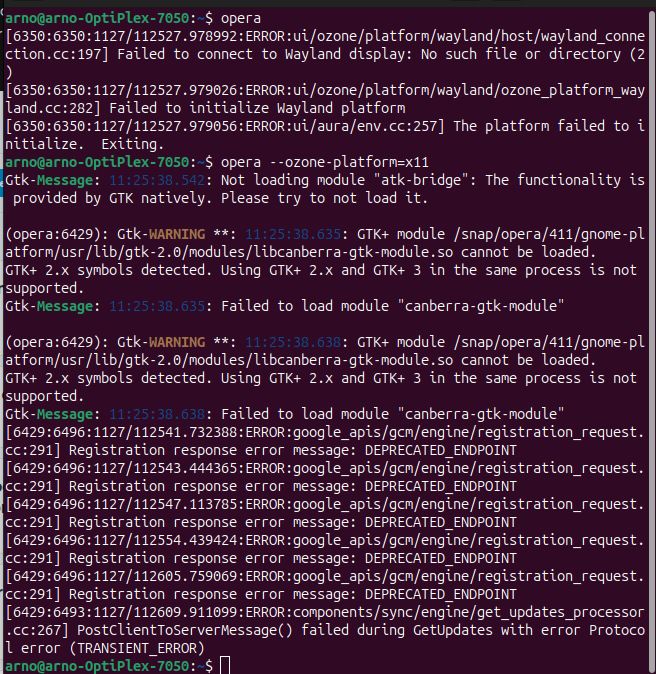
                            20251127Fehlermeldung.jpg

                            meanwhile I changed to another browser

                            Reply Quote 0
                              1 Reply Last reply
                            • UltraVio1et
                              UltraVio1et @Malfet last edited by

                              @Malfet said in Opera Ubuntu does not start after last snap update:

                              @UltraVio1et Thanks, I wish I knew this earlier! I already tried to re-install it, also using deb and flatpak, there is nothing to revert to anymore.

                              Same here, I got that fix from reddit

                              Reply Quote 0
                                1 Reply Last reply
                              • Malfet
                                Malfet last edited by

                                Ok, they managed to fix snap, however there are lots of other issues appearing now. Bitwarden extension stop working, the settings for speed dial are gone. I do not know what the hell is going on with Opera team :(((

                                Reply Quote 0
                                  Arno-Stein 1 Reply Last reply
                                • Arno-Stein
                                  Arno-Stein @Malfet last edited by

                                  @Malfet said in Opera Ubuntu does not start after last snap update:

                                  Ok, they managed to fix snap, however there are lots of other issues appearing now. Bitwarden extension stop working, the settings for speed dial are gone. I do not know what the hell is going on with Opera team :(((

                                  same for me _ back to opera

                                  Reply Quote 0
                                    1 Reply Last reply
                                  • UltraVio1et
                                    UltraVio1et last edited by

                                    All working for me now on Kubuntu

                                    Reply Quote 0
                                      1 Reply Last reply
                                    • First post
                                      Last post

                                    Computer browsers

                                    • Opera for Windows
                                    • Opera for Mac
                                    • Opera for Linux
                                    • Opera beta version
                                    • Opera USB

                                    Mobile browsers

                                    • Opera for Android
                                    • Opera Mini
                                    • Opera Touch
                                    • Opera for basic phones

                                    • Add-ons
                                    • Opera account
                                    • Wallpapers
                                    • Opera Ads

                                    • Help & support
                                    • Opera blogs
                                    • Opera forums
                                    • Dev.Opera

                                    • Security
                                    • Privacy
                                    • Cookies Policy
                                    • EULA
                                    • Terms of Service

                                    • About Opera
                                    • Press info
                                    • Jobs
                                    • Investors
                                    • Become a partner
                                    • Contact us

                                    Follow Opera

                                    • Opera - Facebook
                                    • Opera - Twitter
                                    • Opera - YouTube
                                    • Opera - LinkedIn
                                    • Opera - Instagram

                                    © Opera Software 1995-