• Login
    • Search
    • Categories
    • Recent
    • Tags
    • Users
    • Groups
    • Rules
    • Help

    Do more on the web, with a fast and secure browser!

    Download Opera browser with:

    • built-in ad blocker
    • battery saver
    • free VPN
    Download Opera

    Cant make a new profile on opera gx

    Opera GX
    5
    12
    2920
    Loading More Posts
    • Oldest to Newest
    • Newest to Oldest
    • Most Votes
    Reply
    • Reply as topic
    Log in to reply
    This topic has been deleted. Only users with topic management privileges can see it.
    • K
      Kaisen105 last edited by

      Im trying to make a new profile because i like to have my college browser seperate from my personal browser but it doesnt let me create one. I try making a name and choosing a color and when i click create, nothing happens and theres no new profile. Can someone help me out please??

      Reply Quote 1
        L 1 Reply Last reply
      • L
        leocg Moderator Volunteer @Kaisen105 last edited by

        @kaisen105 Known issue, you need to wait for a fix.

        Reply Quote 2
          R 1 Reply Last reply
        • R
          renarsjr @leocg last edited by

          @leocg hello. How long would they take to fix?

          Reply Quote 0
            L Billyray 2 Replies Last reply
          • L
            leocg Moderator Volunteer @renarsjr last edited by

            @renarsjr Only time will tell.

            Reply Quote 0
              1 Reply Last reply
            • K
              Kaisen105 last edited by

              thanks. Hopefully it gets resolved sooner

              Reply Quote 0
                1 Reply Last reply
              • B
                burnout426 Volunteer last edited by

                You can create a new profile the Chromium way for now. That will still work.

                Reply Quote 0
                  K 1 Reply Last reply
                • K
                  Kaisen105 @burnout426 last edited by

                  @burnout426 how does one do that??

                  Reply Quote 0
                    L 1 Reply Last reply
                  • L
                    leocg Moderator Volunteer @Kaisen105 last edited by

                    @kaisen105 Did you check the instructions on the link?

                    Reply Quote 0
                      K 1 Reply Last reply
                    • Billyray
                      Billyray @renarsjr last edited by

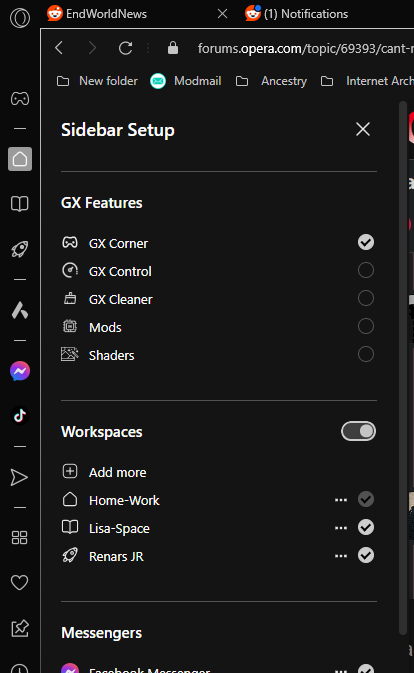
                      @renarsjr
                      For A Profile Work around
                      I use My Sidebar
                      Workspaces
                      Add more

                      image_2024-01-23_190802083.png

                      Reply Quote 0
                        K 1 Reply Last reply
                      • K
                        Kaisen105 @Billyray last edited by

                        @billyray now if i do this will it let me have two different google accounts running?? i have a personal google account and than i have a school google account. i want to be able to open doc without having to switch accounts every time.

                        Reply Quote 0
                          1 Reply Last reply
                        • K
                          Kaisen105 @leocg last edited by

                          @leocg im still confused on how to add that big command thing. is that through a website i have to add it or some other place??

                          Reply Quote 0
                            L 1 Reply Last reply
                          • L
                            leocg Moderator Volunteer @Kaisen105 last edited by

                            @kaisen105 First you create a shortcut for Opera. Then you right click on it and open Properties.
                            In target field you should see the path to Opera executable. You add the command after that path, with a space between them.

                            Reply Quote 0
                              1 Reply Last reply
                            • Locked by  L leocg 
                            • First post
                              Last post

                            Computer browsers

                            • Opera for Windows
                            • Opera for Mac
                            • Opera for Linux
                            • Opera beta version
                            • Opera USB

                            Mobile browsers

                            • Opera for Android
                            • Opera Mini
                            • Opera Touch
                            • Opera for basic phones

                            • Add-ons
                            • Opera account
                            • Wallpapers
                            • Opera Ads

                            • Help & support
                            • Opera blogs
                            • Opera forums
                            • Dev.Opera

                            • Security
                            • Privacy
                            • Cookies Policy
                            • EULA
                            • Terms of Service

                            • About Opera
                            • Press info
                            • Jobs
                            • Investors
                            • Become a partner
                            • Contact us

                            Follow Opera

                            • Opera - Facebook
                            • Opera - Twitter
                            • Opera - YouTube
                            • Opera - LinkedIn
                            • Opera - Instagram

                            © Opera Software 1995-