The menu offering Copy, Snapshot etc.. which opens when you select text in Opera could be enhanced by minimizing the browser when e.g. Ctrl is down when copying the selection.
If you are going to paste into some other program, the browser is thus handily away not requiring moving/resizing.
Posts made by xyzzy-opera
-
Minimize browser when using highlight menuSuggestions and feature requests
-
RE: Opera Crash / ZoomingGeneral
Hi there,
I updated to 116.0.5366.35. No crash this time.
However, I noticed that, when it enters the 'shuffle mode', trying to increase the Zoom level may actually decrease it and vice versa.
Looks like if the changes of the Zoom level come in a too rapid succession then it enters the 'shuffle mode' also giving the impression of actually applying the set of changes many times over before eventually settling down.
Anyways, not a biggie in my books. albeit the shuffling looks rather wild.
Cheers.
-
Opera Crash / ZoomingGeneral
I have some 60 items shown on the Speed Dial.
Now, if I change the Zoom Setting by holding the Ctrl key down and scrolling the mouse wheel back and forth (zoom level varies e.g. from min to max)
- Opera (naturally) starts to recalculate the positions of the Speed Dial items shuffling them as it goes.
This process may crash Opera rather easily, it seems.
Albeit this is a rather marginal issue, maybe someone might want to have a look at this.
My Opera version: 115.0.5322.119
Windows 11 -
RE: Unable to install Opera - libgcc-s1 (>= 3.0) dependencyOpera for Linux
@xyzzy-opera Geez, I forgot the system information .. here it is:
inxi -Fxz yields:
System:
Host: minttu Kernel: 4.15.0-206-generic x86_64 bits: 64 compiler: gcc
v: 7.5.0 Desktop: Cinnamon 4.0.10 Distro: Linux Mint 19.1 Tessa
base: Ubuntu 18.04 bionic -
Unable to install Opera - libgcc-s1 (>= 3.0) dependencyOpera for Linux
opera-stable_97.0.4719.83_amd64.deb won't install on Linux Mint due to libgcc dependency error.
Is this a known 'feature'?
Anyways, all suggestions are welcome.
-
RE: Starting Opera causes excessive MsiInstaller logging to EventLogOpera for Windows
It appears that this has now been fixed in version 89.0.4447.48
Sweet.
-
RE: Starting Opera causes excessive MsiInstaller logging to EventLogOpera for Windows
@bazzaman said in Starting Opera causes excessive MsiInstaller logging to EventLog:
You may be right, but this is happening every time Opera is launched. One has to wonder why why would Opera need to check for installed software on every launch?
A good question.
FWIW, the culprit is not opera_autoupdate.exe. I replaced it with a dummy executable and the behaviour remained the same.
-
RE: Starting Opera causes excessive MsiInstaller logging to EventLogOpera for Windows
@bazzaman
Hi there,Thank you very much for the information!
I'd imagine that they'll weed this one out - all in all, it's a quite nasty feature, after all.
-
RE: Starting Opera causes excessive MsiInstaller logging to EventLogOpera for Windows
@xyzzy-opera
Additional informationTo be more precise, I suspect that Opera's opera_autoupdate.exe ends up running a WMI query which causes the behaviour described above.
A quote from the article I linked to above:
Don’t use Win32_Product
The Win32_Product WMI class is part of the CIMV2 namespace and implements the MSI provider (msiprov.dll and associated msi.mof) to list and validate installed installation packages. You will see MsiInstaller event 1035 in the Application log for each application queried by the class:*
-
Starting Opera causes excessive MsiInstaller logging to EventLogOpera for Windows
I noticed that whenever I start Opera, it causes the Windows Management Instrumentation to enumerate all software installed via MSI. This in turn produces one Event Log (Application) entry per installed piece of software.
On my computer this is ~500 log entries - which is unacceptable.
This appears to have started about a week ago.I'm almost certain that this has something to do with the Win32_Product WMI object, some information is available at:
How to NOT Use Win32_Product in Group Policy FilteringOpera Version:
- 89.0.4447.38
Windows 10 Home version:
- Microsoft Windows [Version 10.0.19043.1645]
Sample Event Log screenshot:

-
Is there a way to suppress calls to OutputDebugString()Opera for Windows
Good day,
I just noticed that at least opera_crashreporter.exe apparently utilizes the OutputDebugString Windows API.
That can be rather annoying (should one be in the midst of debugging some program), so, are there any 'hidden' settings which would save the day?
PS. output from H:\Util\Opera\80.0.4170.63\opera_crashreporter.exe:
ERROR:directory_reader_win.cc(43)] FindFirstFile: The system cannot find the path specified. (0x3)
-
RE: High memory consumption on a specific Microsoft pageOpera for Windows
@burnout426 Aha, okay. Thanks and have a nice weekend, cheers!
-
RE: High memory consumption on a specific Microsoft pageOpera for Windows
@burnout426 Good. I'd assume that this issue gets kind of automagically morphed into, say, a bug report by folks reading this forum?
-
RE: High memory consumption on a specific Microsoft pageOpera for Windows
Update ..
Now this phenomena is 100% reproducible with Opera Beta/Developer versions but NOT the Stable version. With the Stable version, opening the page is quite CPU-intensive, though.
All in all, this seems to be an interplay involving:
- On-Screen Keyboard
- Web pages that are 'under':
https://docs.microsoft.com/en-gb/previous-versions/windows/desktop/legacy/*
Here's a link to a Google-Drive video featuring this 'sorcery' in action ..
PS. If the fine video doesn't play in your browser, you probably need to enable cookies, third-party cookies included.
-
RE: High memory consumption on a specific Microsoft pageOpera for Windows
Hi, out of general interest I spent a couple of hours poking around this issue and can say that:
-
It appears to be not reproducible with the Opera's stable version 66.0.3515.44
-
Annoyingly, it's not 100% reproducible with the Opera's Beta version 67.0.3575.8. But it sort of becomes close to 100% reproducible at times -> I can even quit Opera, restart it, and visit the web page and the issue persists.
Is Opera's adblocker and or VPN turned on? If so, try with those off.
I've tried with those options on/off and haven't noticed any impact one way or another.Is Opera's battery saver turned on and you're running on battery? If so, try turning the battery saver off.
I'm not running on battery (I never am)... disable hardware acceleration and restart Opera to see if it helps
I've tried with hardware acceleration on/off and haven't noticed any impact one way or another.I'll attach a few screenshots of the 'issue in action', maybe some knowledgeable guy might even be able to figure out something ..
#1 the initial status
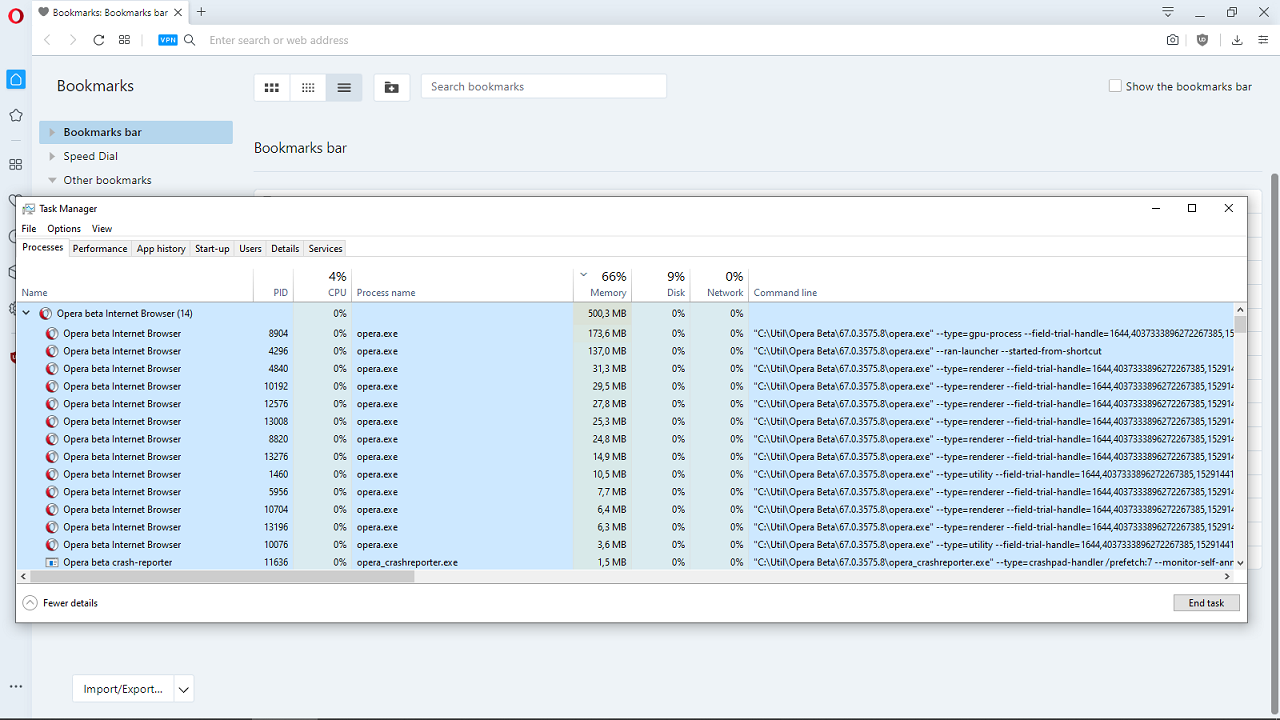
#2 the offending page opened
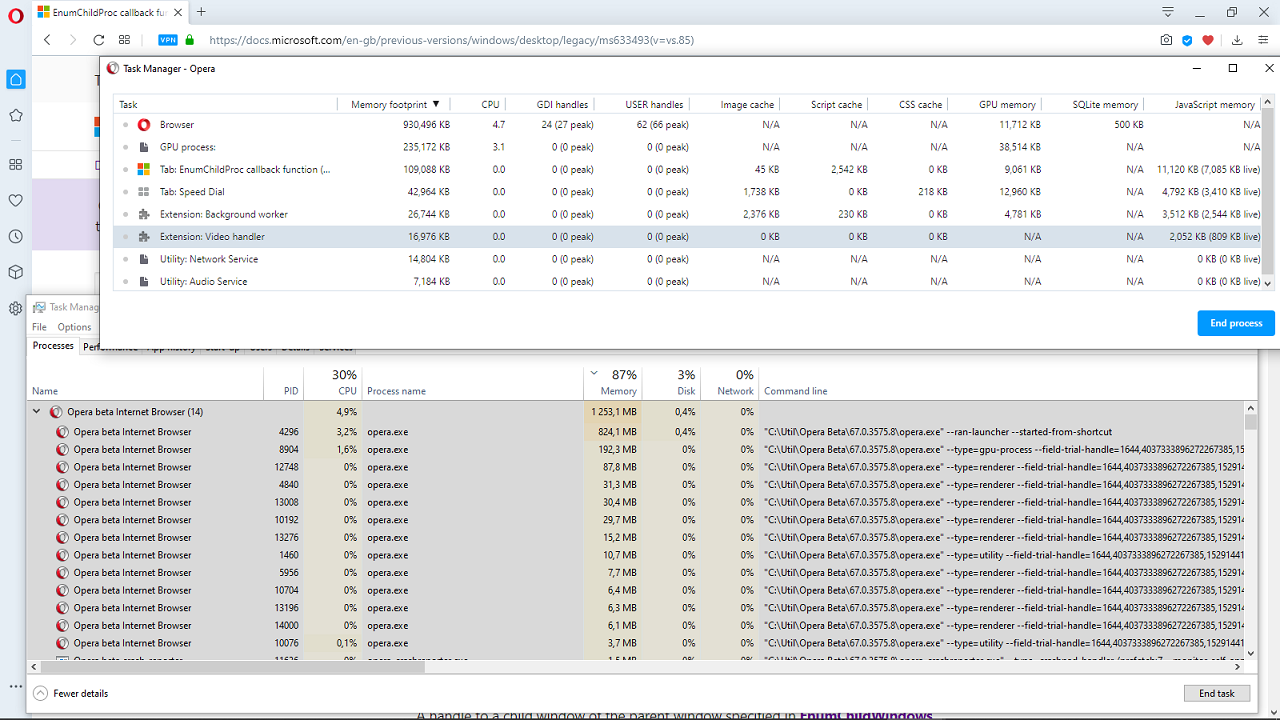
#3 the offending page resized to minimum -> interestingly memory allocation gets reduced (to normal or thereabouts)
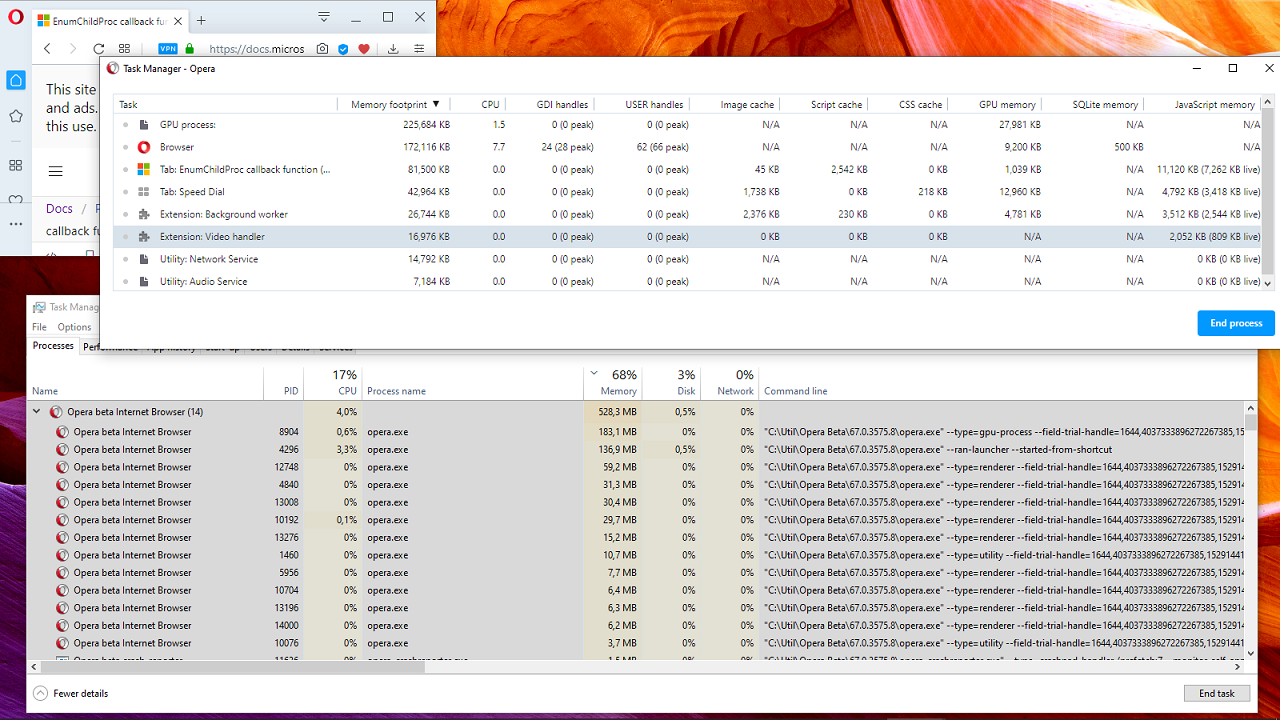
Well, that's all, perhaps it might be worth for a developer having a look at it since it's a 'feature' that has appeared post version 66.0.3515.44.
-
-
High memory consumption on a specific Microsoft pageOpera for Windows
Good day, folks ..
Upon opening an 'offending' web page, Opera's memory allocation climbs from some 400 MBs all the way up to some 1.2 GBs. This does not happen with other browsers (Firefox/Chrome). The offending web page is:
https://docs.microsoft.com/en-gb/previous-versions/windows/desktop/legacy/ms633493(v=vs.85)
My Opera version is:
Version: 67.0.3575.8
Update stream: beta
System: Windows 10 64-bitPS: I have all Opera extensions disabled .