@andrew84 Thank you. I will do that. Hopefully the team can see this and reconsider some of the updates/changes.
R
Latest posts made by rtowne
-
RE: Revise confusing "delete all grouped history" button.Suggestions and feature requests
-
Revise confusing "delete all grouped history" button.Suggestions and feature requests
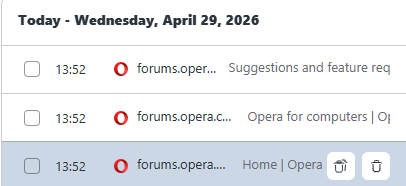
Opera History Screenshot
Windows Clipboard Screenshot

TLDR: The button next to the trash can is confusingly similar to a copy/paste clipboard icon. It isn't intuitive that this will delete all history on a site without confirmation.
I was looking for a specific online document in my history (not on Opera forums. I just have that screenshot as an example). When I saw the 2nd icon appear to the left of the trash can, I assumed it was a double clipboard to copy the URL, as it looks similar to what is used to copy/paste on other applications. Instead, I ended up deleting all of my browsing history from the other domain. There was no popup warning about this, not even a hover alt text. The icon is very similar to a clipboard and as far as I am aware, this is not a common icon on other applications for a delete many function.
I will have to find that URL another way, but if you revise this icon (Maybe just make it text 'delete all', add a popup warning, or add a clear "copy URL" button, this issue can be avoided by others in the future.