Hello, I'm experiencing an issue with Opera where native notifications do not work. The only way I’ve been able to get them to appear is by reinstalling Opera using the installer named Opera_XXX.X.XXXX.XX_Autoupdate.exe. This is inconvenient and feels like a workaround rather than a fix. Could the developers please investigate why native notifications stop working and why the autoupdate installer is the only way to restore them? Thank you.
K
Posts made by kubalav
-
RE: Opera 135.0.5973.76 Stable updateBlogs
-
RE: Opera 135.0.5973.76 Stable updateBlogs
When the bookmarks bar is enabled and Opera is switched to Full Screen (F11), the bookmarks bar sometimes fails to reappear after exiting Full Screen, or it only becomes visible after a delay.
Steps to reproduce:
- Enable the bookmarks (bookmarks/favorites) bar in Opera.
- Press F11 (or use View > Enter Full Screen) to enter Full Screen mode.
- Exit Full Screen mode by pressing Esc or F11 again.
Actual result:
The bookmarks bar does not become visible after exiting Full Screen, or it only appears after a noticeable delay.Expected result:
The bookmarks bar should return immediately after exiting Full Screen, matching the state prior to entering Full Screen.Windows 11
-
Browser notifications with autoupdate OperaOpera for Windows
Hello everyone,
I’m trying to achieve the following on Windows with Opera:
- Automatic Opera updates must work (no “Your Opera installation appears incomplete, please update manually”).
- Notifications should behave like browser notifications (the kind I get when installing with Opera_133.0.5932.60_Autoupdate.exe).
- I do not want Windows/system desktop notifications (the kind I get when doing a clean install with Opera_133.0.5932.60_Setup.exe).
- If I install via *_setup.exe, auto-updates work, but notifications are system-wide.
- If I install via *_autoupdate.exe, the notifications look correct, but automatic updates fail because the installation appears incomplete.
What I already observed
- Opera_133.0.5932.60_Setup.exe
- Clean install works
- Auto-update works
- System/desktop notifications appear (Windows-level toasts)
- Opera_133.0.5932.60_Autoupdate.exe
- Notifications appear exactly as desired (browser-style)
- Auto-update fails with:
“Your Opera installation appears incomplete, please update manually”
- Manual update using *_setup.exe
- Auto-updates start working
- But then notifications become system-level again
How can I repair/complete the auto-update installation (so Opera updates automatically), while keeping the notification behavior that currently only works with the autoupdate installer?
-
RE: Bitwarden - Free Password ManagerOpera add-ons
@wolflingdaddy said in Bitwarden - Free Password Manager:
@magictiger1983: I've been trying to use Bitwarden, but it doesn't seem to have an auto-fill feature. I keep having to go look everything up and then copy/paste. Am I missing something? That's the only thing that's stopping me from giving them my money.
Read the official documentation to find out how the Auto Fill feature works!
- Blogs
-
RE: Opera 108Blogs
@bravissimo594: delete/rename file opera_gx_splash.exe from %LOCALAPPDATA%\Programs\Opera[opera_version_number]
- Opera for Windows
-
RE: Opera 97.0.4719.28 Stable updateBlogs
@gmiazga Yes, exactly the same issue. The last opened tab has broken popup. I use 2 workspaces. If I have all tabs in one worskpace the issue still persist.
-
RE: Opera 97.0.4719.28 Stable updateBlogs
@gmiazga: I'm experiencing that issue too. I have changed these flags: Custom user sites for browser sidebar, Smooth Scrolling, Parallel downloading, Experimental QUIC protocol.
-
RE: Synchronization ProblemSynchronization
I also join in. I've been having this problem for a few days now.
Can any moderator find out what this is about?
-
RE: Opera 81.0.4183.0 developer updateBlogs
I suggest add support custom themes (background and text color, text align and justification), TTS.
- Blogs
-
RE: Opera 71.0.3763.0 developer updateBlogs
Can't view video.
Media error: Format(s) not supported or source(s) not foundAffected site: Winaero.com
Test URL: https://winaero.com/blog/windows-10-build-20175-dev-channel/ -
RE: R2020 is here and it lets you tidy your browsingBlogs
Every workspace should have own history and speeddial!
-
RE: How to replace Windows notifications?Opera for Windows
@burnout426 Opera Developer without command line switch.
-
RE: How to replace Windows notifications?Opera for Windows
@burnout426 It's really works! Thank you very much.
Have you default Windows or Opera notifications? I have Windows notification in Opera Stable an Opera notification in Opera Developer.
Is it any chance to change notification color?
-
How to replace Windows notifications?Opera for Windows
How to get Opera notifications instead Windows notifications?
I want to get this like at the picture: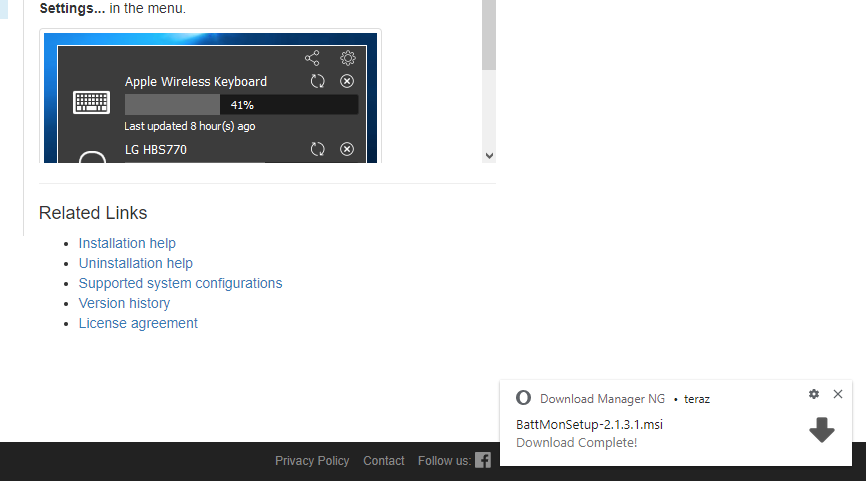
-
RE: Passwörter exportierenDeutsch
Die XML-Datei muss formatiert sein:
<?xml version="1.0" ?> <passwords version="1.0"> <entry> <server>server</server> <username>dein_benutzername</username> <password>passwort</password> <data>eingabename_benuztername=daten&eingabename_passwort=daten</data> </entry> </passwords>Beispiel
<?xml version="1.0" ?>
<passwords version="1.0">
<entry>
<server>www.google.com</server>
<username>valabuk</username>
<password>fkW8p69</password>
<data>username=valabuk&password=fkW8p69</data>
</entry>
</passwords> - Deutsch