@honoriscreed: type 'stamp' into the search box in Options, turn off the last matching option. Come to the support group fb.com/groups/SocialFixerUserSupport
F
Best posts made by filbo
-
RE: Social Fixer for FacebookOpera add-ons
-
RE: Opera 126 developerBlogs
@leocg It had an editable 'post a comment here' box, which failed when I tried to submit. If it isn't intended to allow comments, please don't offer a comment box?
-
RE: How can I re-enable a blacklisted extension?Opera add-ons
@coder-256 According to the git history, Tampermonkey went closed-source after version 2.9, in early 2013. So it has been that way for 6 years.
Opera's blacklisting of it was far more recent. I would like to hear their reason for doing so; especially as they did not blacklist the ID of the TM version found in their own 'store'.
I reported the listing to the Tampermonkey folks at https://github.com/Tampermonkey/tampermonkey/issues/635
Opera's blacklist of extensions is at https://extension-updates.opera.com/static/omaha/blacklist.txt and appears to be in chronological order of addition to the list. TM is the 2nd last entry; they must have added the last two at the same moment.
-
RE: Opera 125.0.5729.21 Stable updateBlogs
@burnout426: that was fixed in a way that should self-repair successfully on package update.
-
RE: How can I re-enable a blacklisted extension?Opera add-ons
Since this was reawakened: the file I previously pointed to (https://extension-updates.opera.com/static/omaha/blacklist.txt) no longer exists; but TM is still blacklisted by Opera. It appears in my Preferences file -- certainly not by my preference, but injected there by Opera.
Opera! There is no reason to be blacklisting Tampermonkey non-beta.
@derjanb got some sort of response from them a long time ago, some sort of guff about TM being force-installed into people's Opera installations by some sort of malware, then used to run the malware's browser extension. Great. That is a bug, misfeature, attack, however you want to characterize it, ON THE PART OF THE MALWARE, not Tampermonkey!
And whatever that malware was, years ago, it is surely handled by people's antivirus etc. these days.
Please un-blacklist TamperMonkey non-beta, ID 'dhdgffkkebhmkfjojejmpbldmpobfkfo', from the Chrome 'store'. And the one from Opera 'store', but I don't know its non-beta ID as you've hidden it in the web UI.
See also DNAWIZ-49270; github.com/Tampermonkey/tampermonkey/issues/635
There were also comments about it on some of the beta blog posts, but those posts now have zero comments at all (https://blogs.opera.com/desktop/2019/01/opera-59-0-3187-0-developer-update/#comment-4270524260) -- ???
-
RE: Opera 125.0.5729.21 Stable updateBlogs
@kilian01: no, you are misusing the packaging system.
dpkg -iwill install any package regardless of whether its dependencies are met. That is its role.aptet al are in charge of the higher level, including paying attention to dependencies. It is like...dpkg -iis you with a screwdriver and some random memory DIMMs, clicking then into your motherboard without checking for compatibility. Whileaptis you using a tool like pcpartspicker or paying a store to install RAM they've selected as compatible with your system. You can download any .deb from your OS's repo withapt download name-of-package, then install it withdpkg -i name-of-package_version_you_received.deb-- and the resulting installed package will fail in similar ways if you didn't grab its dependencies. The OS's packages -- and Opera -- have met their responsibility by recording those dependencies in the .deb metadata.aptimplements paying attention to them.dpkgis a more internal tool and it has to allow installing packages without their dependencies (otherwise some early stages of system install could not work, as the most basic packages circularly depend on each other). -
RE: How can I re-enable a blacklisted extension?Opera add-ons
BTW @derjanb you said the Opera 'store' edition would update alongside the Firefox edition, about every 3mo. https://addons.opera.com/en/extensions/details/tampermonkey-beta/ is on 4.13.6138, updated 2021-06-22, while FF is on 4.16.6160, updated 2022-04-05.
-
RE: Opera One R3 arrives with new AI, Google integrations, and moreBlogs
@andrew84 said in Opera One R3 arrives with new AI, Google integrations, and more:
Yes, sure. But it means a bunch of extra clicks and keyboard use.
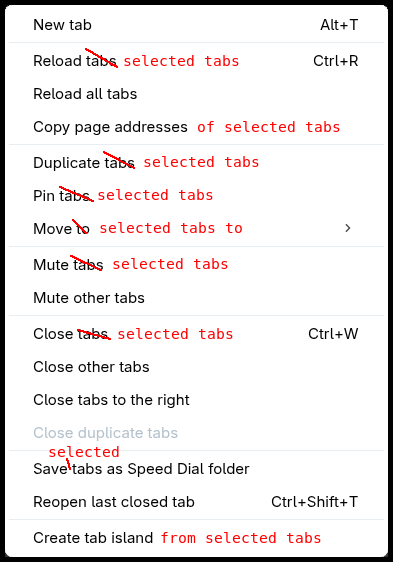
I meant the simple right click on island and select ungroup like in Edge.That would be good too. I like that the Edge tab-group-menu repeats 'group' in every item, making it 100% clear what it intends to do. Opera's has its own nice set of tab-group-menu options, but I don't like the inclarity of its choices:
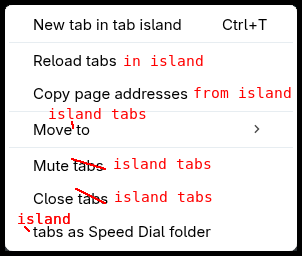
In fact it also has a (fairly different) menu of similar choices available when you have multi-selected non-island tabs; those should also be reworded, even more than the island menu, since it's even more ambiguous: