Please can we have the option to have the vertical tabs on the right hand side please? My mouse it on the right as I'm right handed and naturally falls on the right. This seems like an obvious choice to allow.
C
Latest posts made by cannarwilm
-
RE: We’re turning Vertical Tabs upside down in OperaBlogs
-
Facebook Messenger in sidebar can't load old message dataGeneral
Hi,
Opera One(version: 126.0.5750.18)
Windows Version 10.0.26200 Build 26200this problem I have is with Facebook Messenger in the sidebar only. Things work normally if I open Facebook/Messenger in a normal tab or on a different browser.
Basically this is the error message I am getting.
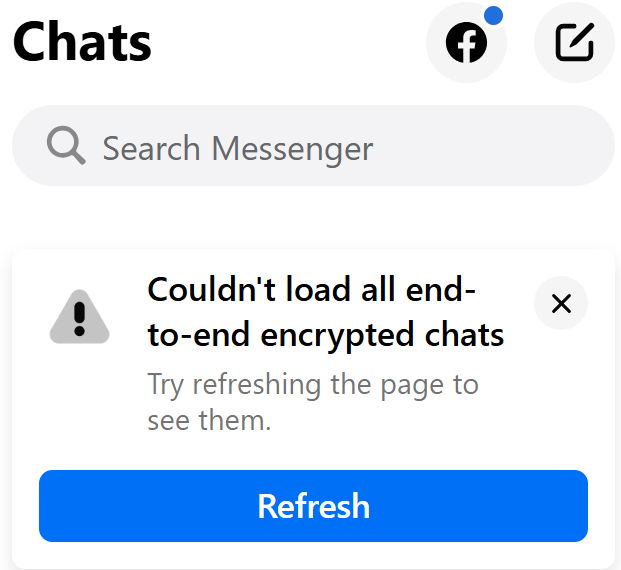
Been getting it for months and now it is beginning to really bug me. Tried logging out, reloading, deleting cache, disabling ad blocker etc. For some reason it doesn't ask me for the pin in the sidebar app (like it does on the actual site) so I think it is stuck in this state where it won't load the old messages.
Does anyone know of a fix? I would really appreciate it.
Glen
-
RE: Search function on some websites causes Opera to stall/loopOpera for Windows
@donq Thank you for the suggestions.
I think I have narrowed it to the Security Software. I use Kaspersky and it seems to be affecting things.
I'm going to look to see if I can add certain sites to the trusted list to see if I can alleviate the problem.
Cheers
Glen
-
Search function on some websites causes Opera to stall/loopOpera for Windows
Hi,
on specific websites (cardmarket.com, scryfall.com and xero.com are three I have found recently), when using some form of search function, the website seems to enter a loop and doesn't progress with the search and go to the findings page.
I've taken a video of this happening (with the developer tab open) but cannot post it here. An IT professional friend has taken a brief look and he says that Opera is performing and repeating a GET function over and over for no discernible reason.
The weird thing is this happens on just my laptop and not the work computer which is set up almost identically. I cannot fathom what the issue is.
I've done all the usual things (cache etc) and gone through the steps at the top of this forum but it hasn't alleviated the problem. Currently Opera is becoming unusable on this machine.
If anyone has any suggestions I would love to hear them.
I'm aware that there may be more information needed to help with this problem (logs etc) so let me know what I need to post and I'll get that done.
Cheers
Glen
-
RE: User Added Search Engines not workingOpera for Windows
Thank you for you help everybody. I tried a few things like rebooting but ultimately this turned out to be an issue with the site I was searching. I set up a couple of other searches on other sites that worked fine (after some tweaking) so figured it must be a site issue. After that it all fell into place.
For more detail, instead of relying on opera to set up the search I performed a search on the site then used the results in the address bar to inform what text was used for the search replacing %s with the search term. With the Magic site it was a little more complex. The basic search didn't work at all but using an advanced search narrowed down to the name of the card I got a result I could use to make the search. Hopefully that info helps someone else struggling with the same/similar issues.
Cheers All
G
-
RE: User Added Search Engines not workingOpera for Windows
The shortcut is just 'm' which isn't assigned to anything else. I will try changing it and also trying other custom searches to see how broad the problem is.
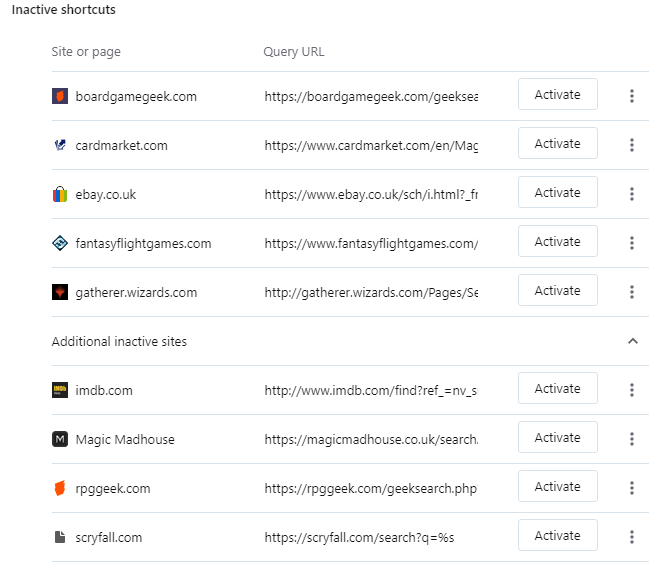
I'm on a different PC now using windows 10 and I tried this search here. The search was already set up on this machine and it has worked for a while and it is still working. Which is weird because when I checked the searched has been deleted and moved to a new section in the settings called "inactive searches". As it is still working I'm not sure I want to 'activate it'.
-
User Added Search Engines not workingOpera for Windows
Hi,
I just tried to add a search (gatherer.wizards.com) to my used added list however, when I type the short cut key plus space (settings and short cut checked - they are correct) it just searches with Google.
Do I need to reboot my system for this to work? I restarted Opera but it still defaults to Google. Weirdly, the icon for "gatherer" appears and disappears in the search bar so I know Opera is recognising it as a user search sometimes. However I never get it to work.
Maybe this is a Windows 11 thing? I going to try this on my Windows 10 machine tonight to see if it works but it was working pretty recently.
Version:89.0.4447.83
Opera is up to date
Update stream:Stable
System:Windows 11 64-bitCheers
Glen
-
RE: Bring back development of Opera MailSuggestions and feature requests
Certainly agree with that. The linked forum above recommends Vivaldi. I will definitely be checking that out, especially as the are suggesting that they will have linked email and browser again.
- Opera for Windows
-
Bring back development of Opera MailSuggestions and feature requests
Yeah I know, Opera do not see this as a something worth doing. But in terms of functionality, it is still (unbelievably) one of the best mail clients out there. How great could it be if it were actively developed?
I know there is a lot of ground root support for Opera mail among Opera users and I think it could be an amazing tool.
Please, please, please reconsider your decision to halt development and bring this fantastic piece of software back to life. And please post something to show your support if you would also like to see Opera Mail revitalised.
 Thanks.