@Enzo023 Same here
A
Latest posts made by ARDEETHREE
- Opera for Android
-
RE: Toolbar always displayed during full-screen videoOpera for Android
Opera techs already responded! I suppose they knew of this issue as they already have a bug fix which will be released in the next update....
"Mobile Customer Support
Today 3:18 PM
Thank you for the detailed report and the screenshots — they make the issue very clear.A fix has already been identified for the toolbar overlay issue in fullscreen video playback. It is being rolled out gradually, and the update should reach your device within the coming days. Once it is available, please update Opera to the latest version and let us know whether the toolbar overlay issue is resolved.
Regarding the unresponsive settings gear in fullscreen mode: this is a separate behaviour that has been observed across other Chromium-based browsers as well, including Chrome, Brave, and Edge, which suggests it originates from YouTube's player rather than Opera itself. In the meantime, exiting fullscreen to adjust quality or playback settings remains the available workaround.
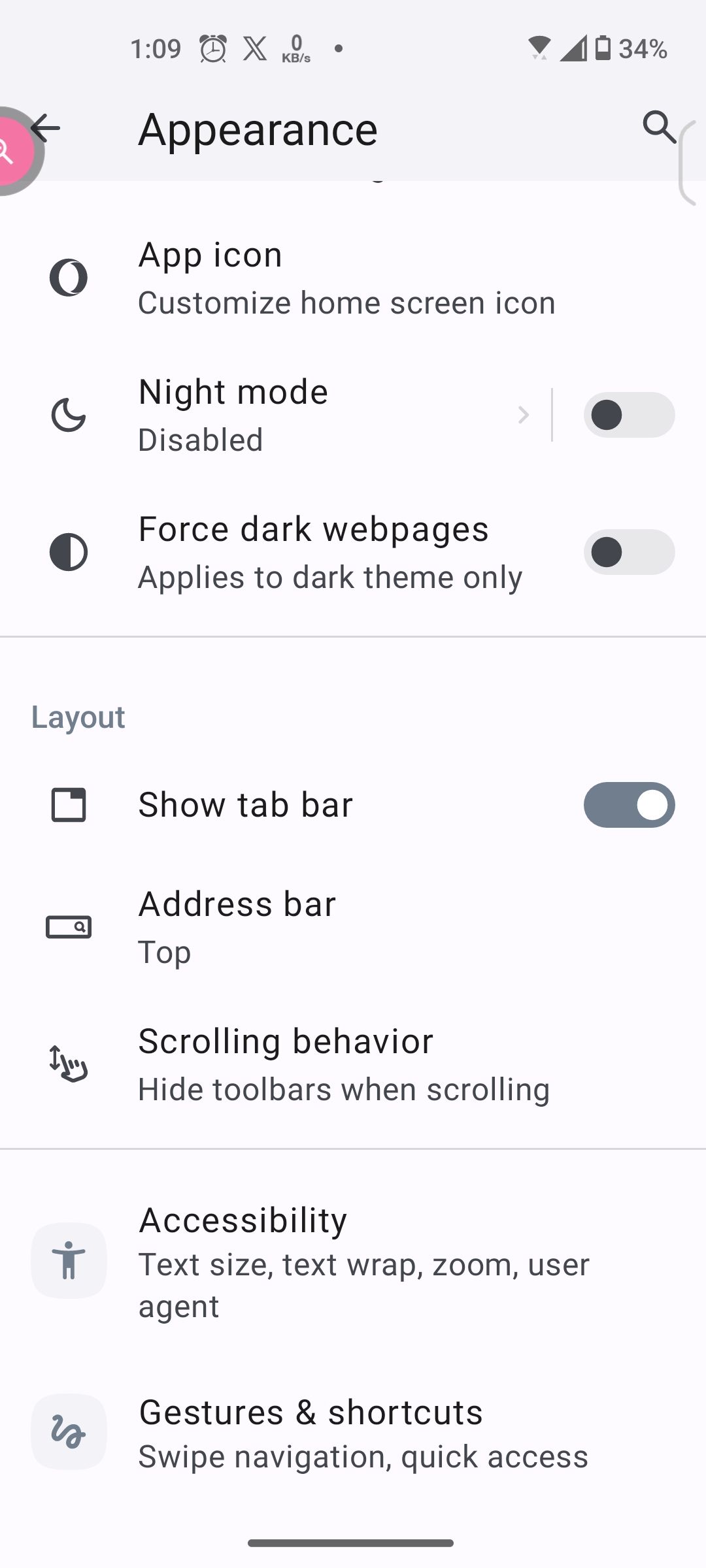
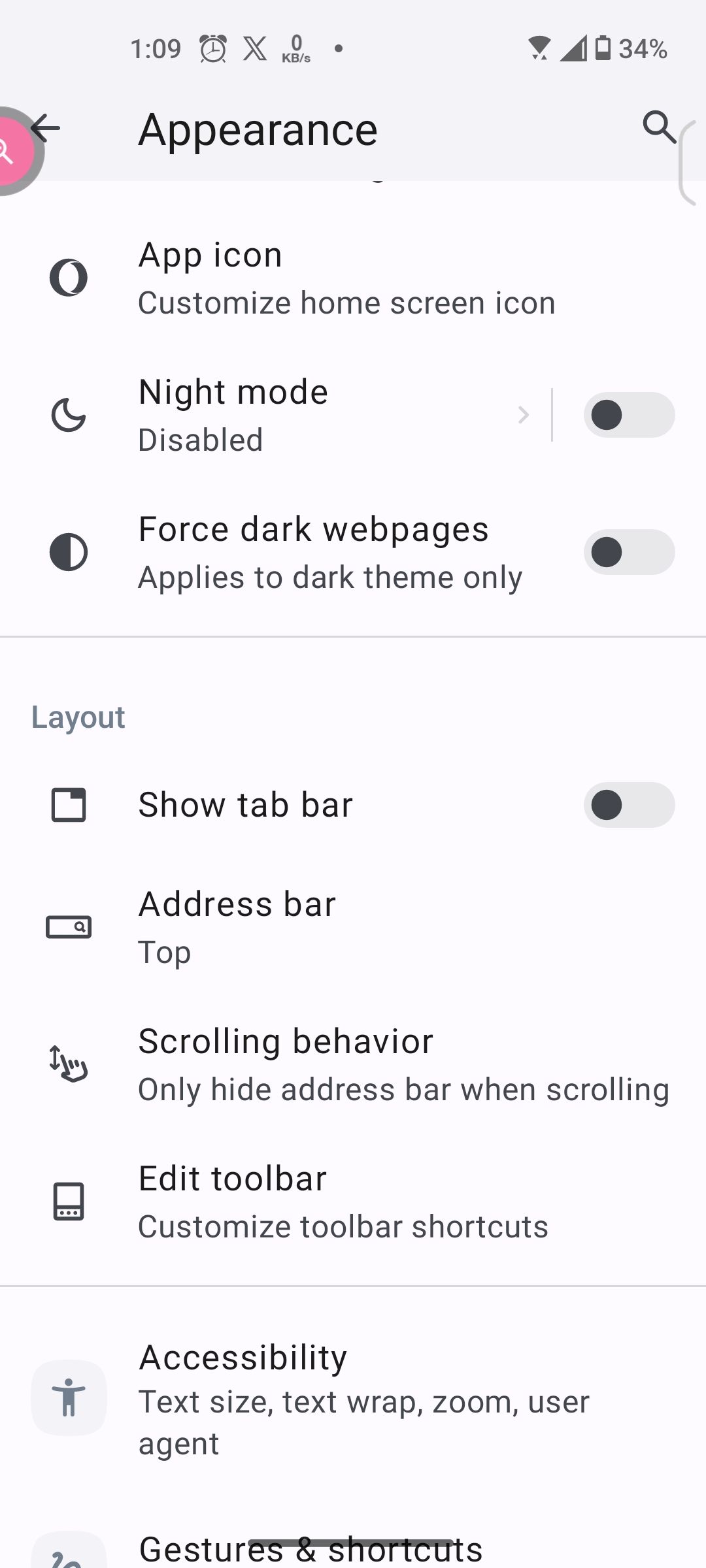
In the meantime, you noted that enabling Show tab bar under Settings > Appearance > Layout causes the fullscreen video to display correctly without the overlaid toolbar — keeping that enabled is a viable workaround until the update arrives on your device.
Please do update once the new version is available and follow up here if either issue persists."
-
RE: Opera toolbar displays over fullscreen YouTube videosOpera for Android
Opera techs already responded! I suppose they knew of this issue as they already have a bug fix which will be released in the next update....
"Mobile Customer Support
Today 3:18 PM
Thank you for the detailed report and the screenshots — they make the issue very clear.A fix has already been identified for the toolbar overlay issue in fullscreen video playback. It is being rolled out gradually, and the update should reach your device within the coming days. Once it is available, please update Opera to the latest version and let us know whether the toolbar overlay issue is resolved.
Regarding the unresponsive settings gear in fullscreen mode: this is a separate behaviour that has been observed across other Chromium-based browsers as well, including Chrome, Brave, and Edge, which suggests it originates from YouTube's player rather than Opera itself. In the meantime, exiting fullscreen to adjust quality or playback settings remains the available workaround.
In the meantime, you noted that enabling Show tab bar under Settings > Appearance > Layout causes the fullscreen video to display correctly without the overlaid toolbar — keeping that enabled is a viable workaround until the update arrives on your device.
Please do update once the new version is available and follow up here if either issue persists."
-
RE: Toolbar always displayed during full-screen videoOpera for Android
@Enzo023 just submitted a bug report.
https://opera.atlassian.net/servicedesk/customer/portal/33/OFABUGS-26932
Let's see what happens
-
RE: Opera toolbar displays over fullscreen YouTube videosOpera for Android
@ARDEETHREE Actually, i just submitted a bug report. Lol
https://opera.atlassian.net/servicedesk/customer/portal/33/OFABUGS-26932
Let's see what happens
-
RE: Opera toolbar displays over fullscreen YouTube videosOpera for Android
@Throwawy97 Hopefully someone at Opera sees this and submits a bug report.
-
RE: Toolbar always displayed during full-screen videoOpera for Android
@Enzo023
I'm experiencing this same issue just recently. Same problem occurs with rumble videos too. Can you test rumble?Interestingly, if i toggle on the "show tab bar" option in settings>appearance>layout, the toolbar isn't displayed in full screen. Does toggling this option remove the toolbar in full screen vids for you?
What phone and android version are you using?
-
RE: Opera toolbar displays over fullscreen YouTube videosOpera for Android
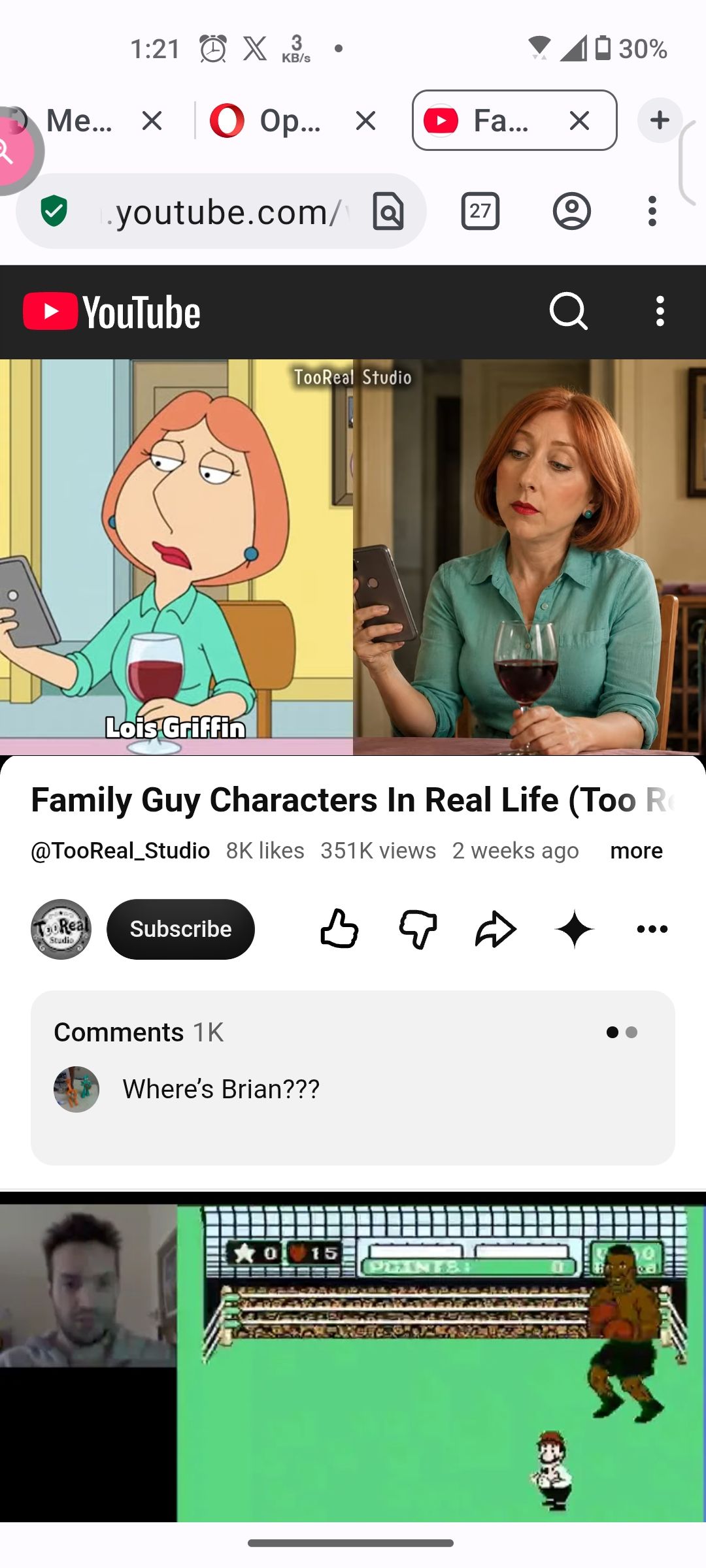
The behavior changes depending on the if "show tab bar" is enabled or disabled in Settings>Appearance>Layout.
With "Show tab bar" enabled, the video displays correctly, without the toolbar in full screen mode.
XXXXXXXXXXXXXXXXXXXXXXXXXXXXXXXXXXXXXXXXXXXXXXXXXXXX
XXXXXXXXXXXXXXXXXXXXXXXXXXXXXXXXXXXXXXXXXXXXXXXXXXXX
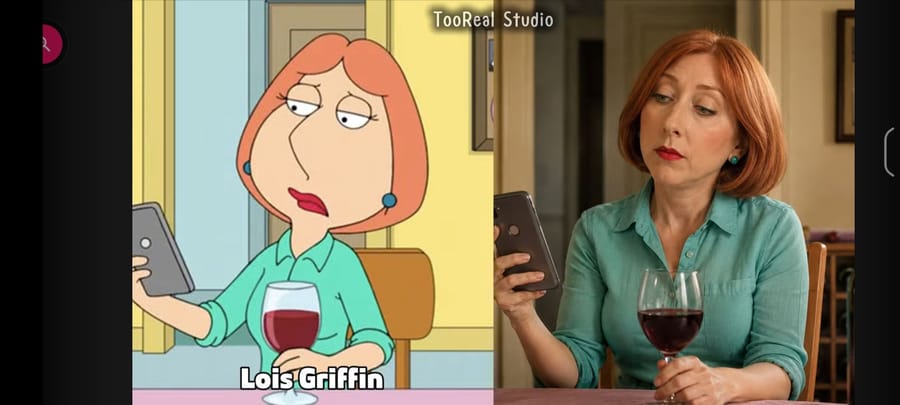
XXXXXXXXXXXXXXXXXXXXXXXXXXXXXXXXXXXXXXXXXXXXXXXXXXXXWith "Show tab bar" disabled, the video displays incorrectly, with the toolbar obscurig the video in full screen mode.
XXXXXXXXXXXXXXXXXXXXXXXXXXXXXXXXXXXXXXXXXXXXXXXXXXXX
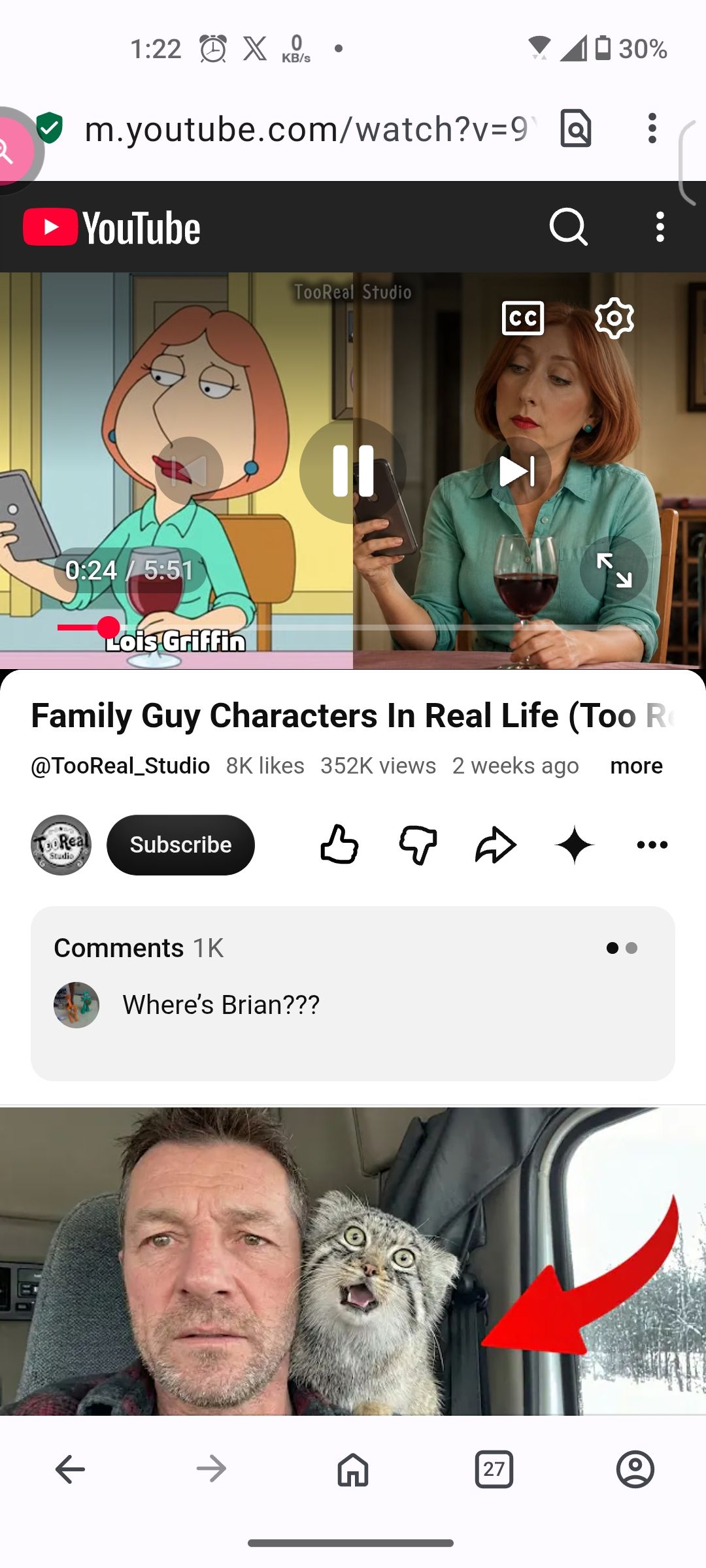
XXXXXXXXXXXXXXXXXXXXXXXXXXXXXXXXXXXXXXXXXXXXXXXXXXXX
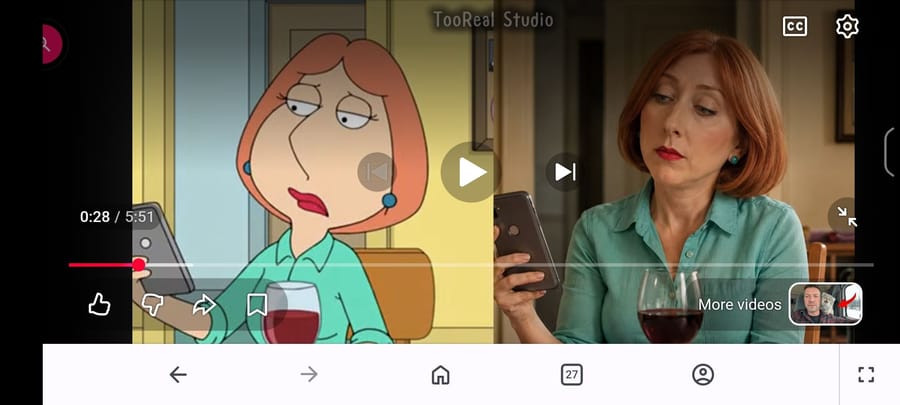
XXXXXXXXXXXXXXXXXXXXXXXXXXXXXXXXXXXXXXXXXXXXXXXXXXXX -
Opera toolbar displays over fullscreen YouTube videosOpera for Android
Android 14 on an Asus Zenfone 9. Using Opera Version 101.1.5178.89889
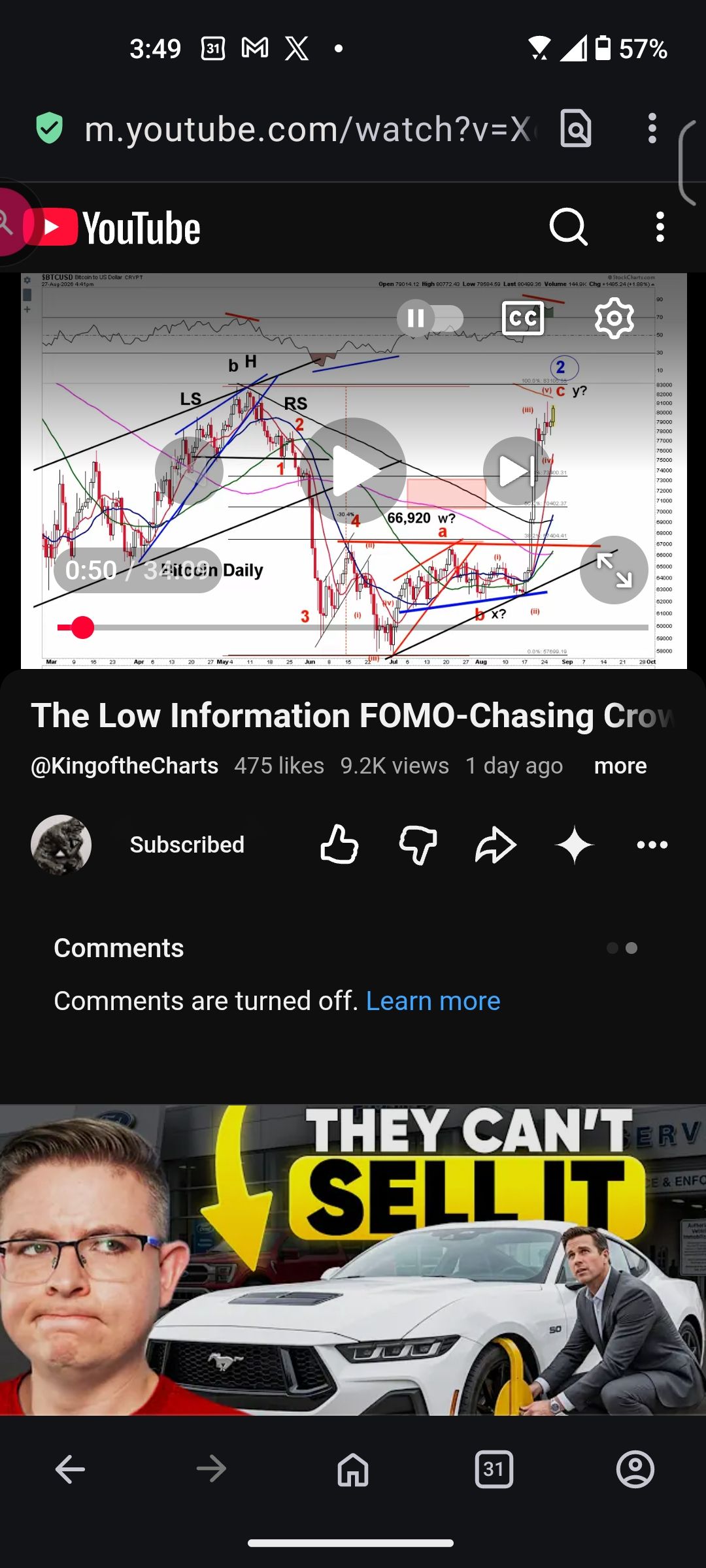
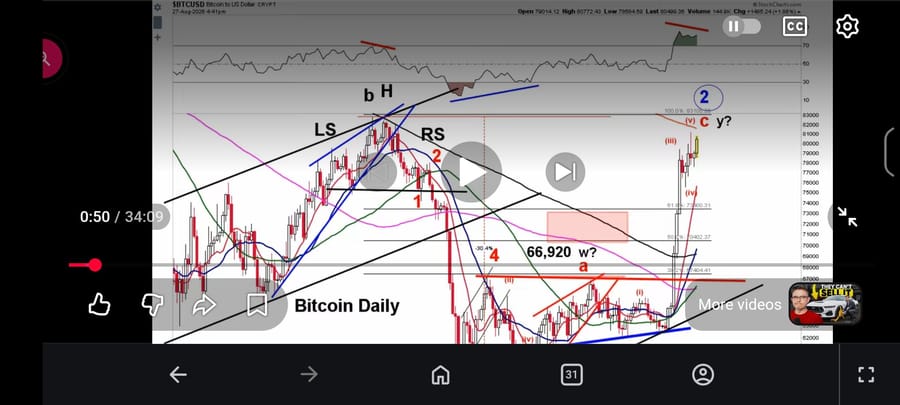
When opening any youtube or rumble video full screen, the Opera toolbar displays at the bottom, covering the bottom of the video. Tapping the "enter full screen" button on the toolbar does nothing.
Problem persists with adblocker disabled. Data savings is disabled.
I tried killing process and deleting cache.
This problem started after updating to the latest version.
Side issue: Also in a recent update, the settings gear in full screen mode became unresponsive. The autoplay toggle and CC buttons work. Settings gear icon works fine after exiting full screen mode.
Regular page:
Full screen mode:
-
Stuttering/jumping when scrollingOpera for Android
Im using an Asus Zenfone 9 (ASUS_AI2202) running Android 13 with the latest updates from Asus and have the latest version of Opera from the Play store at the time of this writing. The problem also occurs in the Chrome app.
When scrolling through my Instagram feed, instead of an always smooth scrolling experience, I usually come accross certain posts that will trigger the problem; the entire web page randomly stutter (jumps up and down rapidly) for a few moments as I'm scrolling through and past the posted image or video. Once ive found a "problematic post", i can replicate the stutter by scrolling back and forth past it. The problem occurs whether I'm scrolling slowly with my finger still on the screen or I'm scrolling fast by flicking.
Here's a video showing the stuttering...
https://m.youtube.com/shorts/UlYXFxA1DIsProblem occurs at 60hz and 120hz display refresh rates. I've tried toggling off the Android SurfaceControl flag but the problem persists.
Ad-blocker is not enabled. Data savings is not enabled.
Any thoughts on the cause of this issue? Issue with Chromium that google needs to address first right?
Thanks!
Opera info:
Application Opera 78.2.4143.75485 1907814306
OS Android 13.0.0; ASUS_AI2202 Build/TKQ1.220807.001
Chromium 117.0.5938.154 (64-bit) (@21c632f199446c544a23b9f03137d6041c711510-refs/branch-heads/5938@{#1549})
Blink 537.36 (@21c632f199446c544a23b9f03137d6041c711510)
JavaScript V8 11.7.439.21
User Agent Mozilla/5.0 (Linux; Android 13; ASUS_AI2202) AppleWebKit/537.36 (KHTML, like Gecko) Chrome/117.0.5938.154 Mobile Safari/537.36 OPR/78.2.4143.75485OS
Android Version : 13
Version Name : T
Released Date : August 15, 2022
Code Name : Android 13
API Level : 33
Security Patch Level : 2023-09-05
Bootloader : unknown
Build Number : TKQ1.220807.001.33.0804.2060.189 release-keys
Baseband : M2.13.33.44-DaVinci_000370,M2.13.33.44-DaVinci_000370
Java VM : 2.1.0
Kernel : 5.10.136-android12-9-00003-g73f898ec1d54-ab9766113
Language : English (en_US)
OpenGL ES : 3.2
Root Management Apps : No Apps Detected
Google Play Services : 23.42.12 (190400-574052649)
Vulkan : Supported (1.1)
Treble : Supported
Seamless Updates : SupportedCPU
SoC : Qualcomm Snapdragon 8+ Gen 1 (4 nm)
1 x Kryo 780 (3.2 GHz)
3 x Kryo 780 (2.75 GHz)
4 x Kryo 780 (2.0 GHz)
Processor : QTI SM8475
CPU Architecture : 1 x 3.19 GHz
3 x 2.75 GHz
4 x 2.02 GHz
Supported ABIs : arm64-v8a, armeabi-v7a, armeabi
CPU Hardware : qcom
CPU Type : 64 Bit
CPU Governor : walt
Cores : 8
CPU Frequency : 1 x 787 MHz - 3187 MHz
3 x 633 MHz - 2745 MHz
4 x 307 MHz - 2016 MHz
GPU Renderer : Adreno (TM) 730
GPU Vendor : Qualcomm
GPU Version : OpenGL ES 3.2 V@0615.0 (GIT@85d46827a0, Idf71a216d1, 1650869735) (Date:04/24/22)Display
Resolution : 2400 x 1080 Pixels (FHD+)
Density : 472 dpi (XHDPI)
Font Scale : 1.1
Physical Size : 5.9 inches
Refresh Rate : • 60.0 Hz,• 90.0 Hz,• 120.0 Hz
HDR : Supported
HDR Capabilities : HDR10, HLG, HDR10+
Brightness Level : 15%
Brightness Mode : Manual
Screen Timeout : 60 Seconds
Orientation : PortraitRandom Access Memory
Type : LPDDR5 3200 MHz
Total : 15242.0MB
Available : 8656.0MB
Used : 6621.0MB
Used Percentage : 43%Internal Storage
Total : 218.12GB
Available : 185.95GB
Used : 32.17GB
Used Percentage : 14%