How to move a speed dial folder into the main list?
-
tlmurray last edited by
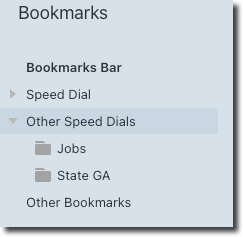
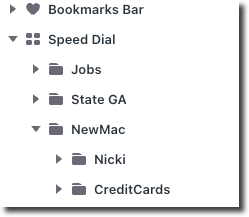
Note the folders "Jobs" and "State GA". How do I move them into the main Speed Dial > NewMac list? I can click and try to drag slowly but they don't move, and a right-click doesn't offer anything relevant.
It really isn't a big deal to just make some new ones in the main list, but still, how do I move them?
Thanks.
-
burnout426 Volunteer last edited by burnout426
You should be able to right-click (or ctrl + left-click if right-click isn't turned on in the macOS settings) on a folder and choose "copy". Then, go in the folder you want to copy to, right-click in a blank spot in the right-hand pane and choose "paste". Or, if you want to move instead of copy, choose "cut".
Dragging and dropping should work for moving too. Just note that the "Speed dial" folder can only have one subfolders. So, you can drag a folder, hover over "Speed dial" in the left-hand pane and release, but you can't hover over a subfolder in "Speed dial" and drop a folder in to that subfolder.
-
tlmurray last edited by
@burnout426 Thanks for the copy & paste; I use that in macOS Finder, but I never thought to try it here. And also for the info "the 'Speed dial' folder can only have one subfolder."
-
burnout426 Volunteer last edited by
@tlmurray The “Speed Dial” folder can have multiple subfolders, but those subfolders can’t have any folders. As in, you can only go one level deep.
-
tlmurray last edited by
@burnout426 said in How to move a speed dial folder into the main list?:
You should be able to right-click . . .
Thanks, tried that, but it doesn't copy. Dragging and dropping is what I do, but I'm going to need carpal tunnel surgery after all that.
