Website display - still having issues
-
Miranda-W last edited by leocg
Hi - I'm new here so sorry if this is supposed to go somewhere else.
I just added a blog section to my website that displays as it should in Chrome but not in Opera.
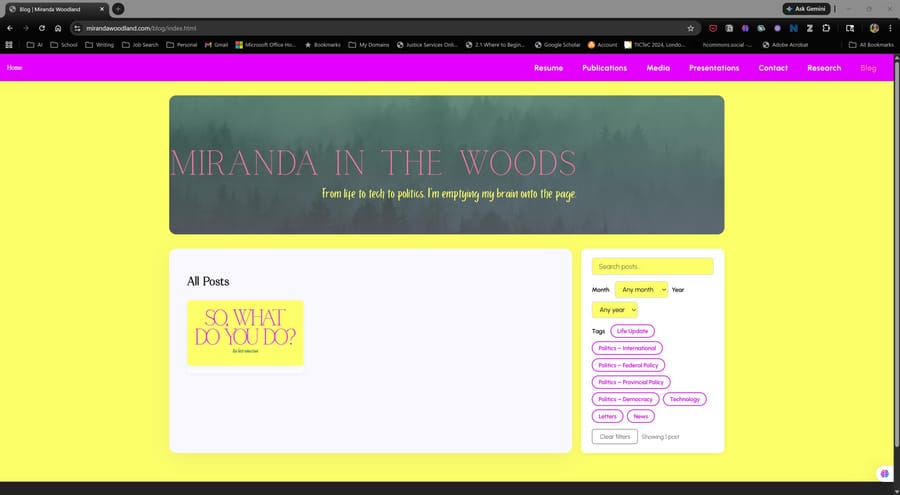
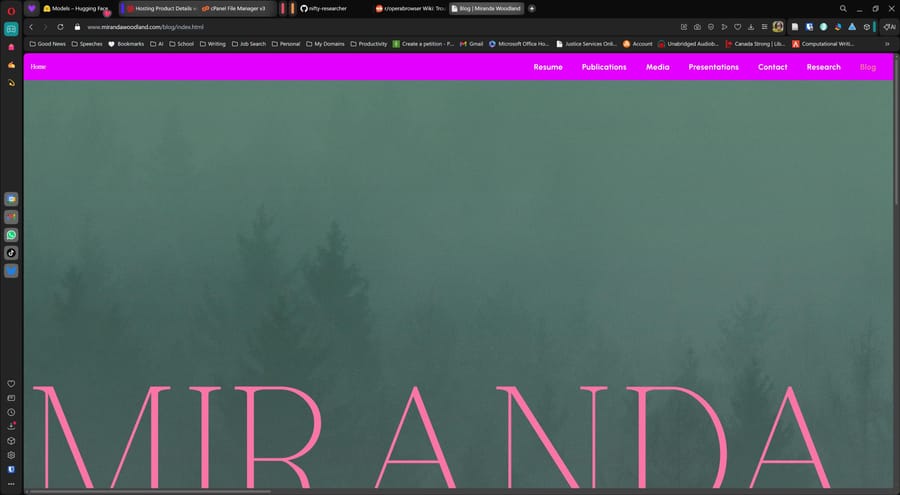
I suppose the easiest fix is to rewrite my css with a simple layout but is there something I'm missing? (Resizing doesn't work - objects are missing or not aligned).
Thanks!
-
 roseanglina last edited by
That’s a pretty common issue—Opera can sometimes behave differently even though it’s Chromium-based. It’s usually due to CSS compatibility, missing prefixes, or something like flex/grid behaving slightly off.
I’d suggest checking your CSS in Opera DevTools, look for any errors, and maybe run it through something like Autoprefixer. Also clear cache and test—no need to rewrite everything yet, it’s likely a small fix .
-
Asta-123 Banned last edited by
Welcome! This kind of browser inconsistency is pretty common, so you’re definitely not alone.
Since it works in Google Chrome but breaks in Opera, it’s likely a CSS compatibility issue rather than your overall layout approach. A few things you can check before rewriting everything:
Vendor compatibility: Make sure you’re not relying on browser-specific behavior. Try adding proper fallbacks or prefixes (e.g., for flexbox/grid).
CSS Grid/Flex issues: Opera usually supports modern CSS, but small differences (like min-width, overflow, or flex alignment) can cause elements to shift or disappear.
Missing prefixes: Use a tool like Autoprefixer to ensure cross-browser support.
Box sizing & resets: Inconsistent defaults can break layouts—try applying box-sizing: border-box; globally.
Inspect in Opera DevTools: Compare computed styles between Chrome and Opera to spot what’s being ignored or overridden.
Check for unsupported properties: Especially newer CSS features that may behave slightly differently.Before rebuilding your layout, I’d strongly recommend debugging with dev tools—you’ll usually find it’s just one or two CSS rules causing the issue