Opera 124.0.5705.42 .deb version install fails
-
 ijpet last edited by
Tested both on a fresh Debian testing install as well as an update to an existing Ubuntu 24.04 install. Installing the .deb version fails at the same point.
~ > sudo apt install opera-stable
Installing:
  opera-stable

Recommended packages:
  chromium-codecs-ffmpeg-extra

Summary:
  Upgrading: 0, Installing: 1, Removing: 0, Not Upgrading: 24
  Download size: 0 B / 133 MB
  Space needed: 361 MB / 118 GB available

Preconfiguring packages ...
Selecting previously unselected package opera-stable.
(Reading database ... 143088 files and directories currently installed.)
Preparing to unpack .../opera-stable_124.0.5705.42_amd64.deb ...
Unpacking opera-stable (124.0.5705.42) ...
Setting up opera-stable (124.0.5705.42) ...
update-alternatives: error: alternative path /usr/bin/opera-stable doesn't exist
dpkg: error processing package opera-stable (--configure):
 installed opera-stable package post-installation script subprocess returned error exit status 2
Processing triggers for hicolor-icon-theme (0.18-2) ...
Processing triggers for gnome-menus (3.38.1-1) ...
Processing triggers for shared-mime-info (2.4-5+b3) ...
Processing triggers for mailcap (3.75) ...
Processing triggers for desktop-file-utils (0.28-1) ...
Errors were encountered while processing:
 opera-stable
Error: Sub-process /usr/bin/dpkg returned an error code (1)
Digging into the details, the install script fails where it tries to register Opera with update-alternatives
update-alternatives --install /usr/bin/x-www-browser x-www-browser /usr/bin/opera-stableThe problem here is that
/usr/bin/opera-stablewas never created, only/usr/bin/opera. Manually creatingopera-stabledoes fix that problem, but the post-install script then still fails where it tries to symlink/usr/share/man/man1/opera-stable.1.gz. This file does not exist within the .deb. I stopped my debug session there.The binary
/usr/lib/x86_64-linux-gnu/operais installed, so you can actually open Opera v124. But it opens without an application id. This means it does not open with the Opera icon but with the generic one. Grouping different Opera windows consequently fails as well. If you've pinned the opera launcher to the dash it will not open there.It also seems to have problems finding the
libffmpeg.so, so many video formats fail.Overall the .deb version is as broken as the snap version atm. There's no sense using Opera in this broken state, so I hope this will be fixed soon.
-
 pindos last edited by
@ijpet said in Opera 124.0.5705.42 .deb version install fails:
The binary /usr/lib/x86_64-linux-gnu/opera is installed, so you can actually open Opera v124. But it opens without an application id. This means it does not open with the Opera icon but with the generic one. Grouping different Opera windows consequently fails as well. If you've pinned the opera launcher to the dash it will not open there.
In my case (I'm using Linux Mint) Opera was installed in /usr/lib/x86_64-linux-gnu/opera-stable. To be more exact, it was moved there by installation process. The old "opera" still remained empty except the "lib_extra" folder, that I created for libffmpeg.so. Moving it to new location solved the problem with video playing.
Another thing I fixed, was creating of opera-stable-symlink in bin directory pointing to opera executable in new location.
There is no troubles with Opera icons in my case. -
ijpet last edited by
You're right, moving the
libffmpeg.sofrom/usr/lib/x86_64-linux-gnu/opera/lib_extrato/usr/lib/x86_64-linux-gnu/opera-stabledoes solve the video issues.But the icon issue is still there. Here's the result of gnome's looking glass. It shows an untracked window for Opera, therefore the correct icon cannot be assigned:
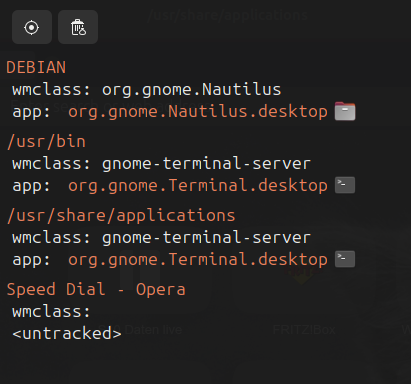 I tested that both on gnome 46 (Ubuntu 24.04) and gnome 48 (Debian testing).
I also have the localisation issue since the update. Up to version 123 Opera started in my native language (de), now I have to start with
--lang=deotherwise it starts in english. -
ijpet last edited by
They just released an update to version 124.0.5705.65 which actually fixes the broken apt install.
But it still does not address the missing icon neither the failing localization. But at least
aptis no longer broken. -
SmokDiplodok last edited by SmokDiplodok
@Malfet
It's already working.
I installed it just a moment ago. According to this manual.
(https://deb.opera.com/manual.html)The new version has a higher number. Maybe the package is better prepared than the previous one.
I wasted a lot of time struggling to install the previous version. The author of the deb package should be more careful.