• Login
    • Search
    • Categories
    • Recent
    • Tags
    • Users
    • Groups
    • Rules
    • Help

    Do more on the web, with a fast and secure browser!

    Download Opera browser with:

    • built-in ad blocker
    • battery saver
    • free VPN
    Download Opera

    Can't change UI language. No option "Display opera in that language"

    Opera for Linux
    31
    44
    88064
    Loading More Posts
    • Oldest to Newest
    • Newest to Oldest
    • Most Votes
    Reply
    • Reply as topic
    Log in to reply
    This topic has been deleted. Only users with topic management privileges can see it.
    • R
      Raffidafi last edited by

      same hier !?!?

      Reply Quote 0
        1 Reply Last reply
      • P
        pici1251 last edited by

        I found a solution for my environment:

        • I'm running Ubuntu 18.04.4 LTS
        • Opera rel. 114.0.5282.21 (snap version)
          I added --lang=it (my preferred language) to the command line used by opera launcher
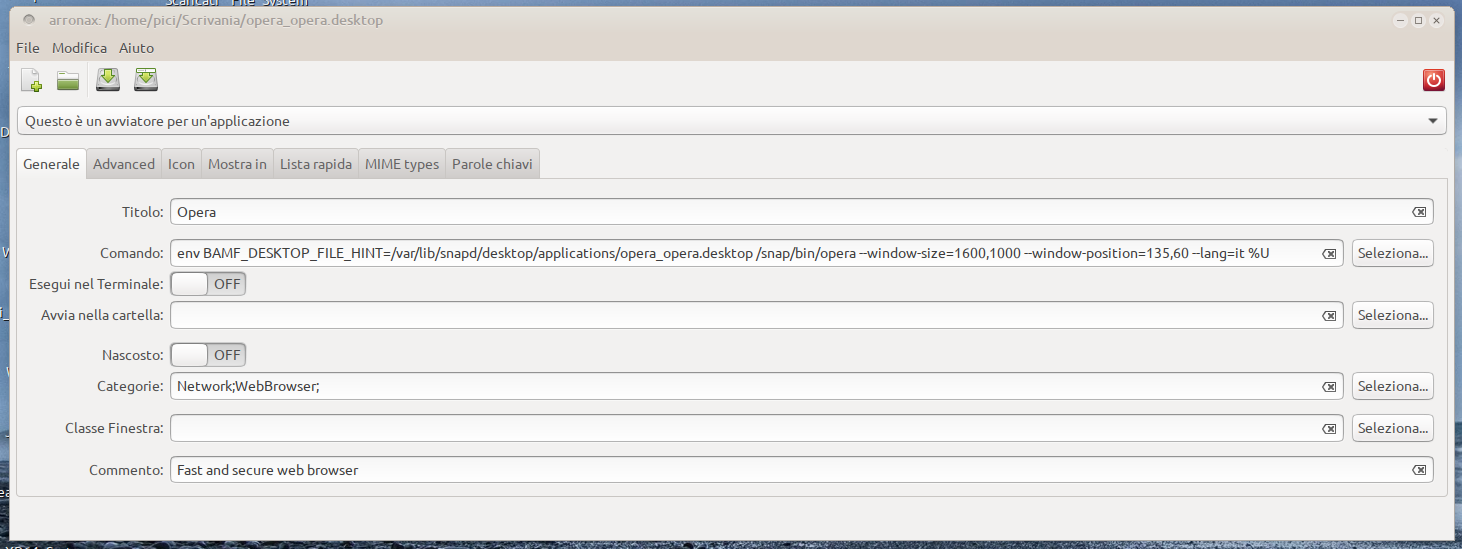
          Opera.dektop2024-09-27 11-43-49.png
          Great: it works fine!!!😁 😁 😁

        Now I will test Ubuntu 24.04.4 over my laptop and over VMVirtualMachine, but I'm optimist ...

        Reply Quote 1
          yokoopera 1 Reply Last reply
        • P
          pici1251 last edited by

          I just tested over VMVirtalBox - 24.04.1 LTS (Noble Numbat) 64-bit:

          OK!!! it works 😁 😁 😁

          Bye

          Reply Quote 0
            1 Reply Last reply
          • yokoopera
            yokoopera @pici1251 last edited by

            @pici1251

            many thanks!

            I edited the file with an editor and was able to change the language.

            /var/lib/snapd/desktop/applications/opera_opera.desktop
            😁 😁 😁

            Screenshot From 2024-11-26 23-52-42.png

            Reply Quote 0
              R 1 Reply Last reply
            • R
              rewers79 @yokoopera last edited by

              @yokoopera - always work on a copy of the activator

              cp /var/lib/snapd/desktop/applications/opera_opera.desktop ~/.local/share/applications/
              
              Reply Quote 0
                yokoopera 1 Reply Last reply
              • Referenced by  yasu0796 yasu0796 
              • Referenced by  leocg leocg 
              • T
                ThePhoenix-90 last edited by

                Can't still change the language except for the method submitted earlier... Did you have any plan to let us do it from the Opera Settings?

                Reply Quote 0
                  1 Reply Last reply
                • L
                  Leconcombremasque @the-codifier last edited by

                  @the-codifier It works with my Linux Mint 22.1 Cinnamon.
                  Thank you kindly.

                  Reply Quote 0
                    1 Reply Last reply
                  • yokoopera
                    yokoopera @rewers79 last edited by

                    @rewers79

                    Sorry for the late reply.

                    I have already uninstalled the snap version and am using the apt(deb) version.

                    I think your information will be useful when I switch to the snap version in the future.

                    Thank you!

                    Reply Quote 0
                      1 Reply Last reply
                    • burnout426
                      burnout426 Volunteer last edited by burnout426

                      This is fixed in Opera Developer 126.0.5748.0. At the URL opera://settings/languages, you can add a language, click its 3 dots and check "Display Opera in this language" and it'll actually work.

                      Reply Quote 0
                        yokoopera 1 Reply Last reply
                      • yokoopera
                        yokoopera @burnout426 last edited by

                        @burnout426

                        Thank you for your notification.

                        I installed Opera Developer 126.0.5748.0 (DEB) and tested it.

                        In this version, the UI language has been replaced with the specified language.

                        I think this is a very good update and hope it will be implemented in Opera Stable.

                        Reply Quote 1
                          1 Reply Last reply
                        • G
                          greet56 last edited by

                          Good to see this finally being handled inside Opera itself instead of relying on launch flags or editing desktop files. Hopefully the same option reaches the Stable channel soon, because changing the interface language should really be a normal browser setting on Linux too.

                          Reply Quote 0
                            1 Reply Last reply
                          • First post
                            Last post

                          Computer browsers

                          • Opera for Windows
                          • Opera for Mac
                          • Opera for Linux
                          • Opera beta version
                          • Opera USB

                          Mobile browsers

                          • Opera for Android
                          • Opera Mini
                          • Opera Touch
                          • Opera for basic phones

                          • Add-ons
                          • Opera account
                          • Wallpapers
                          • Opera Ads

                          • Help & support
                          • Opera blogs
                          • Opera forums
                          • Dev.Opera

                          • Security
                          • Privacy
                          • Cookies Policy
                          • EULA
                          • Terms of Service

                          • About Opera
                          • Press info
                          • Jobs
                          • Investors
                          • Become a partner
                          • Contact us

                          Follow Opera

                          • Opera - Facebook
                          • Opera - Twitter
                          • Opera - YouTube
                          • Opera - LinkedIn
                          • Opera - Instagram

                          © Opera Software 1995-