• Login
    • Search
    • Categories
    • Recent
    • Tags
    • Users
    • Groups
    • Rules
    • Help

    Do more on the web, with a fast and secure browser!

    Download Opera browser with:

    • built-in ad blocker
    • battery saver
    • free VPN
    Download Opera

    Can't change UI language. No option "Display opera in that language"

    Opera for Linux
    30
    42
    78191
    Loading More Posts
    • Oldest to Newest
    • Newest to Oldest
    • Most Votes
    Reply
    • Reply as topic
    Log in to reply
    This topic has been deleted. Only users with topic management privileges can see it.
    • rewers79
      rewers79 last edited by

      On Ubuntu:

      • close opera

      • open terminal

      cp /usr/share/applications/opera.desktop ~/.local/share/applications/
      
      nano ~/.local/share/applications/opera.desktop
      
      • change the line:
        Exec=opera %U
        to:
        Exec=opera --lang=[language_code] %U
        where: [language_code] is example: pl

      • save and close the file

      • open opera 😉

      • enjoy

      Reply Quote 0
        1 Reply Last reply
      • Raffidafi
        Raffidafi last edited by

        same hier !?!?

        Reply Quote 0
          1 Reply Last reply
        • pici1251
          pici1251 last edited by

          I found a solution for my environment:

          • I'm running Ubuntu 18.04.4 LTS
          • Opera rel. 114.0.5282.21 (snap version)
            I added --lang=it (my preferred language) to the command line used by opera launcher
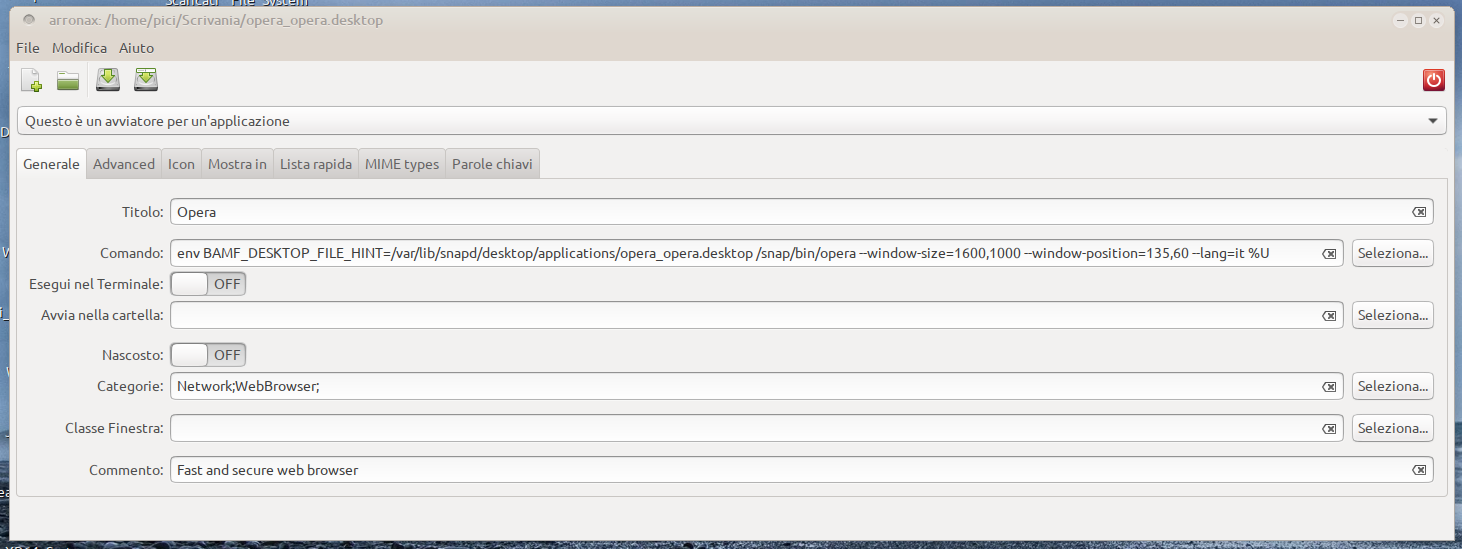
            Opera.dektop2024-09-27 11-43-49.png
            Great: it works fine!!!😁 😁 😁

          Now I will test Ubuntu 24.04.4 over my laptop and over VMVirtualMachine, but I'm optimist ...

          Reply Quote 1
            yokoopera 1 Reply Last reply
          • pici1251
            pici1251 last edited by

            I just tested over VMVirtalBox - 24.04.1 LTS (Noble Numbat) 64-bit:

            OK!!! it works 😁 😁 😁

            Bye

            Reply Quote 0
              1 Reply Last reply
            • yokoopera
              yokoopera @pici1251 last edited by

              @pici1251

              many thanks!

              I edited the file with an editor and was able to change the language.

              /var/lib/snapd/desktop/applications/opera_opera.desktop
              😁 😁 😁

              Screenshot From 2024-11-26 23-52-42.png

              Reply Quote 0
                rewers79 1 Reply Last reply
              • rewers79
                rewers79 @yokoopera last edited by

                @yokoopera - always work on a copy of the activator

                cp /var/lib/snapd/desktop/applications/opera_opera.desktop ~/.local/share/applications/
                
                Reply Quote 0
                  yokoopera 1 Reply Last reply
                • Referenced by  yasu0796 yasu0796 
                • Referenced by  leocg leocg 
                • ThePhoenix-90
                  ThePhoenix-90 last edited by

                  Can't still change the language except for the method submitted earlier... Did you have any plan to let us do it from the Opera Settings?

                  Reply Quote 0
                    1 Reply Last reply
                  • Leconcombremasque
                    Leconcombremasque @the-codifier last edited by

                    @the-codifier It works with my Linux Mint 22.1 Cinnamon.
                    Thank you kindly.

                    Reply Quote 0
                      1 Reply Last reply
                    • yokoopera
                      yokoopera @rewers79 last edited by

                      @rewers79

                      Sorry for the late reply.

                      I have already uninstalled the snap version and am using the apt(deb) version.

                      I think your information will be useful when I switch to the snap version in the future.

                      Thank you!

                      Reply Quote 0
                        1 Reply Last reply
                      • burnout426
                        burnout426 Volunteer last edited by burnout426

                        This is fixed in Opera Developer 126.0.5748.0. At the URL opera://settings/languages, you can add a language, click its 3 dots and check "Display Opera in this language" and it'll actually work.

                        Reply Quote 0
                          1 Reply Last reply
                        • First post
                          Last post

                        Computer browsers

                        • Opera for Windows
                        • Opera for Mac
                        • Opera for Linux
                        • Opera beta version
                        • Opera USB

                        Mobile browsers

                        • Opera for Android
                        • Opera Mini
                        • Opera Touch
                        • Opera for basic phones

                        • Add-ons
                        • Opera account
                        • Wallpapers
                        • Opera Ads

                        • Help & support
                        • Opera blogs
                        • Opera forums
                        • Dev.Opera

                        • Security
                        • Privacy
                        • Cookies Policy
                        • EULA
                        • Terms of Service

                        • About Opera
                        • Press info
                        • Jobs
                        • Investors
                        • Become a partner
                        • Contact us

                        Follow Opera

                        • Opera - Facebook
                        • Opera - Twitter
                        • Opera - YouTube
                        • Opera - LinkedIn
                        • Opera - Instagram

                        © Opera Software 1995-