• Login
    • Search
    • Categories
    • Recent
    • Tags
    • Users
    • Groups
    • Rules
    • Help

    Do more on the web, with a fast and secure browser!

    Download Opera browser with:

    • built-in ad blocker
    • battery saver
    • free VPN
    Download Opera

    How to add GIF as a background in Opera GX?

    Opera GX
    19
    25
    68367
    Loading More Posts
    • Oldest to Newest
    • Newest to Oldest
    • Most Votes
    Reply
    • Reply as topic
    Log in to reply
    This topic has been deleted. Only users with topic management privileges can see it.
    • ?
      A Former User last edited by

      I wanted to add GIF to my background but I don't know how.

      Reply Quote 3
        leocg ? 2 Replies Last reply
      • leocg
        leocg Moderator Volunteer @Guest last edited by

        @willdooperagx I don't think GIF is an accepted format. Anyway, to change your wallpaper, open the Easy Setup, click on add your own wallpaper and select the image you want to use.

        Reply Quote 0
          S 1 Reply Last reply
        • ?
          A Former User @Guest last edited by

          @willdooperagx For animated wallpapers you have to use .webp format.

          Reply Quote 12
            A Q 2 Replies Last reply
          • S
            swedenoppvp @leocg last edited by

            @leocg To be honest they should add support for gif formats and other files such as mp4, JPEG, AVI, MPEG, mov, vmv, ect.

            Reply Quote 4
              ? 1 Reply Last reply
            • ?
              A Former User last edited by

              Hello, willdooperagx. You need to put ''.png'' to your gif name and choose ''All files'' selection. Then go to ''Add your background'' and your background is ready. Enjoy your new background!

              Reply Quote 4
                K K Y 3 Replies Last reply
              • ?
                A Former User @swedenoppvp last edited by

                @swedenoppvp Hello, swedenoppvp. You need to put ''.png'' to the last of your file name and choose ''All files'' selection, your background is ready. Enjoy your new background!

                Reply Quote 2
                  W LOKI-SIMP-HELPo-o anbukatana 4 Replies Last reply
                • W
                  west9599 @Guest last edited by

                  @wloopis

                  @wloopis said in How to add GIF as a background in Opera GX?:

                  @swedenoppvp Hello, swedenoppvp. You need to put ''.png'' to the last of your file name and choose ''All files'' selection, your background is ready. Enjoy your new background!

                  This does not work for win10 as the .gif and what not is no longer part of the file name, any other ideas?

                  Reply Quote 0
                    1 Reply Last reply
                  • W
                    west9599 @Guest last edited by

                    @wloopis nvm figured it out

                    Reply Quote 0
                      ? 1 Reply Last reply
                    • ?
                      A Former User @west9599 last edited by

                      @west9599 how? So what have you done that you can do a gif as your background?

                      Reply Quote 0
                        LOKI-SIMP-HELPo-o RandoomGeekoo 2 Replies Last reply
                      • LOKI-SIMP-HELPo-o
                        LOKI-SIMP-HELPo-o @Guest last edited by

                        @wloopis omg thank you so much i have been trying to do this for so long thank you!

                        Reply Quote 0
                          1 Reply Last reply
                        • LOKI-SIMP-HELPo-o
                          LOKI-SIMP-HELPo-o @Guest last edited by

                          @samsamtran so you can edit the file name right, you need to put .png at the end of the file name after you save the image as but make sure the .gif part is gone sry if its confusing

                          Reply Quote 0
                            1 Reply Last reply
                          • RandoomGeekoo
                            RandoomGeekoo @Guest last edited by

                            @samsamtran To change in the extension you need to open your file explorer (Win + E) and display the extensions in file explorer view settings :
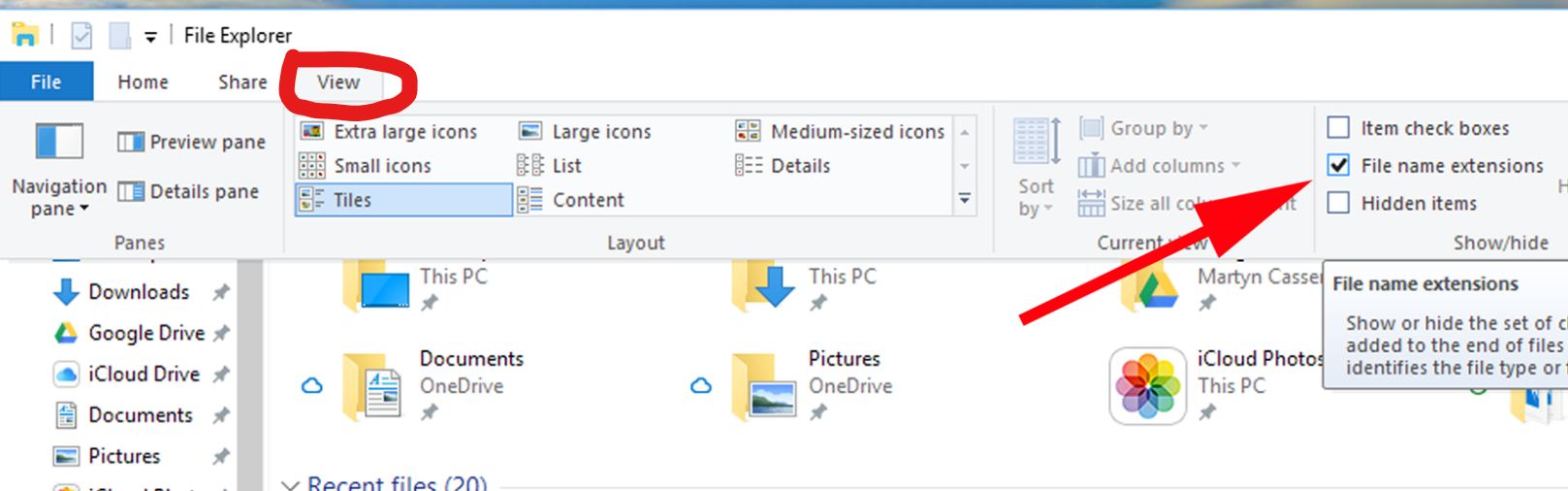
                            55816b7a-8ea3-45c7-824b-8238609cba8d-image.png

                            Reply Quote 1
                              1 Reply Last reply
                            • K
                              kiteflyer324 @Guest last edited by

                              @wloopis thanks for the tip it worked!!!

                              Reply Quote 0
                                1 Reply Last reply
                              • anbukatana
                                anbukatana @Guest last edited by

                                @wloopis tysm omg

                                Reply Quote 0
                                  1 Reply Last reply
                                • H
                                  HueBit last edited by

                                  Just turn the .gif file to a .jpeg file

                                  Reply Quote 0
                                    1 Reply Last reply
                                  • A
                                    alexhasahead @Guest last edited by

                                    @kened I changed my live wallpaper from .gif to .webp and it still said "Unsupported File Type". What do I do now?

                                    Reply Quote 0
                                      H B 2 Replies Last reply
                                    • H
                                      HueBit @alexhasahead last edited by

                                      @alexhasahead just turn the wallpaper on .jpeg

                                      Reply Quote 0
                                        1 Reply Last reply
                                      • B
                                        burnout426 Volunteer @alexhasahead last edited by

                                        @alexhasahead said in How to add GIF as a background in Opera GX?:

                                        I changed my live wallpaper from .gif to .webp

                                        Did you actually convert to webp?

                                        Reply Quote 0
                                          skelinatra 1 Reply Last reply
                                        • skelinatra
                                          skelinatra @burnout426 last edited by

                                          @burnout426 Mine actually converts to webp or png with show file extension on, so, shoot. I cannot figure it out

                                          Reply Quote 0
                                            B 1 Reply Last reply
                                          • B
                                            burnout426 Volunteer @skelinatra last edited by

                                            @skelinatra If you can upload the file somewhere, others can try it and see what the issue is.

                                            Reply Quote 0
                                              1 Reply Last reply
                                            • First post
                                              Last post

                                            Computer browsers

                                            • Opera for Windows
                                            • Opera for Mac
                                            • Opera for Linux
                                            • Opera beta version
                                            • Opera USB

                                            Mobile browsers

                                            • Opera for Android
                                            • Opera Mini
                                            • Opera Touch
                                            • Opera for basic phones

                                            • Add-ons
                                            • Opera account
                                            • Wallpapers
                                            • Opera Ads

                                            • Help & support
                                            • Opera blogs
                                            • Opera forums
                                            • Dev.Opera

                                            • Security
                                            • Privacy
                                            • Cookies Policy
                                            • EULA
                                            • Terms of Service

                                            • About Opera
                                            • Press info
                                            • Jobs
                                            • Investors
                                            • Become a partner
                                            • Contact us

                                            Follow Opera

                                            • Opera - Facebook
                                            • Opera - Twitter
                                            • Opera - YouTube
                                            • Opera - LinkedIn
                                            • Opera - Instagram

                                            © Opera Software 1995-