• Войти
    • Поиск
    • Категории
    • Последние
    • Метки
    • Пользователи
    • Группы
    • Rules
    • Help

    Do more on the web, with a fast and secure browser!

    Download Opera browser with:

    • built-in ad blocker
    • battery saver
    • free VPN
    Download Opera

    scoped_dir folders in downloads directory

    Opera for Windows
    38
    77
    134159
    Загружаем больше сообщений
    • Сначала старые
    • Сначала новые
    • По количеству голосов
    Ответить
    • Ответить, создав новую тему
    Авторизуйтесь, чтобы ответить
    Эта тема была удалена. Только пользователи с правом управления темами могут её видеть.
    • R
      rejzor @burnout426 отредактировано

      @burnout426 Fine, but then fix the Opera to clean up this stuff correctly. It's clearly broken if these folders are being left behind.

      Ответить Цитировать 1
        burnout426 1 ответ Последний ответ
      • burnout426
        burnout426 Volunteer @rejzor отредактировано

        @rejzor said in scoped_dir folders in downloads directory:

        @burnout426 Fine, but then fix the Opera to clean up this stuff correctly. It's clearly broken if these folders are being left behind.

        Can you list each situation where Opera doesn't clean them up? On shutdown of Opera, Opera is at least cleaning up ones it created in that session for me.

        Ответить Цитировать 0
          1 ответ Последний ответ
        • R
          rejzor отредактировано

          I stopped executing downloaded programs from within Opera. Not a single scoped_dir folder in there. It's just annoying that I have the popup there inside Opera interface and I have to avoid using it and manually opening the downloads folder when the thing could work right from the get go in cleaning up its mess in the first place. I mean, no other program uses "scoped_dir" so why doesn't Opera try to clean it up on restarts, checking its designated download folder for scoped_dir folders and if there are any, clean them up. If they are in use, it won't allow it anyway so you just can't make the cleanup wrong. It's an easy fix if anyone at least bothered to do it...

          Ответить Цитировать 0
            1 ответ Последний ответ
          • R
            roma-fl отредактировано

            Agreed with rejzor.
            I always set download directory as "D:\" and I don't want to see strange & ugly folders on my working drive.

            Ответить Цитировать 0
              1 ответ Последний ответ
            • burnout426
              burnout426 Volunteer отредактировано

              As a workaround, you could put:

              noscoped.bat

              FOR /D %%X IN (scoped_dir*) DO RD /S /Q "%%X"
              

              in the downloads folder and double-left-click it for easy cleanup.

              Or, you could do something like:

              cd "d:\downloads"
              FOR /D %%X IN (scoped_dir*) DO RD /S /Q "%%X"
              

              for the batch file and then modify Opera's shortcut to be something like:

               "d:\downloads\noscoped.bat" & "C:\Program Files\Opera\launcher.exe"
              

              That bat obviously wouldn't execute if you launched Opera via a file association (unless you edited the commands in the registry). But, it'd work for the normal shortcut case.

              On a side, I did notice that if you close Opera while a scoped directory it created is in use (because the installer is still open in the directory), Opera won't delete it, obviously. So, that's another situation to avoid.

              Ответить Цитировать 1
                R 1 ответ Последний ответ
              • R
                rkoopmansnl @burnout426 отредактировано

                @burnout426 said in scoped_dir folders in downloads directory:

                FOR /D %%X IN (scoped_dir*) DO RD /S /Q "%%X"
                

                This works better... 😉

                FOR /D %X IN (scoped_dir*) DO RD /S /Q "%X"
                
                Ответить Цитировать 0
                  burnout426 1 ответ Последний ответ
                • burnout426
                  burnout426 Volunteer @rkoopmansnl отредактировано

                  @rkoopmansnl One way is for inside a batch file and the other is for on the command-line directly.

                  Ответить Цитировать 0
                    1 ответ Последний ответ
                  • ?
                    Бывший пользователь @kosterio отредактировано

                    2 years later, Feb 5th 2018, this is still an issue. Executing file after download from the browser will create a "scoped_dir" folder......

                    Ответить Цитировать 1
                      1 ответ Последний ответ
                    • D
                      demiryasinoruc отредактировано

                      Still continue.

                      V51.0.2830.26

                      Ответить Цитировать 0
                        1 ответ Последний ответ
                      • ?
                        Бывший пользователь отредактировано

                        same here

                        Ответить Цитировать 0
                          1 ответ Последний ответ
                        • R
                          redscarf отредактировано

                          54.0.2952.60 stable has same problem

                          Ответить Цитировать 0
                            1 ответ Последний ответ
                          • ?
                            Бывший пользователь отредактировано

                            UP!!

                            Ответить Цитировать 0
                              1 ответ Последний ответ
                            • burnout426
                              burnout426 Volunteer отредактировано

                              It's still intended behavior and there's still no word of having an option to turn it off.

                              Ответить Цитировать 0
                                1 ответ Последний ответ
                              • privatadata
                                privatadata отредактировано

                                This is ridiculous. I love the browser but hate this behaviour! There has to be an unofficial fix.

                                Ответить Цитировать 1
                                  burnout426 1 ответ Последний ответ
                                • burnout426
                                  burnout426 Volunteer @privatadata отредактировано

                                  @privatadata

                                  The current workaround is to make sure your downloads folder is on the same drive as your temp folder. For example, if your temp folder is at "C:\Users\yourusername\AppData\Local\temp", your downloads folder needs to be on C: also. Then, those scoped directores will be created in the temp folder instead.

                                  Another workaround is to have the drive your downloads folder is on formatted as FAT32 instead of NTFS.

                                  Another workaround might (depends on how the feature is coded) be to set your temp folder to be on the same drive as your downloads folder. For example, if your downloads folder is at F:\downloads, your temp folder needs to be set to f:\temp for example. However, before you can do that, you need to figure out how Opera determines the temp folder path. If it just uses the TEMP or TMP environment variables, you can modify those. However, if it uses USERNAME or USERPROFILE or APPDATA or LOCALAPPDATA or HOMEPATH as a base of the temp path, you would have to move your whole windows user profile to F:\Users\yourusername for example. That'd be a mess. If Opera uses HOMEDRIVE or SYSTEMROOT as a base, you're probably SOL.

                                  However, if you can figure out why Opera is not cleaning up the scoped folders for you when it closes, maybe you'll have another workaround. Haven't checked in a while, but Opera cleans them up for me.

                                  For example,:

                                  On a side, I did notice that if you close Opera while a scoped directory it created is in use (because the installer is still open in the directory), Opera won't delete it, obviously. So, that's another situation to avoid.

                                  Ответить Цитировать 0
                                    1 ответ Последний ответ
                                  • ?
                                    Бывший пользователь отредактировано

                                    Same here (11/17/2018)

                                    56.0.3051.104 Stable
                                    Windows 10 64bit

                                    Ответить Цитировать 0
                                      1 ответ Последний ответ
                                    • ?
                                      Бывший пользователь отредактировано

                                      I came across this thread while looking for a solution to the exact problem mentioned by the original poster and some comment posters.

                                      The problem started occurring with fresh install of Opera for "the current user only" and I have been seeing "scoped_dir*" folders being created for "*.exe" files downloaded via Opera.

                                      I have found a solution for myself while reading a comment by Moderator, @leocg, who asked whether the problem persists regardless of "which directory (a person) save the file"; and I have went to the settings, then searched for "download", then clicked on "Change" button for an item titled "Location under "Downloads", then selected the Download folder from a popup window titled "Browse for folder" by navigating to the path that reads "(drive):\Users(username)" instead of navigating to the path that reads "(username)\Downloads".

                                      I do not know how Windows or Opera is coded to cause such a problem, as I am an average user with a little more knowledge for computers than people around me, but ".exe" files I downloaded have gone to the Downloads folder without creating "scoped_dir" folders after taking actions in the previous paragraph. I hope this helps to fix problems for others.

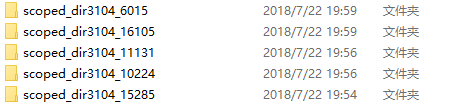
                                      Ответить Цитировать 1
                                        1 ответ Последний ответ
                                      • Первое сообщение
                                        Последнее сообщение

                                      Computer browsers

                                      • Opera for Windows
                                      • Opera for Mac
                                      • Opera for Linux
                                      • Opera beta version
                                      • Opera USB

                                      Mobile browsers

                                      • Opera for Android
                                      • Opera Mini
                                      • Opera Touch
                                      • Opera for basic phones

                                      • Add-ons
                                      • Opera account
                                      • Wallpapers
                                      • Opera Ads

                                      • Help & support
                                      • Opera blogs
                                      • Opera forums
                                      • Dev.Opera

                                      • Security
                                      • Privacy
                                      • Cookies Policy
                                      • EULA
                                      • Terms of Service

                                      • About Opera
                                      • Press info
                                      • Jobs
                                      • Investors
                                      • Become a partner
                                      • Contact us

                                      Follow Opera

                                      • Opera - Facebook
                                      • Opera - Twitter
                                      • Opera - YouTube
                                      • Opera - LinkedIn
                                      • Opera - Instagram

                                      © Opera Software 1995-