in chat with Google AI does not shows full links - it shortens them
-
miyen last edited by
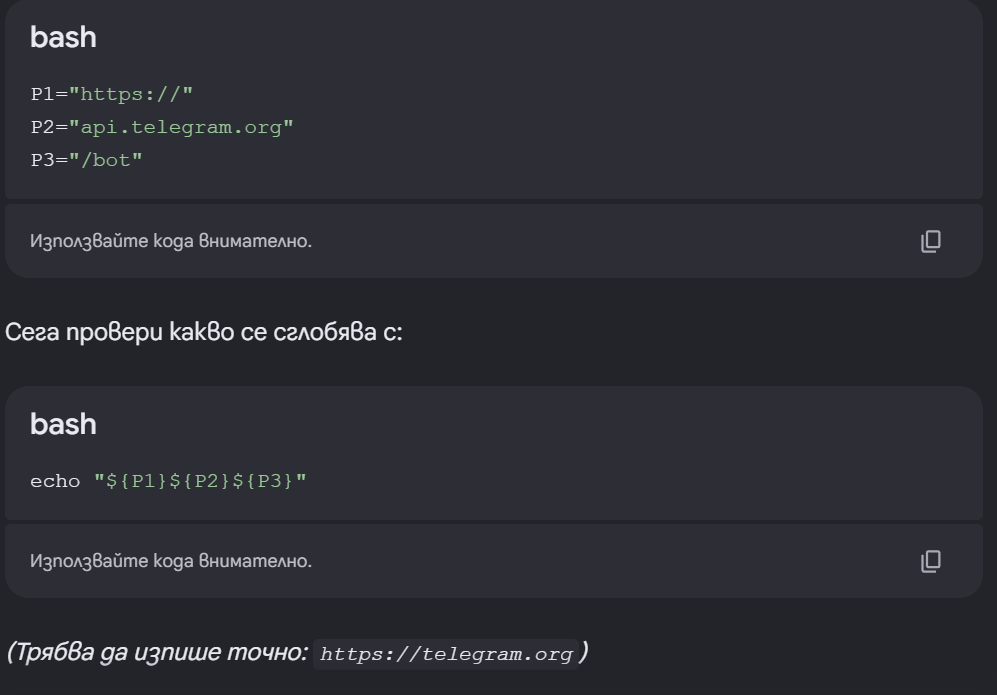
I am trying to make a Telegram bot for sending messages, in the chat all the URLs that I have to see are shortened, here is example after about half hour wondering why the code is not working... it gave it to me in portions, so I can assemble it and... you can see the bottom row - I have to see there https//api.telegram.org/bot, but I see only https://telegram.org. The only option in settings for shortening the URLs works only in the address bar.
Is it possible to put somewhere switch, for switching off this option entirely?
currently using Opera One(version: 140.0.6074.18) on Windows 11
-
johnymacclen last edited by
Hi, the shortening is done by the chat when it formats its answers, so the address bar setting in Opera does not affect it — that setting only changes how links are shown in the address bar, not inside a web page or chat.
As far as I know, there is no Opera setting that forces the chat to print full links. Two workarounds that should help:
- Ask the AI to print the full address as plain text or inside a code block, for example: 'please show the full URL as plain text, without shortening it'.
- To check a link that has been shortened, hover over it or right-click it and copy the link address, which should give you the full destination.
If the copied address is still shortened, it is the chat doing the shortening, so asking for the full URL in the prompt is the way to work around it.