• Login
    • Search
    • Categories
    • Recent
    • Tags
    • Users
    • Groups
    • Rules
    • Help

    Do more on the web, with a fast and secure browser!

    Download Opera browser with:

    • built-in ad blocker
    • battery saver
    • free VPN
    Download Opera

    How to remove old devices from synced items?

    Opera for Mac
    2
    2
    55
    Loading More Posts
    • Oldest to Newest
    • Newest to Oldest
    • Most Votes
    Reply
    • Reply as topic
    Log in to reply
    This topic has been deleted. Only users with topic management privileges can see it.
    • T
      tlmurray last edited by

      When I synced a new install today, I ended up syncing some old devices. I can delete them from the bookmark view, but how can I delete them for good?

      In the screenshot, 2A is the Mac I am on now. In about a month, 2A will be retired, and some other name will take its place.
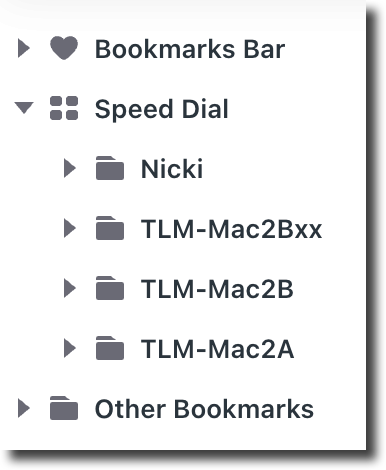
      Bookmarks.png

      Reply Quote 0
        Janijan 1 Reply Last reply
      • Janijan
        Janijan @tlmurray last edited by

        @tlmurray I’ve had a similar issue with old devices still appearing in Opera Sync even after removing or reinstalling the browser. It seems that deleting them from the bookmarks view doesn't always remove their synced device entries permanently. I found this previous discussion, which might help explain the issue and some possible workarounds. Hopefully, Opera provides a proper option to remove old devices in the future.

        Reply Quote 0
          1 Reply Last reply
        • First post
          Last post

        Computer browsers

        • Opera for Windows
        • Opera for Mac
        • Opera for Linux
        • Opera beta version
        • Opera USB

        Mobile browsers

        • Opera for Android
        • Opera Mini
        • Opera Touch
        • Opera for basic phones

        • Add-ons
        • Opera account
        • Wallpapers
        • Opera Ads

        • Help & support
        • Opera blogs
        • Opera forums
        • Dev.Opera

        • Security
        • Privacy
        • Cookies Policy
        • EULA
        • Terms of Service

        • About Opera
        • Press info
        • Jobs
        • Investors
        • Become a partner
        • Contact us

        Follow Opera

        • Opera - Facebook
        • Opera - Twitter
        • Opera - YouTube
        • Opera - LinkedIn
        • Opera - Instagram

        © Opera Software 1995-