"Out of memory" crash.
-
burnout426 Volunteer last edited by burnout426
Is this with regular Opera (Opera One) or Opera GX or Opera Air?
Are you running on battery and have the battery saver turned on?
If using Opera GX, do you have any limiters enabled in the GX Control sidebar panel?
What sites are causing this? If you leave Google Docs open for example, it's known to eventually run out of RAM sometimes. If it's Youtube, are you using any adblockers?
Does it happen in a test standalone installation too?
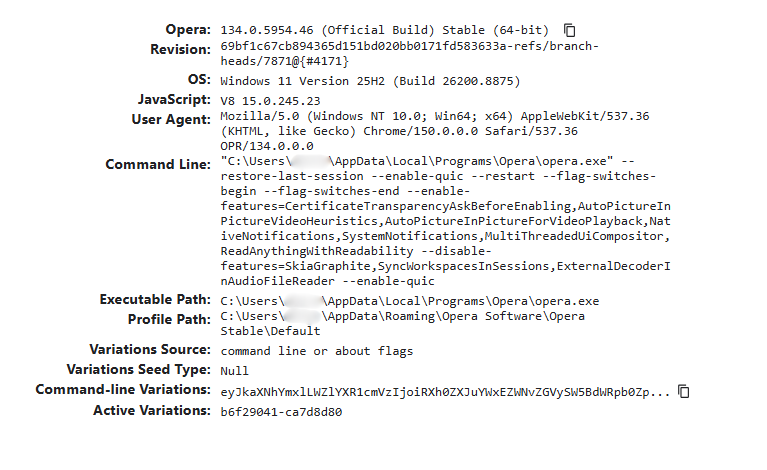
What specific version of Opera as shown at the URLs
opera://aboutandopera://version?Are you getting any entries listed at the URL
opera://crasheswhen this happens? -
 Artie last edited by
@burnout426 This is "regular" Opera on a laptop. I never do YouTube in Opera. I use Vivaldi for that. I never use Google Sheets. Just regular websites, like some guitar and/or music forums. Tech articles, food articles. Email, calendar, etc.
And like I said, in the past, I've dozens of tabs open, with no problem. This is a fairly new phenomenon. I had crash reports turned off. It's on now.
I'll see if I can post the version screenshot.
-
burnout426 Volunteer last edited by
@Artie said in "Out of memory" crash.:
Just regular websites, like some guitar and/or music forums. Tech articles, food articles. Email, calendar, etc.
URLs?
-
Artie last edited by Artie
@burnout426 I can't really list dozens, (100's?) of websites. It's not any specific websites. It's just the fact that I used to be able to have many open, in several workspaces, and now it crashes if I do the same.
I think the bigger question is: Why is Opera "running out of memory?" Might I have some limiting factor set wrong in Windows?
-
burnout426 Volunteer last edited by
@Artie With:
If I only have a few open, Opera will tell me that the page is "out of memory."
, how many is a few?
As in, I don't know what has changed that would cause this. I personally can only see if I can reproduce it myself, if given enough details.
Also, when one of the pages says "Out of memory", hit shift + esc in Opera to see how much RAM each process in Opera is using. Also look in the Windows Task Manager to see how much free RAM you have.
Also, how much RAM do you have on your system?
A single tab can only use so much RAM, so if it runs out of memory, it might have something to do with that page where you still have enough free RAM on the system. It'd be interesting to see what
opera://crashessays after you reload one of those pages and Opera crashes completely. -
Artie last edited by
@burnout426 Thanks. I didn't know about the shift+esc trick. I'll try that next time. This is an ASUS "gaming" laptop with 16GB ram.
I'm not sure how to interpret the "crashes" page.
BTW, Opera Air did it also last night. It's important to note that this is a new phenomena. My laptop hasn't changed, so I doubt it's a computer issue. I used to be able to have several dozen tabs open in one workspace, and several others in other workspaces. I keep my emails, calendar, etc, open in their own WS.
I'll try to get a crash report next time it happens. I have crash reporting turned on now in both browsers.
-
burnout426 Volunteer last edited by
See https://forums.opera.com/post/407659 starting with "For another test..." for how to install a test version of Opera 133 that doesn't update to 134 on you (and won't interfere with your current Opera) to test if 133 still works as expected.
Also, as a test, not a solution, please try a test standalone installation of this Opera Developer build (Windows installation link is down the page just a tad) to see if you can get it to happen there too or not.
-
burnout426 Volunteer last edited by
Opera Stable 134.0.5954.56 just came out. Make sure to update just to see if it's any different. Nothing in the changelog says it will help, but there are a few crash fixes there.
-
Artie last edited by
@burnout426 Hmmm. My Opera is saying it's up to date with the .46 version. I'll give it a little time.
-

