re-enable WhatsApp notifications
-
buzzyheb last edited by
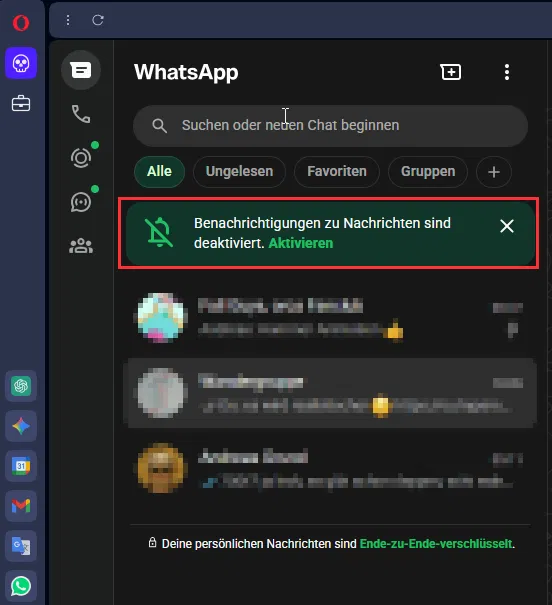
Hi there, is there any solution to tell Opera to keep the notification-settings for WhatsApp (and Google calendar)?
Sometimes I have to re-enable them several times a day...TIA,
Buzzy -
burnout426 Volunteer last edited by
While you're in the panel or at web.whatapps.com in a tab, click the lock icon (at middle top in the panel and at the left of the address field in a tab), goto "site settings" and set "allow" for notifications.
Then, goto the URL
opera://settings/content/notificationsand confirm that WhatsApp is in the allow list. Then, restart Opera, go back to that URL and confirm that WhatsApp is still in there. If not, Opera might have an issue saving to some of its files.Also, at the URL
opera://settings/clearBrowserData, make sure "Site settings" isn't enabled when you clear data (manually or on exit).You can also goto the URL
opera://settings/content/all, typewhatsapp.comin the search field and click "Delete displayed data". That will clear cookies and log you out. Then, goto the URLopera://settings/clearBrowserData, make sure only "Cached images and files" is checked, make sure the time range is set to "all time" and click "Delete data".Then, log back in to WhatsApp (in the panel or tab) and see how things go from there.
-
buzzyheb last edited by
Hi,
I tried this yesterday and had to enable notifications one more time...no further action required so far, but I'll wait what the day will bring
Thanks so far,
Buzzy -
buzzyheb last edited by
Hi again,
didn't work - already had to re-enable notifications twice today :-|Regards,
Buzzy -
 Janijan last edited by
@burnout426 Thanks for the detailed steps. I’ll try these settings and see if they resolve the WhatsApp notification issue.
-
burnout426 Volunteer last edited by
@buzzyheb Same issue in a test standalone installation to a folder named "Opera Test" on your desktop?
-
buzzyheb last edited by
@burnout426 For the Reddit explicilty says Uncheck "Import bookmarks and data from the default browser" - does this mean I shouldn't import them after installation, too?
-
burnout426 Volunteer last edited by
@buzzyheb Correct. For the test standalone installation, you do not import anything during installation or after.
-
burnout426 Volunteer last edited by
Long shot, but at the URL
opera://settings/content, scroll down to the bottom of the page, disable "Automatically remove permissions from unused sites" and restart Opera. Then, enable notifications for WhatsApp again if they're removed and restart Opera again. Then, see if things stick. -
buzzyheb last edited by leocg
@burnout426 said in re-enable WhatsApp notifications:
Long shot, but at the URL
opera://settings/content, scroll down to the bottom of the page, disable "Automatically remove permissions from unused sites" and restart Opera. Then, enable notifications for WhatsApp again if they're removed and restart Opera again. Then, see if things stick.I'll give it a try - it didn't happen that frequently recently (a couple of time per week), so I could live with that
Thanks,
Buzzy


