• Login
    • Search
    • Categories
    • Recent
    • Tags
    • Users
    • Groups
    • Rules
    • Help

    Do more on the web, with a fast and secure browser!

    Download Opera browser with:

    • built-in ad blocker
    • battery saver
    • free VPN
    Download Opera

    how do i change the width of the top bar?

    Opera for Linux
    2
    6
    284
    Loading More Posts
    • Oldest to Newest
    • Newest to Oldest
    • Most Votes
    Reply
    • Reply as topic
    Log in to reply
    This topic has been deleted. Only users with topic management privileges can see it.
    • M
      mlclmrbrtn last edited by

      how do i make the top bar narrower?

      Reply Quote 0
        M 1 Reply Last reply
      • M
        mlclmrbrtn @mlclmrbrtn last edited by

        by width i mean the shorter dimension,
        ie from top to bottom of bar: thickness.
        my display in linux has the tab/s bar on top,
        then immediately below that the bar for
        the open tab: icons for back, forward, reload
        etc.

        both those bars have space above & below
        the line of info / icons. space almost equal
        the actual space the line info/icons uses.

        the title bar for this topic is also nearly 2/3
        empty space. the bar for forum icons is nearly
        3/4 empty space.

        almost half the horizontal space of my opera
        window is used for nothing. i'll try a screenshot.
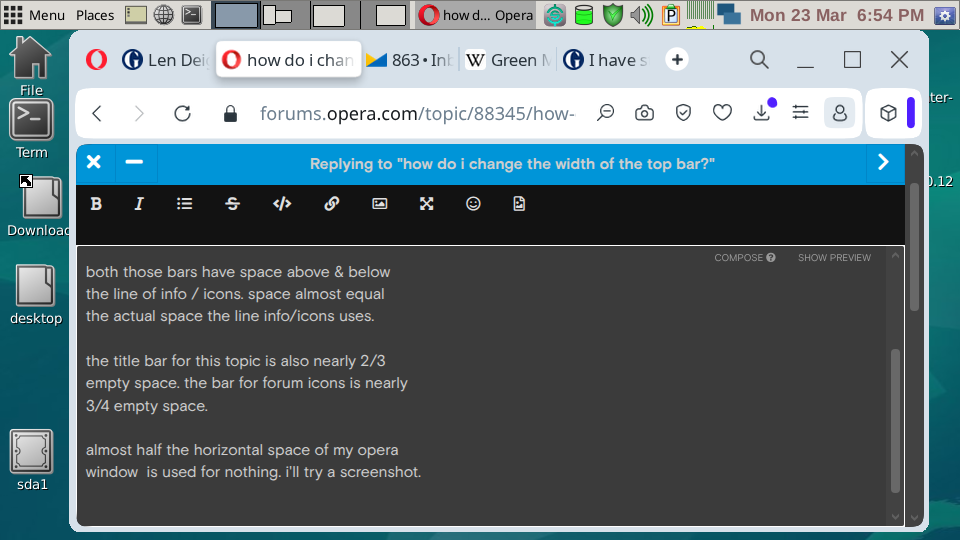
        Screenshot-20260323T185444.png

        thanks , cheers, mm

        Reply Quote 0
          Mlipka 1 Reply Last reply
        • Mlipka
          Mlipka Opera @mlclmrbrtn last edited by

          HI @mlclmrbrtn

          I'm not aware of build-in option to change browser dimensions in space you mentioned.

          Reply Quote 0
            M 1 Reply Last reply
          • M
            mlclmrbrtn @Mlipka last edited by

            @Mlipka thanks, there is address which opens the files of display, including the dimension info
            in text form of the directions the computer follows to to create the settings for first appearamce.
            in text form they can be modified, then saved for next use. i did in firefox, but i can't recall address..
            cheers, mm

            Reply Quote 0
              Mlipka 1 Reply Last reply
            • Mlipka
              Mlipka Opera @mlclmrbrtn last edited by

              @mlclmrbrtn
              My recommendation would be to ask via a ticket:
              https://forums.opera.com/topic/88353/report-your-bug-here

              it will reach more technical folks and maybe they will be able to answer.
              You can even link this thread in the ticket.

              Reply Quote 0
                1 Reply Last reply
              • M
                mlclmrbrtn last edited by

                thanks mike
                getting ticket now.
                also posted to forum
                for linux os, puppylinux.
                cheers, mm

                Reply Quote 0
                  1 Reply Last reply
                • First post
                  Last post

                Computer browsers

                • Opera for Windows
                • Opera for Mac
                • Opera for Linux
                • Opera beta version
                • Opera USB

                Mobile browsers

                • Opera for Android
                • Opera Mini
                • Opera Touch
                • Opera for basic phones

                • Add-ons
                • Opera account
                • Wallpapers
                • Opera Ads

                • Help & support
                • Opera blogs
                • Opera forums
                • Dev.Opera

                • Security
                • Privacy
                • Cookies Policy
                • EULA
                • Terms of Service

                • About Opera
                • Press info
                • Jobs
                • Investors
                • Become a partner
                • Contact us

                Follow Opera

                • Opera - Facebook
                • Opera - Twitter
                • Opera - YouTube
                • Opera - LinkedIn
                • Opera - Instagram

                © Opera Software 1995-
