[Your feedback for new feature] - Eye Support
-
 Mlipka last edited by Mlipka
Hey Gang,
I'm experimenting with something new and need your help.
There are some features that are different, and before releasing them, we'd love to get your opinion.Okay, here’s the first one.
During the lack of dark mode, many users complained about eye strain caused by the browser. I'd like to keep improving your eye health and have come up with the feature described below.
For now, we call it Eye Support.
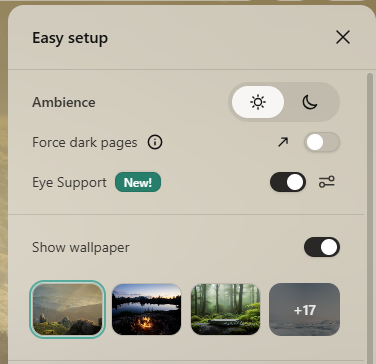
You can enable it in the easy setup. By default, it will slightly reduce blue light and brightness. However, you can also go to settings and make your own adjustments to light and colors.
Easy setup:
Settings:
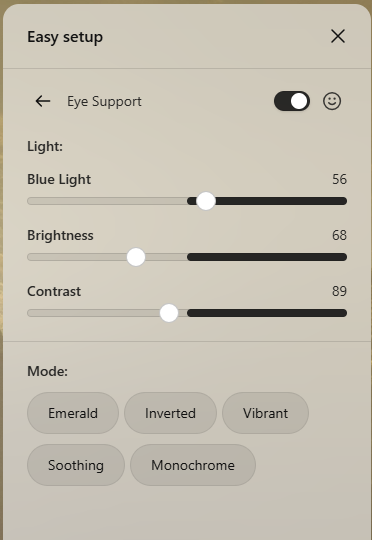
If you want to know more about the effects each mode provides, here’s a description:
Emerald Evokes the rich, soothing quality of the color green, often associated with nature, peace, and tranquility. Emerald Mode creates a visually calming experience, perfect for relaxation.
Soothing Creates a calm and gentle visual experience, reducing eye strain and discomfort. Soothing Mode is most useful in the morning or evening, and for users with sensitive eye conditions.
Vibrant Emphasizes the intensity and energy of colors, making the visual experience dynamic and exciting. Vibrant Mode is perfect for gaming, watching movies, and boosting dynamic visuals.
Monochrome Displays shades of black and white for low-light conditions. Monochrome Mode is excellent for reading text or reducing stimulation before sleep.
Inverted Replaces each color with its opposite on the color wheel. Inverted Mode is extremely useful for identifying color imbalances when editing images, designs, or video.
So, what do you think?