• Login
    • Search
    • Categories
    • Recent
    • Tags
    • Users
    • Groups
    • Rules
    • Help

    Do more on the web, with a fast and secure browser!

    Download Opera browser with:

    • built-in ad blocker
    • battery saver
    • free VPN
    Download Opera

    I can't access my netgear wifi extender because of a http address

    General
    3
    9
    377
    Loading More Posts
    • Oldest to Newest
    • Newest to Oldest
    • Most Votes
    Reply
    • Reply as topic
    Log in to reply
    This topic has been deleted. Only users with topic management privileges can see it.
    • sergiob
      sergiob last edited by

      Hello,
      I'm trying to install my netgear wifi extender and to configure it, I have to enter http://mywifiext in Opera but Opera gives me this error message : ERR_CONNECTION_TIMED_OUT
      I tried http://192.168.0.250 and it gave me the same error message. It seems that all addresses beginning by http instead of https is causing problem. When I click on a "Continue to the site" button, it times out. Help please.

      Windows 11
      Opera One (version : 125.0.5729.49)
      Netgear WN3000RPv3

      Reply Quote 0
        fitzydj 1 Reply Last reply
      • fitzydj
        fitzydj @sergiob last edited by fitzydj

        @sergiob I have a different brand router but can still connect to it using http. I am using Opera One (version : 125.0.5729.49).

        Also check your security settings in Opera you may need to temporarily toggle these settings off if they are enabled.
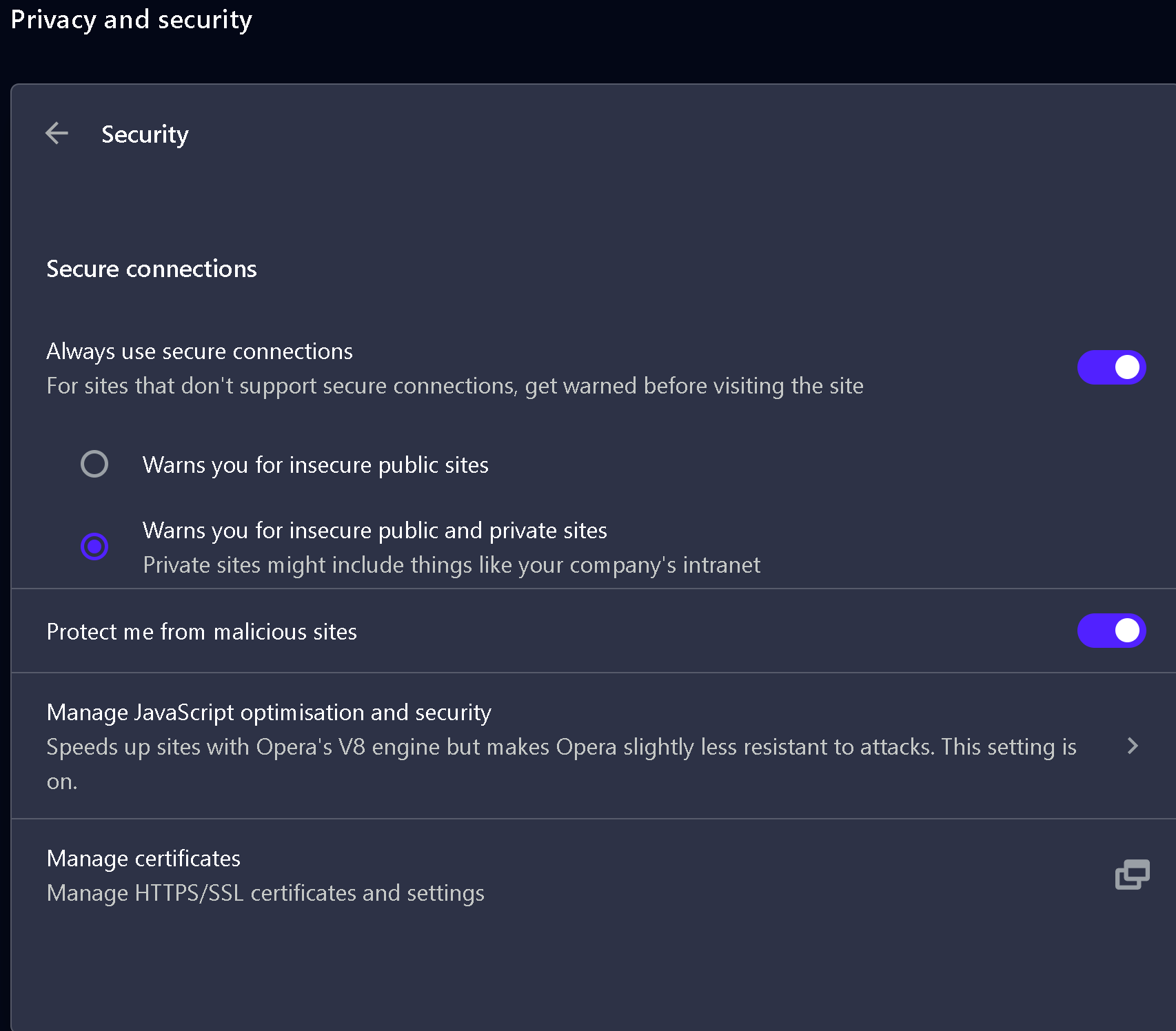
        Opera Security Settings.png

        Also if you are using any third party security software check the settings.

        Reply Quote 0
          sergiob 1 Reply Last reply
        • sergiob
          sergiob @fitzydj last edited by

          @fitzydj Hello, thank you for the reply but this is something that I have already tried without succes

          Reply Quote 0
            1 Reply Last reply
          • burnout426
            burnout426 Volunteer last edited by

            When you're on the error page, click a blank spot on the page and type thisisunsafe. That might give you an option to permanently bypass the error page.

            Reply Quote 0
              sergiob 1 Reply Last reply
            • burnout426
              burnout426 Volunteer last edited by

              Or a different thing you can try is to add http://mywifiext to the list for the "Insecure origins treated as secure" flag at the URL opera://flags/#unsafely-treat-insecure-origin-as-secure and restart Opera.

              Reply Quote 0
                1 Reply Last reply
              • sergiob
                sergiob @burnout426 last edited by

                @burnout426 Hein?😕
                It does nothing at all 😞
                That would have surprised me😲
                Thank you just the same!

                Reply Quote 0
                  1 Reply Last reply
                • burnout426
                  burnout426 Volunteer last edited by

                  Or, close Opera, hit Windows key + r to open the run dialog, type cmd and press enter to open a command prompt.

                  Then, type:

                  "%localappdata%\Programs\Opera\opera.exe" --allow-insecure-localhost 
                  

                  and press enter to start Opera. Then try the URL.

                  If that doesn't work, close Opera and try:

                  "%localappdata%\Programs\Opera\opera.exe" "--unsafely-treat-insecure-origin-as-secure=http://mywifiext"
                  

                  or:

                  "%localappdata%\Programs\Opera\opera.exe" "--unsafely-treat-insecure-origin-as-secure=http://192.168.0.250"
                  

                  If one of those commands work, you can create an Opera shortcut on your desktop that uses the command.

                  Right-click on your desktop, goto "New", choose "Shortcut", browse to "C:\Users\yourusername\AppData\Local\Programs\Opera\opera.exe", click "Next", name the shortcut "Opera Router Access" and click "Finish". Then, right-click on the "Opera Router Access" shortcut, goto "Properties" and switch to the "Shortcut" tab. On that tab, you'll want to modify the command in the target field, click "apply" and OK out. Then, whenever Opera is closed, you can use that shortcut ot open Opera with that command.

                  So, in the target field, you can try:

                  "C:\Users\yourusername\AppData\Local\Programs\Opera\opera.exe" --allow-insecure-localhost
                  

                  or:

                  "%localappdata%\Programs\Opera\opera.exe" "--unsafely-treat-insecure-origin-as-secure=http://mywifiext"
                  

                  for example to see if it helps.

                  Reply Quote 0
                    sergiob 1 Reply Last reply
                  • sergiob
                    sergiob @burnout426 last edited by

                    @burnout426 Hello,
                    I did not try all suggestions but I finally set my Netgear Extender by configuring it in my router (there is no WPS button on my router, that would have been simple).
                    Thank you for your help!
                    And Happy New Year!

                    Reply Quote 2
                      burnout426 1 Reply Last reply
                    • burnout426
                      burnout426 Volunteer @sergiob last edited by

                      @sergiob Awesome. Glad you got it.

                      Reply Quote 0
                        1 Reply Last reply
                      • First post
                        Last post

                      Computer browsers

                      • Opera for Windows
                      • Opera for Mac
                      • Opera for Linux
                      • Opera beta version
                      • Opera USB

                      Mobile browsers

                      • Opera for Android
                      • Opera Mini
                      • Opera Touch
                      • Opera for basic phones

                      • Add-ons
                      • Opera account
                      • Wallpapers
                      • Opera Ads

                      • Help & support
                      • Opera blogs
                      • Opera forums
                      • Dev.Opera

                      • Security
                      • Privacy
                      • Cookies Policy
                      • EULA
                      • Terms of Service

                      • About Opera
                      • Press info
                      • Jobs
                      • Investors
                      • Become a partner
                      • Contact us

                      Follow Opera

                      • Opera - Facebook
                      • Opera - Twitter
                      • Opera - YouTube
                      • Opera - LinkedIn
                      • Opera - Instagram

                      © Opera Software 1995-