• Login
    • Search
    • Categories
    • Recent
    • Tags
    • Users
    • Groups
    • Rules
    • Help

    Do more on the web, with a fast and secure browser!

    Download Opera browser with:

    • built-in ad blocker
    • battery saver
    • free VPN
    Download Opera

    Ubuntu: starting Opera fails

    Opera for Linux
    crashing ubuntu 22.10
    6
    12
    1376
    Loading More Posts
    • Oldest to Newest
    • Newest to Oldest
    • Most Votes
    Reply
    • Reply as topic
    Log in to reply
    This topic has been deleted. Only users with topic management privileges can see it.
    • kniffte
      kniffte last edited by

      Hello,
      before, I used Opera version 124.0.5705.65 without any issues.
      Then, I updated to version 125.0.5729.12 using apt.
      Now, Opera starts to launch, but fails.
      I've removed folder ~/.config/opera, which gets re-created upon the next try. But launching Opera fails again.

      Since Opera doesn't start, I cannot upload a report including the crash info, but here's the log I'm getting:

      2025-12-05T12:20:55.179909+01:00 linex014 systemd[5784]: Started app-opera-644d7a4b69a340668b185fd5b7d5e6db.scope - Opera - Web browser.
      2025-12-05T12:20:57.249596+01:00 linex014 kernel: audit: type=1400 audit(1764933657.248:422): apparmor="AUDIT" operation="userns_create" class="namespace" info="Userns create - transitioning profile" profile="unconfined" pid=22105 comm="opera" requested="userns_create" target="unprivileged_userns"
      2025-12-05T12:20:57.366075+01:00 linex014 plasmashell[22105]: [22105:22105:1205/122057.365718:ERROR:chrome/browser/process_singleton_posix.cc:231] read() failed: Die Verbindung wurde vom Kommunikationspartner zurückgesetzt (104)
      2025-12-05T12:20:57.809247+01:00 linex014 plasmashell[22105]: [22105:22124:1205/122057.809170:ERROR:opera/opera_components/partner_bookmarks/partner_bookmarks_utils.cc:269] Unable to read partner speeddials file.
      2025-12-05T12:20:57.900364+01:00 linex014 plasmashell[22105]: [22105:22105:1205/122057.900279:ERROR:cc/paint/skottie_wrapper_impl.cc:46] [Skottie] "Failed to parse JSON input.
      2025-12-05T12:20:57.900433+01:00 linex014 plasmashell[22105]: "
      2025-12-05T12:20:57.910107+01:00 linex014 plasmashell[22108]: [1205/122057.909811:ERROR:third_party/crashpad/crashpad/snapshot/elf/elf_dynamic_array_reader.h:64] tag not found
      2025-12-05T12:20:57.910164+01:00 linex014 plasmashell[22108]: [1205/122057.909974:ERROR:third_party/crashpad/crashpad/snapshot/elf/elf_dynamic_array_reader.h:64] tag not found
      2025-12-05T12:20:57.910207+01:00 linex014 plasmashell[22108]: [1205/122057.910031:ERROR:third_party/crashpad/crashpad/snapshot/elf/elf_dynamic_array_reader.h:64] tag not found
      2025-12-05T12:20:57.910960+01:00 linex014 plasmashell[22108]: [1205/122057.910898:ERROR:third_party/crashpad/crashpad/snapshot/elf/elf_dynamic_array_reader.h:64] tag not found
      2025-12-05T12:20:57.911980+01:00 linex014 plasmashell[22108]: [1205/122057.911922:ERROR:third_party/crashpad/crashpad/snapshot/elf/elf_dynamic_array_reader.h:64] tag not found
      2025-12-05T12:20:57.915005+01:00 linex014 plasmashell[22108]: [1205/122057.914942:ERROR:third_party/crashpad/crashpad/snapshot/elf/elf_dynamic_array_reader.h:64] tag not found
      2025-12-05T12:20:57.915049+01:00 linex014 plasmashell[22108]: [1205/122057.915007:ERROR:third_party/crashpad/crashpad/snapshot/elf/elf_dynamic_array_reader.h:64] tag not found
      2025-12-05T12:20:57.915471+01:00 linex014 plasmashell[22108]: [1205/122057.915413:ERROR:third_party/crashpad/crashpad/snapshot/elf/elf_dynamic_array_reader.h:64] tag not found
      2025-12-05T12:20:58.062524+01:00 linex014 systemd[5784]: app-opera-644d7a4b69a340668b185fd5b7d5e6db.scope: Consumed 4.771s CPU time.
      

      ...this log is repeated 4 times, but I cannot paste so much text here.

      Thanks for your help.
      kniffte

      Reply Quote 0
        geekk 1 Reply Last reply
      • geekk
        geekk @kniffte last edited by

        @kniffte Same here on Arch (AUR package), both 125.0.5729.12 and 125.0.5729.15

        Reply Quote 0
          1 Reply Last reply
        • zibi1981
          zibi1981 last edited by

          Known bug especially on Arch based systems and KDE. There is a workaround but it requires to run Opera on X11 instead of Wayland.

          Reply Quote 0
            geekk 1 Reply Last reply
          • geekk
            geekk @zibi1981 last edited by

            @zibi1981 What's the workaround? I'm on X11.

            Reply Quote 0
              zibi1981 1 Reply Last reply
            • zibi1981
              zibi1981 @geekk last edited by

              @geekk Hmm, then maybe you are hit by a different bug. This works on my CachyOS KDE on Wayland

              mkdir -p /tmp/opera-clean
              env XDG_CURRENT_DESKTOP=GNOME XDG_SESSION_DESKTOP=GNOME XDG_SESSION_TYPE=x11 \
                opera-stable --ozone-platform=x11 --user-data-dir=/tmp/opera-clean --no-first-run --disable-gpu about:blank
              
              Reply Quote 0
                geekk 1 Reply Last reply
              • geekk
                geekk @zibi1981 last edited by geekk

                @zibi1981 Maybe a different bug, as you already said. Getting the same errors. Thanks for your help.

                Reply Quote 0
                  1 Reply Last reply
                • ds123456
                  ds123456 last edited by
                  env XDG_CURRENT_DESKTOP=GNOME  opera
                  

                  worked for me, thanks zibi1981

                  Reply Quote 1
                    zibi1981 1 Reply Last reply
                  • zibi1981
                    zibi1981 @ds123456 last edited by

                    @ds123456 Yeah, another proof the bug is KDE + Wayland related.

                    Reply Quote 0
                      1 Reply Last reply
                    • parkerlreed
                      parkerlreed last edited by

                      For what it's worth, extracting the latest deb to a folder and running works on Fedora KDE Plasma Wayland.
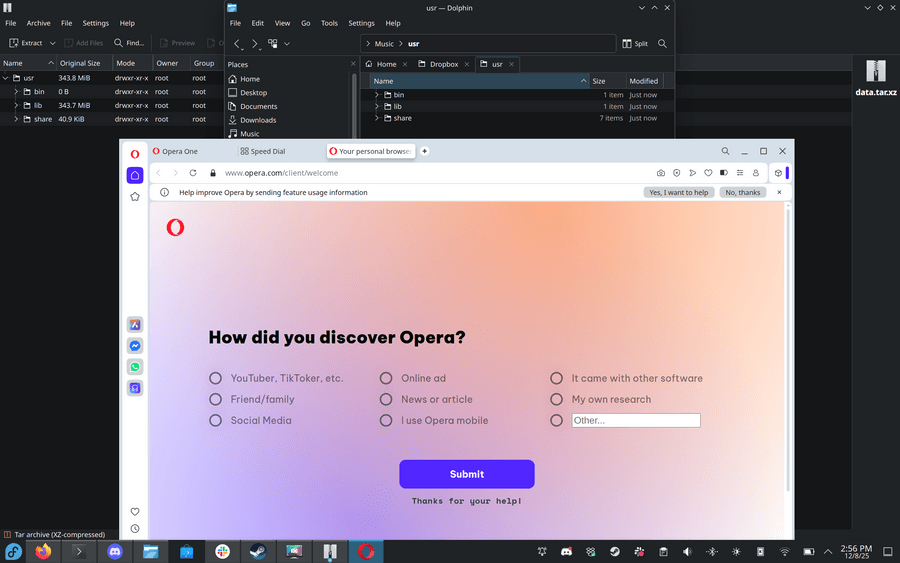
                      b1aa3cc8-0921-4b3c-a1ef-83267715f288-image.png

                      Reply Quote 0
                        1 Reply Last reply
                      • geekk
                        geekk last edited by

                        Crash is fixed for me in version 125.0.5729.21.

                        Reply Quote 1
                          kniffte 1 Reply Last reply
                        • kniffte
                          kniffte @geekk last edited by

                          @geekk yes, I tried that yesterday, too - it's working again. Thanks 🙂

                          Reply Quote 0
                            1 Reply Last reply
                          • simroux
                            simroux last edited by

                            Just to add to the list: I saw the same error with "chrome/browser/process_singleton_posix" when updating to 125.0.5729.12 on Ubuntu. I "fixed" it based on @zibi1981 suggestion above, as follows:

                            opera --ozone-platform=x11
                            

                            From my crude understanding, it would again point to wayland vs x11 issue, but anyway, just sharing in case someone else ends up here after seeing opera crash on startup in Ubuntu.

                            Reply Quote 0
                              1 Reply Last reply
                            • First post
                              Last post

                            Computer browsers

                            • Opera for Windows
                            • Opera for Mac
                            • Opera for Linux
                            • Opera beta version
                            • Opera USB

                            Mobile browsers

                            • Opera for Android
                            • Opera Mini
                            • Opera Touch
                            • Opera for basic phones

                            • Add-ons
                            • Opera account
                            • Wallpapers
                            • Opera Ads

                            • Help & support
                            • Opera blogs
                            • Opera forums
                            • Dev.Opera

                            • Security
                            • Privacy
                            • Cookies Policy
                            • EULA
                            • Terms of Service

                            • About Opera
                            • Press info
                            • Jobs
                            • Investors
                            • Become a partner
                            • Contact us

                            Follow Opera

                            • Opera - Facebook
                            • Opera - Twitter
                            • Opera - YouTube
                            • Opera - LinkedIn
                            • Opera - Instagram

                            © Opera Software 1995-