• Login
    • Search
    • Categories
    • Recent
    • Tags
    • Users
    • Groups
    • Rules
    • Help

    Do more on the web, with a fast and secure browser!

    Download Opera browser with:

    • built-in ad blocker
    • battery saver
    • free VPN
    Download Opera

    Opera not displaying Captcha

    Opera for Windows
    9
    16
    20936
    Loading More Posts
    • Oldest to Newest
    • Newest to Oldest
    • Most Votes
    Reply
    • Reply as topic
    Log in to reply
    This topic has been deleted. Only users with topic management privileges can see it.
    • commis
      commis last edited by

      I use moz with windscrib while waiting for a solution for opera

      Reply Quote 0
        1 Reply Last reply
      • mockacrot
        mockacrot @VeryOldMan1 last edited by

        @veryoldman1
        try this, coz i have same problem
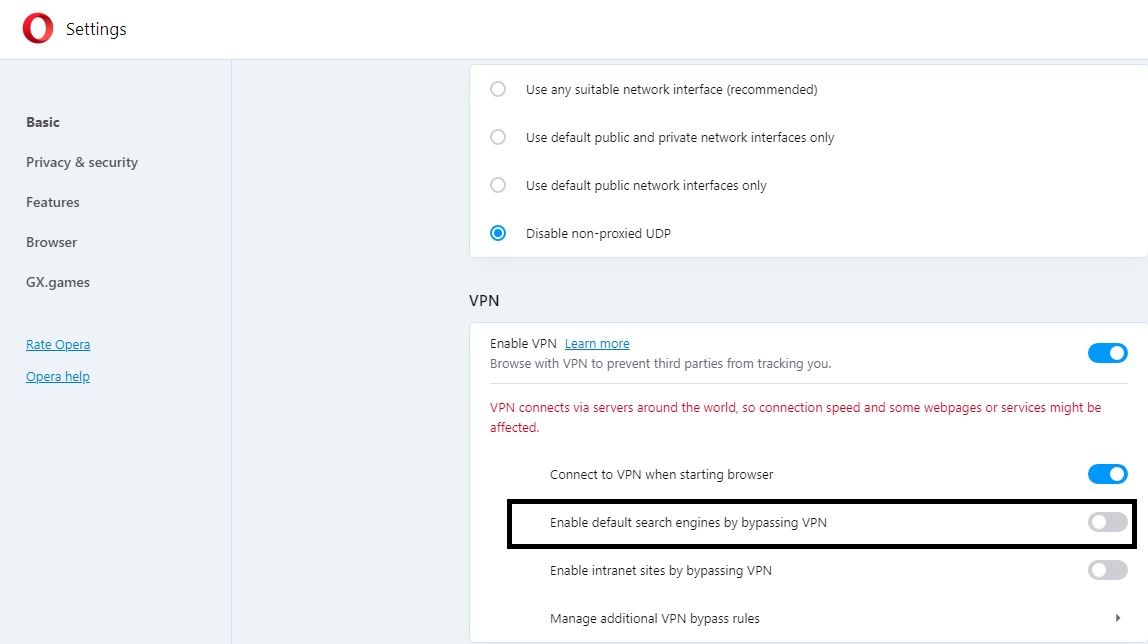
        go to setting>privacy & security>VPN>disable "enables default search engines by bypassing VPN"
        go to website with recaptcha then refresh...if still not working clear browsing data first (choose last 4 weeks or all time prefer 4 weeks) then refresh again..

        Reply Quote 5
          BrachAnders twijackgfs 2 Replies Last reply
        • VeryOldMan1
          VeryOldMan1 last edited by

          Your solution worked

          Many Thanks

          Reply Quote 1
            1 Reply Last reply
          • commis
            commis last edited by

            Good. Thk.

            Reply Quote 1
              1 Reply Last reply
            • BrachAnders
              BrachAnders @mockacrot last edited by

              @mockacrot Can't find "VPN" at the end of "settings>privacy & security>VPN>"

              Reply Quote 0
                mockacrot 1 Reply Last reply
              • VeryOldMan1
                VeryOldMan1 last edited by leocg

                @brachanders said in Opera not displaying Captcha:

                Can't find "VPN" at the end of "settings>privacy & security>VPN

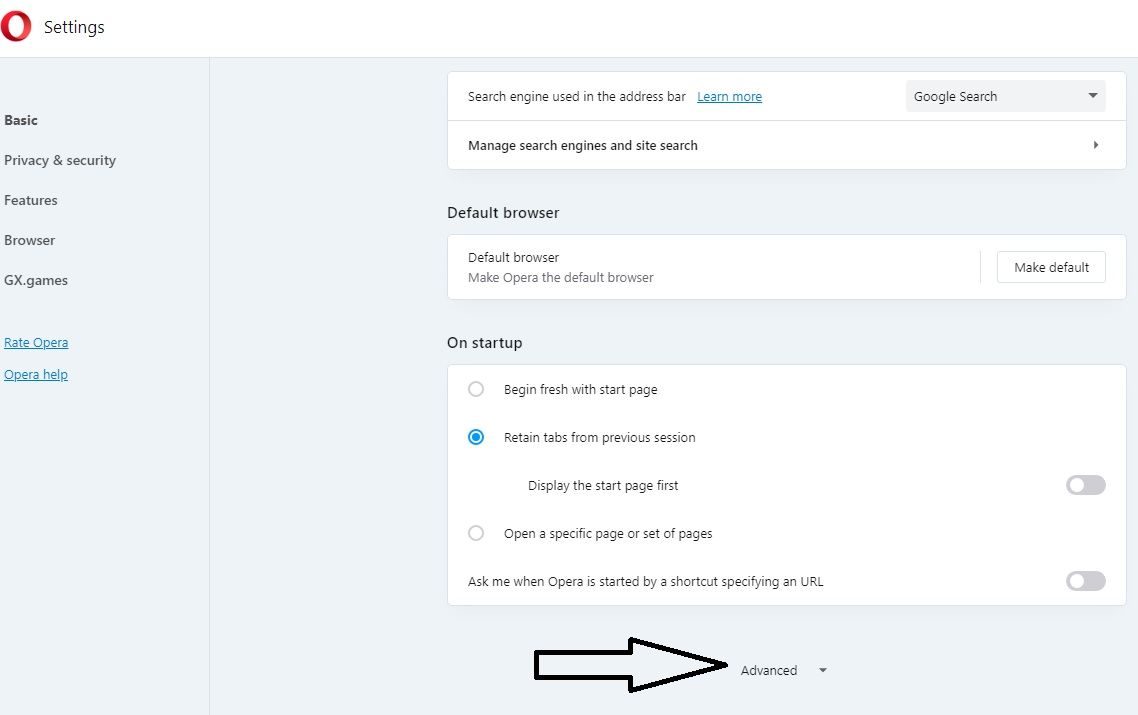
                select advanced

                settings>privacy & security> Advanced>VPN

                Reply Quote 0
                  1 Reply Last reply
                • mockacrot
                  mockacrot @BrachAnders last edited by

                  @brachanders
                  Untitled.jpg
                  Untitled1.jpg

                  Reply Quote 0
                    1 Reply Last reply
                  • JELIXUU
                    JELIXUU last edited by

                    Hey, there is some time i wanted to download a document in my computer, but in the web site it is not working. I tried on google first but someone advised me to use another navigator. I tried Opera and applied your advice but it's not working too.

                    Please i need some advice

                    thanks

                    Reply Quote 0
                      1 Reply Last reply
                    • twijackgfs
                      twijackgfs @mockacrot last edited by

                      @mockacrot it doesn't work for me anymore for some reason

                      Reply Quote 0
                        1 Reply Last reply
                      • AndyFed
                        AndyFed last edited by

                        Eh... None of the solutions here work. I'm using Opera 117.0.5408.142, the latest. I have no extensions on, no VPN (there's no VPN section in the advanced preferences at all btw), no third-party VPNs. Just an Opera and an Edge. In the Edge I can open any Cloudflare protected site. In Opera - no. Any solution? Just installed Opera after many years in Chrome and I don't really like the idea of going back,

                        Reply Quote 0
                          1 Reply Last reply
                        • cygoat
                          cygoat last edited by

                          Just had to save myself from this issue, if you can sign into ur account via phone, ipad or whatever sign in and then connect ur account through the apple, gmail or facebook social connects. Apple didnt work for me but gmail did and I am back. good luck
                          Reply Quote 0
                            1 Reply Last reply
                          • First post
                            Last post

                          Computer browsers

                          • Opera for Windows
                          • Opera for Mac
                          • Opera for Linux
                          • Opera beta version
                          • Opera USB

                          Mobile browsers

                          • Opera for Android
                          • Opera Mini
                          • Opera Touch
                          • Opera for basic phones

                          • Add-ons
                          • Opera account
                          • Wallpapers
                          • Opera Ads

                          • Help & support
                          • Opera blogs
                          • Opera forums
                          • Dev.Opera

                          • Security
                          • Privacy
                          • Cookies Policy
                          • EULA
                          • Terms of Service

                          • About Opera
                          • Press info
                          • Jobs
                          • Investors
                          • Become a partner
                          • Contact us

                          Follow Opera

                          • Opera - Facebook
                          • Opera - Twitter
                          • Opera - YouTube
                          • Opera - LinkedIn
                          • Opera - Instagram

                          © Opera Software 1995-