Video and Opera does not seem to be going good on Linux Mint
-
typeoftian last edited by
@mochica this is right.
but for some people who user some package manager such snap, flatpak, aur, yay etc. the correct directory is /usr/lib/opera.
-
A Former User last edited by
I couldn't find package that contains libffmpeg on APT repo (and I don't really trust results on internet). So I copied codium's libffmpeg into Opera's lib_extra. This routine fixed video problem for me.
-
isabella-87 Banned last edited by
Have you tried updating your codecs or switching the video renderer in Opera’s settings? Sometimes adjusting those can help improve performance. Also, checking if hardware acceleration is enabled might be worth a try. Let me know if that helps!
-
RubensMatos last edited by
@lavanyadeepak-0 The same happened to me, but after I closed Opera and run it again, everything is fine. All videos are working like a charm. thank you @mochica
-
FinnFinnigan last edited by
I ran into the same issue, so I reported it as a bug to opera and got this automated bug fix response, they must get it a lot. I haven't tried it yet but I thought that I would post in in here as another fix method:
Automation for Jira commented:
It looks like your report is connected with media issues on Linux OS.
Unfortunately, Opera .deb and .rpm versions don't support the H.264/MP4 codec natively. We recommend using snap to avoid problems with codecs.If you want to fix it manually, please try the following steps:
You should have Chromium installed on your system.Download Chromium.
Run the following command in Linux Shell:
sudo ln -s /usr/lib/chromium-browser/libs/libffmpeg.so /usr/lib/x86_64-linux-gnu/opera/lib_extra/libffmpeg.so.32
(This command links the Chromium libffmpeg.so file to Opera.)
Now restart Opera and visit this site to check if HTML5 playback works correctly.
imageThank you for helping improve Opera!
Best wishes, the Opera Desktop Team
-
Stugrue last edited by
@jito463 Yeah they can f... off its not up to me to fix their shit and I'm definitely not going to install another program Snap just so i can have 1 app
-
boriisii last edited by
libffmpeg.so from Balena Etcher Saved my OPERA!!!
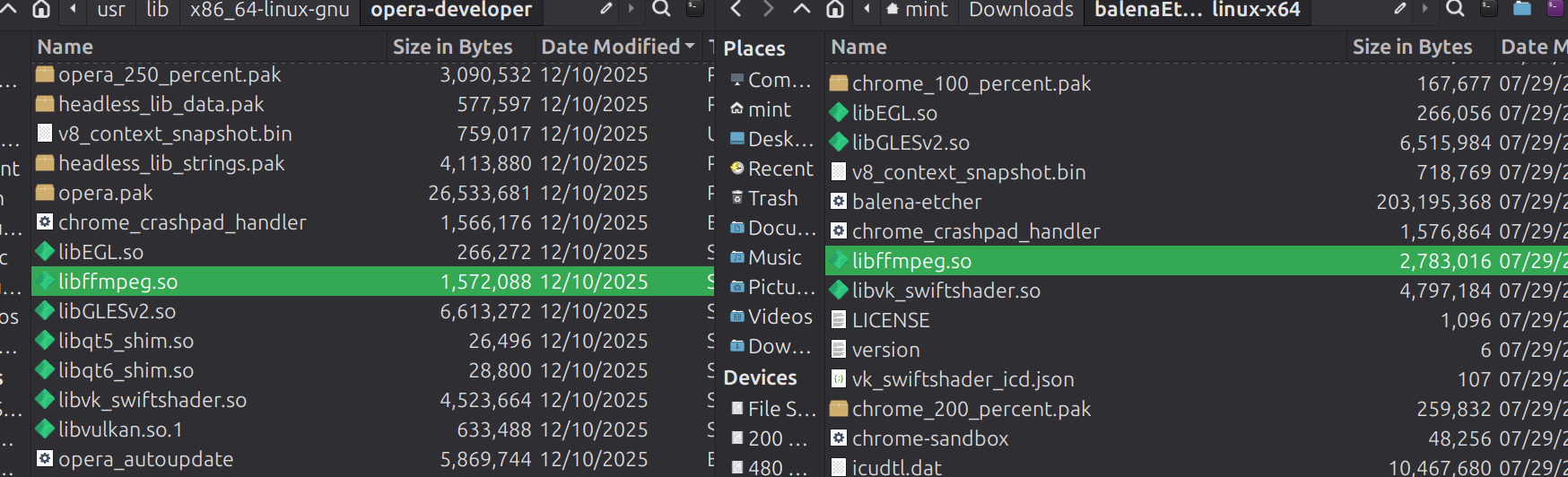
libffmpeg.so 2,783,016 07/29/25
vs
libffmpeg.so 1,572,088 12/10/2025leaving out the important part....
-
Foxbiker last edited by
Today I tried the procedure to replace the libffmpeg.so file from Chromium and it works fine. Over time only the path to the files changed. Now it is:
I deleted the libffmpeg.so file from Opera with:
sudo rm /usr/lib/x86_64-linux-gnu/opera-stable/libffmpeg.soand copied the better one from the new Chromium:
sudo ln -s /usr/lib/chromium/libffmpeg.so /usr/lib/x86_64-linux-gnu/opera-stable/libffmpeg.soThank you for this advice. I was already desperate and tried using other browsers like Firefox or Chromium, but for me Opera is the best for many practical reasons.
-
A Former User last edited by
There's a funny thing: Opera worked perfectly for me regarding playing video and then after an update, it hasn't worked anymore. "opera-stable" loll. Very stable.
Anyway, alternative way to the solution of @Foxbiker is to use libffmpeg of codium.sudo rm /usr/lib/x86_64-linux-gnu/opera-stable/libffmpeg.so sudo ln -s /usr/share/codium/libffmpeg.so /usr/lib/x86_64-linux-gnu/opera-stable/libffmpeg.so -
mochica00 last edited by
This script fix the issue of video not playing every time Opera is updated.
And it has an option to run it automatically every time the browser is updated. Works great for me. -
Referenced by S sorenfeodor
-
awesomedanger last edited by
@mochica This worked for me! I got the latest version of the linux zip, and replaced it with the command line using this:
sudo mv <new_file/file_location> <existing_file/file_location>it was slow to load in the first video, but it looks like it's just because it's the first video it's loading with the new libffmpeg.so file (Also, because of the nature of the website that is loading in this class recording).
-
kevinoperauser123 last edited by
@mochica Thank you! It worked...
 I had to download Nautilus to be able to replace that codec since admin options didn't show in file. Cheers!