• Login
    • Search
    • Categories
    • Recent
    • Tags
    • Users
    • Groups
    • Rules
    • Help

    Do more on the web, with a fast and secure browser!

    Download Opera browser with:

    • built-in ad blocker
    • battery saver
    • free VPN
    Download Opera

    Video and Opera does not seem to be going good on Linux Mint

    Opera for Linux
    27
    38
    66326
    Loading More Posts
    • Oldest to Newest
    • Newest to Oldest
    • Most Votes
    Reply
    • Reply as topic
    Log in to reply
    This topic has been deleted. Only users with topic management privileges can see it.
    • MrBaloo11
      MrBaloo11 @styen last edited by

      @styen Thank you, this solution worked excellent with Linux Mint 22.

      Reply Quote 0
        1 Reply Last reply
      • typeoftian
        typeoftian @mochica last edited by

        @mochica this is right.

        but for some people who user some package manager such snap, flatpak, aur, yay etc. the correct directory is /usr/lib/opera.

        Reply Quote 0
          1 Reply Last reply
        • DmKnght
          DmKnght last edited by

          I couldn't find package that contains libffmpeg on APT repo (and I don't really trust results on internet). So I copied codium's libffmpeg into Opera's lib_extra. This routine fixed video problem for me.

          Reply Quote 0
            1 Reply Last reply
          • isabella-87
            isabella-87 Banned last edited by

            Have you tried updating your codecs or switching the video renderer in Opera’s settings? Sometimes adjusting those can help improve performance. Also, checking if hardware acceleration is enabled might be worth a try. Let me know if that helps!

            Reply Quote 0
              1 Reply Last reply
            • RubensMatos
              RubensMatos @lavanyadeepak 0 last edited by

              @lavanyadeepak-0 The same happened to me, but after I closed Opera and run it again, everything is fine. All videos are working like a charm. thank you @mochica

              Reply Quote 0
                1 Reply Last reply
              • FinnFinnigan
                FinnFinnigan @lavanyadeepak 0 last edited by

                @lavanyadeepak-0

                I ran into the same issue, so I reported it as a bug to opera and got this automated bug fix response, they must get it a lot. I haven't tried it yet but I thought that I would post in in here as another fix method:

                Automation for Jira commented:

                It looks like your report is connected with media issues on Linux OS.
                Unfortunately, Opera .deb and .rpm versions don't support the H.264/MP4 codec natively. We recommend using snap to avoid problems with codecs.

                If you want to fix it manually, please try the following steps:
                You should have Chromium installed on your system.

                Download Chromium.
                Run the following command in Linux Shell:
                sudo ln -s /usr/lib/chromium-browser/libs/libffmpeg.so /usr/lib/x86_64-linux-gnu/opera/lib_extra/libffmpeg.so.32
                (This command links the Chromium libffmpeg.so file to Opera.)
                Now restart Opera and visit this site to check if HTML5 playback works correctly.
                image

                Thank you for helping improve Opera!

                Best wishes, the Opera Desktop Team

                Reply Quote 0
                  1 Reply Last reply
                • Stugrue
                  Stugrue @jito463 last edited by

                  @jito463 Yeah they can f... off its not up to me to fix their shit and I'm definitely not going to install another program Snap just so i can have 1 app

                  Reply Quote 0
                    1 Reply Last reply
                  • boriisii
                    boriisii last edited by

                    libffmpeg.so from Balena Etcher saved my Opera!!!!

                    Reply Quote 0
                      1 Reply Last reply
                    • boriisii
                      boriisii last edited by

                      libffmpeg.so from Balena Etcher Saved my OPERA!!!
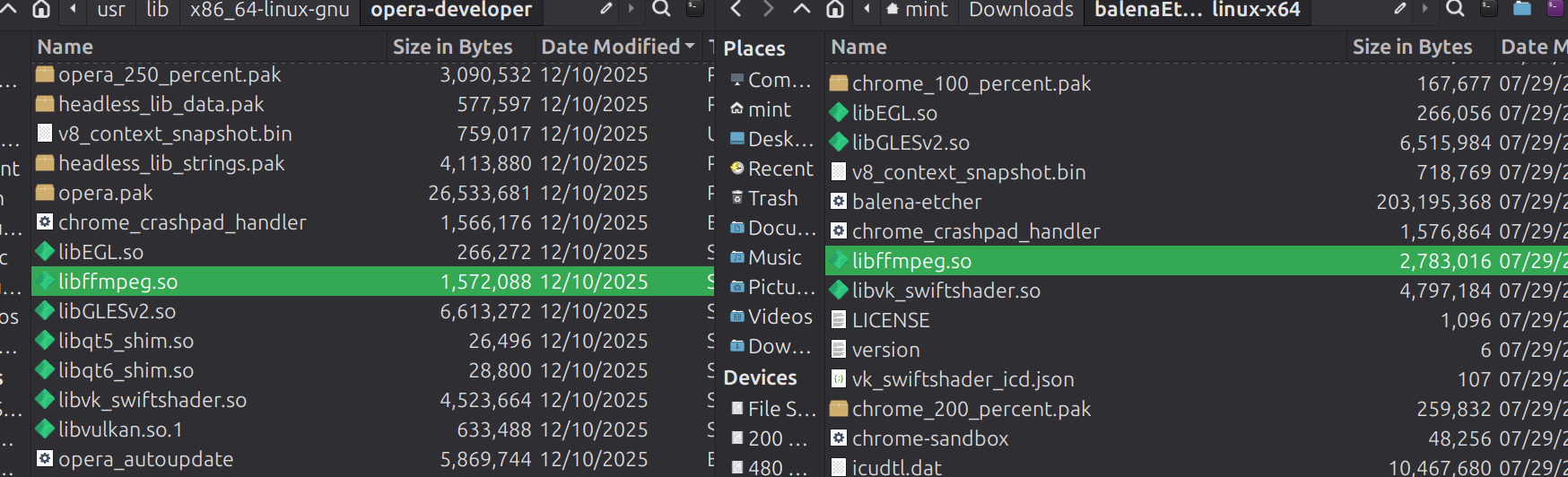
                      0b258c4f-4445-4ab1-8223-6a85063dc56d-image.png

                      libffmpeg.so 2,783,016 07/29/25
                      vs
                      libffmpeg.so 1,572,088 12/10/2025

                      leaving out the important part....

                      Reply Quote 0
                        1 Reply Last reply
                      • Foxbiker
                        Foxbiker last edited by

                        Today I tried the procedure to replace the libffmpeg.so file from Chromium and it works fine. Over time only the path to the files changed. Now it is:

                        I deleted the libffmpeg.so file from Opera with:
                        sudo rm /usr/lib/x86_64-linux-gnu/opera-stable/libffmpeg.so

                        and copied the better one from the new Chromium:
                        sudo ln -s /usr/lib/chromium/libffmpeg.so /usr/lib/x86_64-linux-gnu/opera-stable/libffmpeg.so

                        Thank you for this advice. I was already desperate and tried using other browsers like Firefox or Chromium, but for me Opera is the best for many practical reasons.

                        Reply Quote 0
                          1 Reply Last reply
                        • First post
                          Last post

                        Computer browsers

                        • Opera for Windows
                        • Opera for Mac
                        • Opera for Linux
                        • Opera beta version
                        • Opera USB

                        Mobile browsers

                        • Opera for Android
                        • Opera Mini
                        • Opera Touch
                        • Opera for basic phones

                        • Add-ons
                        • Opera account
                        • Wallpapers
                        • Opera Ads

                        • Help & support
                        • Opera blogs
                        • Opera forums
                        • Dev.Opera

                        • Security
                        • Privacy
                        • Cookies Policy
                        • EULA
                        • Terms of Service

                        • About Opera
                        • Press info
                        • Jobs
                        • Investors
                        • Become a partner
                        • Contact us

                        Follow Opera

                        • Opera - Facebook
                        • Opera - Twitter
                        • Opera - YouTube
                        • Opera - LinkedIn
                        • Opera - Instagram

                        © Opera Software 1995-