The Opera GX is slow topic
-
simplyholly last edited by
Most pages are running fine, but youtube is extremely slow. This just started for me maybe a month ago (April 2025). Anyone have any idea how to fix?
-
Levael last edited by
@simplyholly said in The Opera GX is slow topic:
Most pages are running fine, but youtube is extremely slow. This just started for me maybe a month ago (April 2025). Anyone have any idea how to fix?
Same, more that month now, literally unusable after a few hours, so laggy
-
 rastanz last edited by
Yup, I just joined the "Opera GX is slow" group.
Recent updates, Opera now takes too long to start, there's a heavy delay when opening graphics heavy pages, experiencing sluggish playback of Youtube videos 1440p and up.
What I tried:
 Disable all extensions
  Shouldn't need to...
Disable the ad-blocker Shouldn't have to...
Disable Speed Dial Shouldn't ask to...
Reset settings to default Recommended action by Moderators... Doesn't always work...
Reset flags to default Undo all customizations...
Create a clean profile folder/directory Pretty much a reset/refresh...
Adjust system settings Shouldn't need to just for a browser to work...
Uninstall Reinstall with Revo Clean install... No change of behavior...
Custom GPU profile created for Opera GX via NVIDIA Control Panel Dedicating GPU resources doesn't change a thing with Opera GX's sluggish performance...
Given up  Pretty much getting there!
Since the last 3 updates Opera's been fucked to use, forces itself to update whether or not you disable the damn thing so it's a complete waste of time and effort customizing the browser to your personal taste when the update goes and resets it all.
Installed other browsers to do a speed and stability comparison test and where Opera GX was once ahead of the rest, it now fails miserably.
Fast =
Slow = Could Do Better =  Browser loading speed test:
Opera GX- Mozilla Firefox - Edge - Vivaldi - Chrome
There's now a 5-8sec delay when loading up Opera GX's home page (set to google search with no speed dial tiles loaded). Ad-blocker test:
Opera GX- Mozilla Firefox - Edge - Vivaldi - Chrome
Upon every new update there are random intrusive adverts popping up on my start page where there once wasn't any. UI customization:
Opera GX- Mozilla Firefox - Edge - Vivaldi - Chrome
Opera has discarded all custom settings from earlier builds now limiting users to lackluster and restrictive UI templates. Youtube playback:
Opera GX- Mozilla Firefox - Edge - Vivaldi - Chrome
Enhancement now does more harm than good for both video and image media, creating over sharpening that makes videos playback sluggishly and adds a ridiculous overlay of fuzziness to images. Extensions behavior after browser updates:
Opera GX- Mozilla Firefox - Edge - Vivaldi - Chrome
There are conflicts with browser extensions that will simply no longer work after updating. Resource hog after latest browser updates:
Opera GX- Mozilla Firefox - Edge - Vivaldi - Chrome
Opera has become a resource hog, simply by starting the browser, my system resources hit the roof for a brief amount of time.I clean installed an older version of Opera GX which worked flawlessly, never experienced or had issues of any of the mentioned above, it just worked, however, it all went back to shit once it updated.
I've more or less accumulated most of the issues users are having in one post.
-
cthl last edited by
Ever since they revamped the UI into this ridiculous 'granny mode' with oversized bold 'futuristic' fonts (around 3-4 months ago) the browser has become painfully slow. It takes nearly 30 seconds just to open the sidebar or browser settings, let alone render websites properly. I finally had to uninstall it, it's absolutely trash on high-end system I bought 6 months ago.
-
rastanz last edited by
GPU upgrade WOOHOO! Nvidia 4070 Super to AMD 9070 XT, man what a card, programs run smooth as silk, gaming is fun once again without frame drops or lag... oh but wait... Opera GX still runs like shit so no change there!
-
RayMan1020 last edited by
Alriiiight. Joining the slow topic. I was perfectly fine, now opera gx is incredibly unresponsive. With it taking ages to click on something, or a page to load. Youtube has it the worst.
-
johnmubarak Banned last edited by
@leocg said in The Opera GX is slow topic:
The Opera GX is slow topic
Try clearing your cache and disabling unnecessary extensions they often slow Opera GX down. Also, check if hardware acceleration is enabled in settings; turning it off sometimes improves performance. Make sure you’re on the latest version too.
-
st4mps0s4y last edited by
For me, the new UI version is slow only when I search in a new tab — it takes around 10 seconds to load. The old version with the previous UI was fast and worked perfectly, but yesterday it suddenly crashed and wouldn’t open at all. So now I have no choice but to use the new version… honestly, so unlucky.
-
WBR511 last edited by leocg
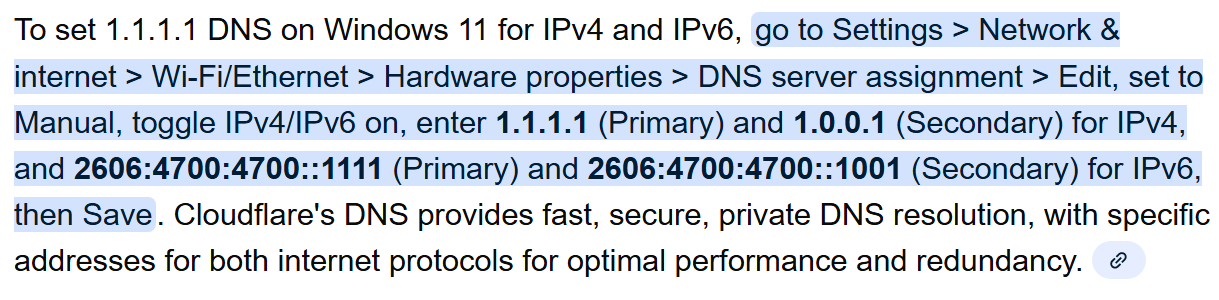
Eureka!! Hey Everyone! I just "may" have found the solution!! After trying almost every one of the recommended "fixes" for the extremely sluggish loading of pages on Opera GX, I just found out that changing my DNS settings to Cloudflare was the answer! [for me anyways; hope it is for you as well!]
Yesterday, neither CNN or Instagram would load and after just changing my DNS Servers to Cloudflare both load instantly! Even Youtube videos now load quickly and don't buffer like they did yesterday! I've attached a screenshot from a Google search on how to do it; hope it works for everyone else too!!
-
Forked by
 leocg
leocg
 Well, Vivaldi, nice to meet you!