• Login
    • Search
    • Categories
    • Recent
    • Tags
    • Users
    • Groups
    • Rules
    • Help

    Do more on the web, with a fast and secure browser!

    Download Opera browser with:

    • built-in ad blocker
    • battery saver
    • free VPN
    Download Opera

    Can't Sync the passwords

    Opera GX
    2
    2
    223
    Loading More Posts
    • Oldest to Newest
    • Newest to Oldest
    • Most Votes
    Reply
    • Reply as topic
    Log in to reply
    This topic has been deleted. Only users with topic management privileges can see it.
    • V
      VitorSisanoski last edited by

      Hello, i made an clean install of my windows 11, and now, when i installed the OperaGX, i tried to configure the app, but when i tried to sync my data and passwords, an screen opens and ask me to put my account password and when i do this, the window just close and nothing happens after. I continue recieving an error of syncronization and my passwords are unavailable.
      And Yes, my password is being typed correctly.
      I don't know what to do, i already tried to logout, close the app open and login again but didn't work. I tried clean the cache but it doesn't work too.
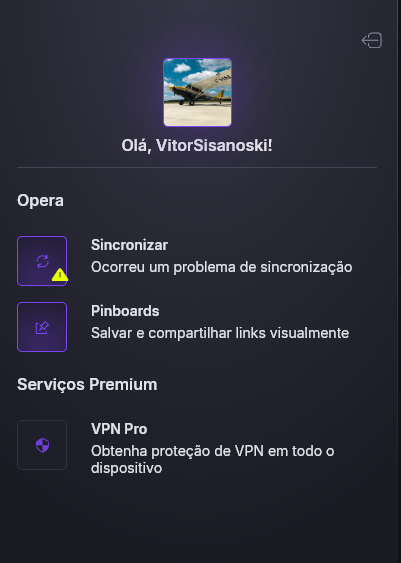
      imagem_2026-11-13_163047705.png Captura de tela 2026-11-13 162611.png

      Reply Quote 0
        J 1 Reply Last reply
      • J
        johnkimmy @VitorSisanoski last edited by

        @VitorSisanoski said in Can't Sync the passwords:

          	VitorSisanoski


          last edited by  
        
          
          	2 days ago
        

        Hello, i made an clean install of my windows 11, and now, when i installed the OperaGX, i tried to configure the app, but when i tried to sync my data and passwords, an screen opens and ask me to put my account password and when i do this, the window just close and nothing happens after. I continue recieving an error of syncronization and my passwords are unavailable.
        And Yes, my password is being typed correctly.
        I don't know what to do, i already tried to logout, close the app open and login again but didn't work. I tried clean the cache but it doesn't work too.

        This sounds like a sync issue rather than an incorrect password, especially since the login window closes without completing the process. I’d suggest checking whether Opera GX is up to date and trying the sync again after restarting the browser. It may also be worth checking whether password sync is enabled in your Opera account settings.

        Reply Quote 0
          1 Reply Last reply
        • First post
          Last post

        Computer browsers

        • Opera for Windows
        • Opera for Mac
        • Opera for Linux
        • Opera beta version
        • Opera USB

        Mobile browsers

        • Opera for Android
        • Opera Mini
        • Opera Touch
        • Opera for basic phones

        • Add-ons
        • Opera account
        • Wallpapers
        • Opera Ads

        • Help & support
        • Opera blogs
        • Opera forums
        • Dev.Opera

        • Security
        • Privacy
        • Cookies Policy
        • EULA
        • Terms of Service

        • About Opera
        • Press info
        • Jobs
        • Investors
        • Become a partner
        • Contact us

        Follow Opera

        • Opera - Facebook
        • Opera - Twitter
        • Opera - YouTube
        • Opera - LinkedIn
        • Opera - Instagram

        © Opera Software 1995-