Opera GX profile not working
-
KimKimKimKimKimplaceholder last edited by
returing for the same problem i have to open up my profile by searching opera gx and hitting said profile in the profiles and i can pin the tab but when i click on it it takes me to the normal opera GX and i cannot fix it
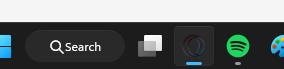
right now i cant only use a shortcut on my desktop that i cannot pin for it to work can someone tell me how to fix this
-kim -
burnout426 Volunteer last edited by
When you goto the URL
opera://settings/profilesand add a profile, a desktop shortcut should be created for that profile and you should get a Windows notification asking you if you want to pin an icon to the taskbar for the profile. If you say yes, you should get a taskbar button for just that profile where that profile's windows will only show up under that taskbar button. Same thing should happen for an existing profile if you goto the URLopera://settings/profilesin the main Opera GX profile, click the 3 dots to the right of the profile and choose "Create shortcuts".However, if you're using Windows 11 24H2 or newer, while the desktop shortcut might get created fine, you might not get a notification to pin the taskbar and the pinning of the taskbar button for that profile might never work. And, pinning that profile yourself by right-clicking the desktop shortcut and choosing "Pin to taskbar" or opening the profile, right-clicking its non-pinned taskbar button and choosing "Pin to taskbar" won't work properly as the taskbar button needs to programmtically created by Opera and allowed by Windows to properly work right. The profile's windows will probably open up under Opera's main profile's taskbar button instead.
So, if you don't like using the desktop shortcuts to open the separate profiles, you need to goto the URL
opera://settings/profilesin the main GX profile and click on the profile you want to launch it. Or, you can click Opera's menu button at the top left, goto "Profiles" and click the profile you want in the submenu to launch it. You can bookmarkopera://settings/profilesas a speed dial or a bookmark. Or, you can add it to the sidebar (see https://www.reddit.com/r/operabrowser/wiki/opera/custom_site_panels/). You can also pinopera://settings/profiles.I tested with Opera GX 136.0.6008.111 64-bit on Windows 11 and things seems to work fine (with those caveats in mind).
