• Login
    • Search
    • Categories
    • Recent
    • Tags
    • Users
    • Groups
    • Rules
    • Help

    Do more on the web, with a fast and secure browser!

    Download Opera browser with:

    • built-in ad blocker
    • battery saver
    • free VPN
    Download Opera

    [Compilation]Discussions On How To Disable Splash Screen When Opening Opera One

    General
    126
    227
    199510
    Loading More Posts
    • Oldest to Newest
    • Newest to Oldest
    • Most Votes
    Reply
    • Reply as topic
    Log in to reply
    This topic has been deleted. Only users with topic management privileges can see it.
    • L
      LucasAlmonacid last edited by

      i need to mute/disable the sound of the opera's logo when its starts , its way too loud and i cant find the options to disabled it

      Reply Quote 0
        1 Reply Last reply
      • F
        Fadeev last edited by

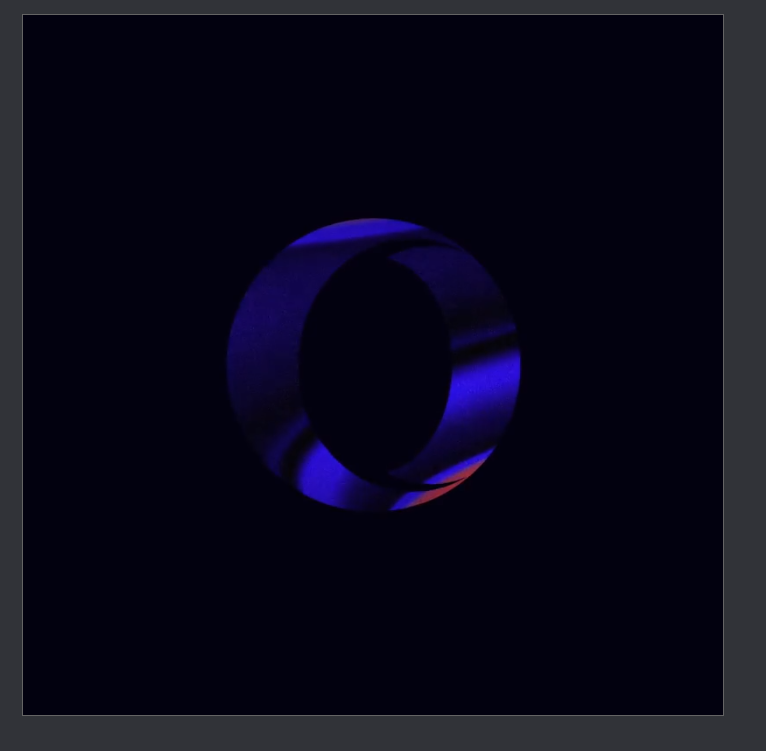
        Good afternoon, my problem is that when I click on the shortcut ( When I turn on the browser ) A square appears in the center of the screen, a logo is inside it, and a sound is also heard. And so every time you turn on the opera, how to remove it?

        Reply Quote 0
          1 Reply Last reply
        • A
          angeldust0 last edited by

          Ok this sound is getting really annoying. If it doesn't go away soon, I'll go back to Chrome, sorry!

          Reply Quote 7
            1 Reply Last reply
          • D
            dpindrus last edited by

            3294db34-f0fd-4707-b13b-d90109c61ecb-image.png
            I don't want to see this window and sound every time I open opera, How can I turn it off?

            Reply Quote 0
              1 Reply Last reply
            • S
              SKYY2K @emivy last edited by

              @emivy said in [Duplicated]I keep on getting this annoying square when opening opera:

              opera://flags/#opera-one-introduction

              i did it the square and music did not go away

              Reply Quote 2
                1 Reply Last reply
              • robinjustin
                robinjustin Banned last edited by

                Open Opera Browser: Launch the Opera browser on your computer.

                Access Settings: Click on the three vertical dots (Opera menu) located at the top-right corner of the browser window to open the menu.

                Go to Settings: Scroll down in the menu and click on "Settings."

                Set Start Page: In the "On startup" section, you'll likely see options like "Open a specific page or set of pages" selected. Change this to "Open the start page" or "Continue where you left off" to avoid the start screen.

                Save Changes: Once you've made your selection, be sure to save your changes.

                Reply Quote 0
                  T 1 Reply Last reply
                • T
                  tumblerr @robinjustin last edited by

                  @robinjustin sadly this did not work, still getting the logo and sound every time I log in

                  Reply Quote 0
                    1 Reply Last reply
                  • M
                    Magnusssss last edited by

                    This is ridiculous. No browser should have a startup sound.

                    Reply Quote 8
                      1 Reply Last reply
                    • gurbuz06
                      gurbuz06 @trifon81 last edited by

                      @trifon81 Yes you are right

                      what is this

                      Reply Quote 0
                        1 Reply Last reply
                      • Meeker-Morgan
                        Meeker-Morgan last edited by

                        Not just after an update.

                        Is there some setting to suppress this?
                        Thank you.

                        Reply Quote 0
                          Meeker-Morgan S 2 Replies Last reply
                        • Meeker-Morgan
                          Meeker-Morgan @Meeker-Morgan last edited by

                          What we have here is yet another example of sloppiness, lack of transparency, and lack of regression testing.

                          Opera didn't used to be like this, only since they recently "reinvented" it. I have come to dread every new update.

                          Because of this, I have abandoned Opera as my default browser for business, though I still like it for recreational purposes. But the new annoyances keep accumulating.

                          Reply Quote 1
                            1 Reply Last reply
                          • R
                            remmachine last edited by

                            This keeps happening to me, this annoying sound keeps popping up every time I open opera.

                            Reply Quote 0
                              1 Reply Last reply
                            • D
                              Dwied last edited by

                              I'm writting about this "o" appearing, when I'm opening classical opera. How to turn it off? Where's the right button?

                              Reply Quote 2
                                E 1 Reply Last reply
                              • S
                                slewantoski last edited by

                                Hi, since the last Update this splash screen starts everytime. Even if the browser is already open an you simply try to open a .html file from Windows Explorer.

                                I'v resolved this by renaming the file opera_gx_splash.exe in the Opera folder. Now i can use the browser without this useless splash screen.

                                Reply Quote 3
                                  1 Reply Last reply
                                • E
                                  Em99 @Dwied last edited by

                                  please!!!!, I want the same here.
                                  so annoying

                                  Reply Quote 0
                                    ? 1 Reply Last reply
                                  • S
                                    steve1376 @leocg last edited by

                                    @leocg
                                    the splash screen was driving me mad but have found a way around it
                                    go into program files search for opera inside find the launcher .exe
                                    save to desktop as a short cut use it to the open browser and there will be no more annoying noisy splash screen

                                    Reply Quote 1
                                      1 Reply Last reply
                                    • S
                                      steve1376 @Meeker-Morgan last edited by

                                      @meeker-morgan
                                      got to cdrive program settings inside the opera folder
                                      find the launcher.exe right click save as desktop shortcut use this to open the browser and the splash screen is no more an annoyance

                                      Reply Quote 0
                                        1 Reply Last reply
                                      • W
                                        Warow last edited by

                                        Hi,

                                        I recently installed Opera everything works perfectly.

                                        There is one issue though, whenever I close it and I open a new Tab a music and the Opera logo appears, it's really annoying I tried looking through the settings but coudn't find anything .. Does anyone have the same issue ?

                                        Reply Quote 0
                                          1 Reply Last reply
                                        • B
                                          BantuBob last edited by

                                          You can disable this sound in Opera one but it is not that straight forward and might be undone with an update but I am not sure if it will.
                                          Follow these steps:

                                          • Press the windows key
                                          • Search Opera and right click
                                          • Open the file directory, do this twice to go to the Opera files
                                          • While being in this folder search for: splash
                                          • Delete or move the following file to another folder: opera_gx_splash

                                          Good luck, hope this also works for you guys!
                                          Bob

                                          Reply Quote 10
                                            D S cplescafotograf H I 5 Replies Last reply
                                          • D
                                            Dinasu @BantuBob last edited by

                                            @bantubob Thank you, it has worked !! : )

                                            Reply Quote 4
                                              1 Reply Last reply
                                            • First post
                                              Last post

                                            Computer browsers

                                            • Opera for Windows
                                            • Opera for Mac
                                            • Opera for Linux
                                            • Opera beta version
                                            • Opera USB

                                            Mobile browsers

                                            • Opera for Android
                                            • Opera Mini
                                            • Opera Touch
                                            • Opera for basic phones

                                            • Add-ons
                                            • Opera account
                                            • Wallpapers
                                            • Opera Ads

                                            • Help & support
                                            • Opera blogs
                                            • Opera forums
                                            • Dev.Opera

                                            • Security
                                            • Privacy
                                            • Cookies Policy
                                            • EULA
                                            • Terms of Service

                                            • About Opera
                                            • Press info
                                            • Jobs
                                            • Investors
                                            • Become a partner
                                            • Contact us

                                            Follow Opera

                                            • Opera - Facebook
                                            • Opera - Twitter
                                            • Opera - YouTube
                                            • Opera - LinkedIn
                                            • Opera - Instagram

                                            © Opera Software 1995-