UI Font Size on Linux
-
rakeshsingh last edited by
Hi,
Thanks again to the developers for creating a Linux version of Opera GX.
It has been running fine on my system, but was wondering if there was any way to increase the UI font size?
Firefox is fine, but Chrome based browsers are a bit small for my eyesight. I could change the UI size on Vivaldi to about 120% to match Firefox.Thanks
Firefox:
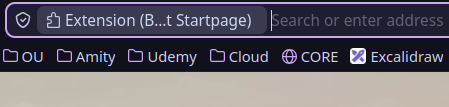
Opera GX:

-
rakeshsingh last edited by
@rakeshsingh Resolved with "--force-device-scale-factor=1.25"
I map Super+O in XFCE to launch /usr/bin/opera-gx --force-device-scale-factor=1.25Not recommended, but I also changed the shortcut.
bat /usr/share/applications/opera-gx.desktop
─────┬─────────────────────────────────────────────────────────────────────────────────────────────────────────────────────────────────────────────────────────────────────────────────────────────────────────────
     │ File: /usr/share/applications/opera-gx.desktop
─────┼─────────────────────────────────────────────────────────────────────────────────────────────────────────────────────────────────────────────────────────────────────────────────────────────────────────────
   1 │ [Desktop Entry]
   2 │ Version=1.0
   3 │ Name=Opera GX
   4 │ GenericName=Web browser
   5 │ Comment=Fast and secure web browser
   6 │ TryExec=opera-gx
   7 │ Exec=opera-gx --force-device-scale-factor=1.25 %U
   8 │ Terminal=false
   9 │ Icon=opera-gx
  10 │ Type=Application
  11 │ Categories=Network;WebBrowser;
  12 │ MimeType=text/html;text/xml;application/xhtml_xml;x-scheme-handler/http;x-scheme-handler/https;x-scheme-handler/ftp;application/x-opera-download;
  13 │ Actions=new-window;new-private-window;
  14 │ StartupWMClass=Opera GX
  15 │
  16 │ [Desktop Action new-window]
  17 │ Name=New Window
  18 │ Exec=opera-gx --force-device-scale-factor=1.25 --new-window
  19 │ TargetEnvironment=Unity
  20 │
  21 │ [Desktop Action new-private-window]
  22 │ Name=New Private Window
  23 │ Exec=opera-gx --force-device-scale-factor=1.25 --incognito
  24 │ TargetEnvironment=Unity