<title>
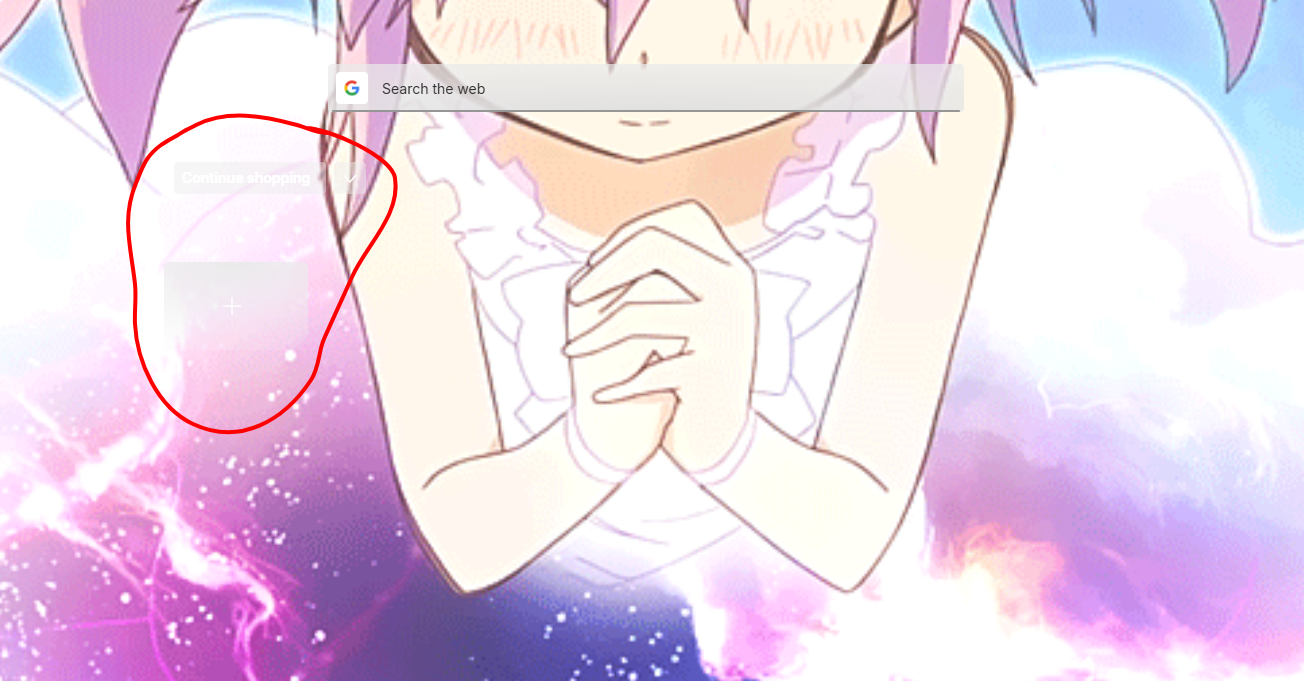
<![CDATA[ How to remove continue shopping and add a site? ]]>
</title>
<description>
<![CDATA[ <p dir="auto">I have had them gone for so long but after the new update they appeared again. I figured it was no big deal and went to settings but its all different and I cannot find out how to get rid of them. Could anyone help? ^^<img src="/assets/uploads/files/1745717174043-opera-snapshot_2025-04-26_202209_opera.png" alt="Opera Snapshot_2025-04-26_202209_opera.png" class=" img-responsive img-markdown" /></p>
]]>
</description>
<link>https://forums.opera.com/topic/84403/how-to-remove-continue-shopping-and-add-a-site</link>
<generator>RSS for Node</generator>
<lastBuildDate>Sun, 20 Jul 2025 04:38:25 GMT</lastBuildDate>
<atom:link href="https://forums.opera.com/topic/84403.rss" rel="self" type="application/rss+xml"/>
<pubDate>Sun, 27 Apr 2025 01:26:35 GMT</pubDate>
<ttl>60</ttl>
<item>
<title>
<![CDATA[ Reply to How to remove continue shopping and add a site? on Tue, 29 Apr 2025 17:09:47 GMT ]]>
</title>
<description>
<![CDATA[ <p dir="auto"><a class="plugin-mentions-user plugin-mentions-a" href="https://forums.opera.com/uid/965045">@keddymono</a> They should be enabled, disabling them will make both speed dial and the add a page button to show up.</p>
<p dir="auto">So both Hide Speed Dial and Hide "Add a site" should be turned on for them to not be visible.</p>
]]>
</description>
<link>https://forums.opera.com/post/383670</link>
<guid isPermaLink="true">https://forums.opera.com/post/383670</guid>
<dc:creator>
...</dc:creator>
<pubDate>Tue, 29 Apr 2025 17:09:47 GMT</pubDate>
</item>
<item>
<title>
<![CDATA[ Reply to How to remove continue shopping and add a site? on Tue, 29 Apr 2025 15:29:06 GMT ]]>
</title>
<description>
<![CDATA[ <p dir="auto"><a class="plugin-mentions-user plugin-mentions-a" href="https://forums.opera.com/uid/64">@sgunhouse</a> Yes they were all disabled. I actually just decided to delete and redownload opera. I suppose something went wrong when updating because once I redownloaded it everything was fine. Thank you for your help! ^^</p>
]]>
</description>
<link>https://forums.opera.com/post/383664</link>
<guid isPermaLink="true">https://forums.opera.com/post/383664</guid>
<dc:creator>
...</dc:creator>
<pubDate>Tue, 29 Apr 2025 15:29:06 GMT</pubDate>
</item>
<item>
<title>
<![CDATA[ Reply to How to remove continue shopping and add a site? on Tue, 29 Apr 2025 07:16:19 GMT ]]>
</title>
<description>
<![CDATA[ <p dir="auto"><a class="plugin-mentions-user plugin-mentions-a" href="https://forums.opera.com/uid/965045">@keddymono</a> I don't see Continue shopping here, though then again GX isn't my main version - I use Opera One - and thus even though it was still enabled there was nothing to see. Not sure, then ...</p>
<p dir="auto">There is both Hide Speed Dial and Hide Add Site options in Settings, you have both disabled?</p>
]]>
</description>
<link>https://forums.opera.com/post/383617</link>
<guid isPermaLink="true">https://forums.opera.com/post/383617</guid>
<dc:creator>
...</dc:creator>
<pubDate>Tue, 29 Apr 2025 07:16:19 GMT</pubDate>
</item>
<item>
<title>
<![CDATA[ Reply to How to remove continue shopping and add a site? on Tue, 29 Apr 2025 01:08:57 GMT ]]>
</title>
<description>
<![CDATA[ <p dir="auto"><a class="plugin-mentions-user plugin-mentions-a" href="https://forums.opera.com/uid/64">@sgunhouse</a> Sorry for the late reply but it is GX!! ^^</p>
]]>
</description>
<link>https://forums.opera.com/post/383608</link>
<guid isPermaLink="true">https://forums.opera.com/post/383608</guid>
<dc:creator>
...</dc:creator>
<pubDate>Tue, 29 Apr 2025 01:08:57 GMT</pubDate>
</item>
<item>
<title>
<![CDATA[ Reply to How to remove continue shopping and add a site? on Sun, 27 Apr 2025 22:00:35 GMT ]]>
</title>
<description>
<![CDATA[ <p dir="auto"><a class="plugin-mentions-user plugin-mentions-a" href="https://forums.opera.com/uid/965045">@keddymono</a> Which version of Opera? I'm sure from the screenshot it isn't Air, but it could be either One (regular Opera) or GX. Actually I'd guess GX from the almost transparency, but I could be wrong ...</p>
]]>
</description>
<link>https://forums.opera.com/post/383508</link>
<guid isPermaLink="true">https://forums.opera.com/post/383508</guid>
<dc:creator>
...</dc:creator>
<pubDate>Sun, 27 Apr 2025 22:00:35 GMT</pubDate>
</item>
<item>
<title>
<![CDATA[ Reply to How to remove continue shopping and add a site? on Sun, 27 Apr 2025 20:53:50 GMT ]]>
</title>
<description>
<![CDATA[ <p dir="auto"><a class="plugin-mentions-user plugin-mentions-a" href="https://forums.opera.com/uid/64">@sgunhouse</a> I have all of it on/off accordingly :(( they are still there. Should I try deleting and redownloading opera? I'm holding off because it would be a hassle lol</p>
]]>
</description>
<link>https://forums.opera.com/post/383506</link>
<guid isPermaLink="true">https://forums.opera.com/post/383506</guid>
<dc:creator>
...</dc:creator>
<pubDate>Sun, 27 Apr 2025 20:53:50 GMT</pubDate>
</item>
<item>
<title>
<![CDATA[ Reply to How to remove continue shopping and add a site? on Sun, 27 Apr 2025 03:57:29 GMT ]]>
</title>
<description>
<![CDATA[ <p dir="auto"><a class="plugin-mentions-user plugin-mentions-a" href="https://forums.opera.com/uid/965045">@keddymono</a> There is an option in Settings to hide Continue Shopping, does it not work? Likewise there is an option to hide the speed dial section, I would expect that to hide the Add a site button.</p>
]]>
</description>
<link>https://forums.opera.com/post/383455</link>
<guid isPermaLink="true">https://forums.opera.com/post/383455</guid>
<dc:creator>
...</dc:creator>
<pubDate>Sun, 27 Apr 2025 03:57:29 GMT</pubDate>
</item>
 ]]>
]]>