<title>
<![CDATA[ YouTube "blinks" for half-a-second. ]]>
</title>
<description>
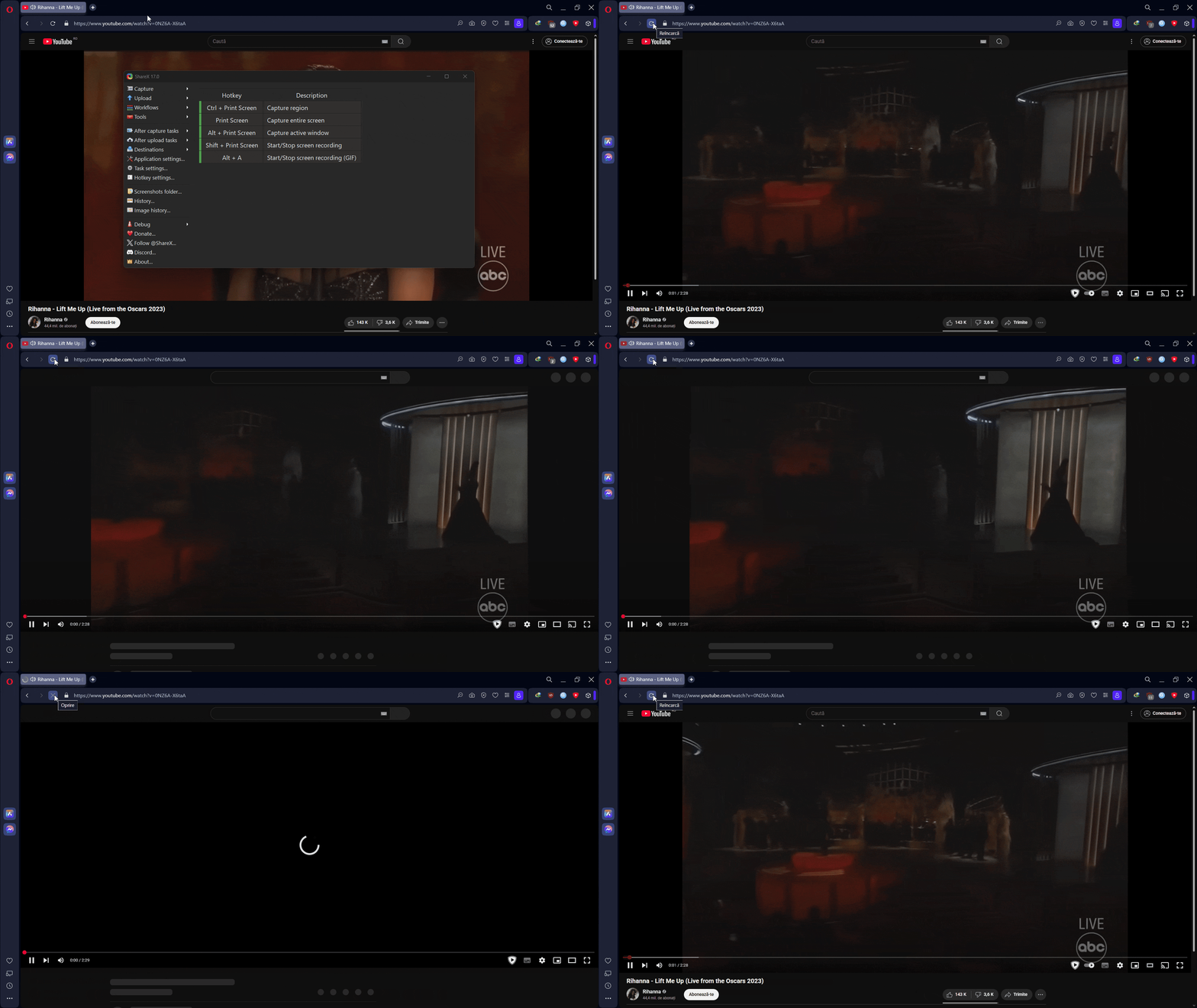
<![CDATA[ <p dir="auto">In the gif below you can notice that after the YouTube site loads the video, there is a very short "blinking" happening.<br />
<img src="https://files.catbox.moe/wh0j7i.gif" alt="alt text" class=" img-responsive img-markdown" width="1920" height="1078" /><br />
Any fix?</p>
]]>
</description>
<link>https://forums.opera.com/topic/84320/youtube-blinks-for-half-a-second</link>
<generator>RSS for Node</generator>
<lastBuildDate>Sun, 11 May 2025 01:07:40 GMT</lastBuildDate>
<atom:link href="https://forums.opera.com/topic/84320.rss" rel="self" type="application/rss+xml"/>
<pubDate>Mon, 21 Apr 2025 19:27:42 GMT</pubDate>
<ttl>60</ttl>
<item>
<title>
<![CDATA[ Reply to YouTube "blinks" for half-a-second. on Sat, 10 May 2025 11:58:37 GMT ]]>
</title>
<description>
<![CDATA[ <p dir="auto">Found a fix: delete all of YouTube's website data in Opera's settings.</p>
]]>
</description>
<link>https://forums.opera.com/post/384525</link>
<guid isPermaLink="true">https://forums.opera.com/post/384525</guid>
<dc:creator>
...</dc:creator>
<pubDate>Sat, 10 May 2025 11:58:37 GMT</pubDate>
</item>
<item>
<title>
<![CDATA[ Reply to YouTube "blinks" for half-a-second. on Sat, 26 Apr 2025 09:50:51 GMT ]]>
</title>
<description>
<![CDATA[ <p dir="auto">I also tried with incognito windows, and when using one the issue disappears, so it occurs only on normal tabs, when not logged in.</p>
]]>
</description>
<link>https://forums.opera.com/post/383401</link>
<guid isPermaLink="true">https://forums.opera.com/post/383401</guid>
<dc:creator>
...</dc:creator>
<pubDate>Sat, 26 Apr 2025 09:50:51 GMT</pubDate>
</item>
<item>
<title>
<![CDATA[ Reply to YouTube "blinks" for half-a-second. on Sat, 26 Apr 2025 07:54:03 GMT ]]>
</title>
<description>
<![CDATA[ <p dir="auto">I notice that, now the blinking occurs only when logged out of YouTube.</p>
<p dir="auto">If I use an account, the blinking disappears.</p>
]]>
</description>
<link>https://forums.opera.com/post/383400</link>
<guid isPermaLink="true">https://forums.opera.com/post/383400</guid>
<dc:creator>
...</dc:creator>
<pubDate>Sat, 26 Apr 2025 07:54:03 GMT</pubDate>
</item>
<item>
<title>
<![CDATA[ Reply to YouTube "blinks" for half-a-second. on Fri, 25 Apr 2025 20:41:13 GMT ]]>
</title>
<description>
<![CDATA[ <p dir="auto">It happens again now, for the last two days the issue disappeared by itself...</p>
]]>
</description>
<link>https://forums.opera.com/post/383367</link>
<guid isPermaLink="true">https://forums.opera.com/post/383367</guid>
<dc:creator>
...</dc:creator>
<pubDate>Fri, 25 Apr 2025 20:41:13 GMT</pubDate>
</item>
<item>
<title>
<![CDATA[ Reply to YouTube "blinks" for half-a-second. on Wed, 23 Apr 2025 15:03:59 GMT ]]>
</title>
<description>
<![CDATA[ <p dir="auto"><a class="plugin-mentions-user plugin-mentions-a" href="https://forums.opera.com/uid/122">@burnout426</a> I tried that but the Opera's UI is very very slow and bugged.</p>
<p dir="auto">I reverted back to the default setting, because of that.</p>
]]>
</description>
<link>https://forums.opera.com/post/383173</link>
<guid isPermaLink="true">https://forums.opera.com/post/383173</guid>
<dc:creator>
...</dc:creator>
<pubDate>Wed, 23 Apr 2025 15:03:59 GMT</pubDate>
</item>
<item>
<title>
<![CDATA[ Reply to YouTube "blinks" for half-a-second. on Wed, 23 Apr 2025 15:00:33 GMT ]]>
</title>
<description>
<![CDATA[ <p dir="auto">Not seeing that issue in Opera 118.0.5461.60 64-bit on Windows 11 23H2, for what it's worth.</p>
<p dir="auto">In addition to making sure Opera is using the GPU that you want, you might need to <a href="https://www.reddit.com/r/operabrowser/wiki/opera/known_issues/#wiki_opera_on_windows_is_slow" target="_blank" rel="noopener noreferrer nofollow ugc">adjust the Angle flag for your GPU</a>. (Scroll down to the "Opera on Windows Is Slow" section if it doesn't jump automatically. Reddit might might have a bug at the moment with that.)</p>
]]>
</description>
<link>https://forums.opera.com/post/383172</link>
<guid isPermaLink="true">https://forums.opera.com/post/383172</guid>
<dc:creator>
...</dc:creator>
<pubDate>Wed, 23 Apr 2025 15:00:33 GMT</pubDate>
</item>
<item>
<title>
<![CDATA[ Reply to YouTube "blinks" for half-a-second. on Tue, 22 Apr 2025 16:51:34 GMT ]]>
</title>
<description>
<![CDATA[ <p dir="auto">I had similar YouTube flickering in Opera and switching to integrated graphics instead of discrete helped</p>
]]>
</description>
<link>https://forums.opera.com/post/383068</link>
<guid isPermaLink="true">https://forums.opera.com/post/383068</guid>
<dc:creator>
...</dc:creator>
<pubDate>Tue, 22 Apr 2025 16:51:34 GMT</pubDate>
</item>
<item>
<title>
<![CDATA[ Reply to YouTube "blinks" for half-a-second. on Tue, 22 Apr 2025 16:45:28 GMT ]]>
</title>
<description>
<![CDATA[ <p dir="auto">It doesn't fix anything.</p>
]]>
</description>
<link>https://forums.opera.com/post/383067</link>
<guid isPermaLink="true">https://forums.opera.com/post/383067</guid>
<dc:creator>
...</dc:creator>
<pubDate>Tue, 22 Apr 2025 16:45:28 GMT</pubDate>
</item>
<item>
<title>
<![CDATA[ Reply to YouTube "blinks" for half-a-second. on Tue, 22 Apr 2025 16:23:50 GMT ]]>
</title>
<description>
<![CDATA[ <p dir="auto"><a class="plugin-mentions-user plugin-mentions-a" href="https://forums.opera.com/uid/912418">@pilis00</a> said in <a href="/post/383057">YouTube "blinks" for half-a-second.</a>:</p>
<blockquote>
<p dir="auto">Laptop</p>
</blockquote>
<p dir="auto">go to <code>settings win 11 - system - display - graphics</code> and select not high-performance 3060ti, but energy-efficient integrated graphics for processing the Opera application</p>
]]>
</description>
<link>https://forums.opera.com/post/383066</link>
<guid isPermaLink="true">https://forums.opera.com/post/383066</guid>
<dc:creator>
...</dc:creator>
<pubDate>Tue, 22 Apr 2025 16:23:50 GMT</pubDate>
</item>
<item>
<title>
<![CDATA[ Reply to YouTube "blinks" for half-a-second. on Tue, 22 Apr 2025 12:23:15 GMT ]]>
</title>
<description>
<![CDATA[ <p dir="auto">Laptop.</p>
<p dir="auto">My specs:</p>
<pre><code>NVIDIA System Information report created on: 04/17/2025 20:34:27
System name: DESKTOP-QHIIVN7
[Display]
DirectX version: 12.0
GPU processor: NVIDIA GeForce RTX 3070 Ti Laptop GPU
Driver version: 576.02
Driver Type: DCH
Direct3D feature level: 12_1
CUDA Cores: 5888
Max-Q Technologies Yes
Dynamic Boost Yes
WhisperMode Yes
Advanced Optimus No
Maximum Graphics Power 150 W
Core clock: 1410 MHz
Memory data rate: 14.00 Gbps
Memory interface: 256-bit
Memory bandwidth: 448.06 GB/s
Total available graphics memory: 15202 MB
Dedicated video memory: 8192 MB GDDR6
System video memory: 0 MB
Shared system memory: 7010 MB
Video BIOS version: 94.04.7F.40.12
IRQ: Not used
Bus: PCI Express x8 Gen4
Device Id: 10DE 24A0 159E1025
Part Number: 4735 0010
[Components]
nvui.dll 8.17.15.7602 NVIDIA User Experience Driver Component
nvxdplcy.dll 8.17.15.7602 NVIDIA User Experience Driver Component
nvxdbat.dll 8.17.15.7602 NVIDIA User Experience Driver Component
nvxdapix.dll 8.17.15.7602 NVIDIA User Experience Driver Component
NVCPL.DLL 8.17.15.7602 NVIDIA User Experience Driver Component
nvCplUIR.dll 8.1.940.0 NVIDIA Control Panel
nvCplUI.exe 8.1.940.0 NVIDIA Control Panel
nvWSSR.dll 32.0.15.7602 NVIDIA Workstation Server
nvWSS.dll 32.0.15.7602 NVIDIA Workstation Server
nvViTvSR.dll 32.0.15.7602 NVIDIA Video Server
nvViTvS.dll 32.0.15.7602 NVIDIA Video Server
nvLicensingS.dll 6.14.15.7602 NVIDIA Licensing Server
nvDevToolSR.dll 32.0.15.7602 NVIDIA Licensing Server
nvDevToolS.dll 32.0.15.7602 NVIDIA 3D Settings Server
nvDispSR.dll 32.0.15.7602 NVIDIA Display Server
nvDispS.dll 32.0.15.7602 NVIDIA Display Server
PhysX 09.23.1019 NVIDIA PhysX
NVCUDA64.DLL 32.0.15.7602 NVIDIA CUDA 12.9.40 driver
nvGameSR.dll 32.0.15.7602 NVIDIA 3D Settings Server
nvGameS.dll 32.0.15.7602 NVIDIA 3D Settings Server
</code></pre>
<pre><code>Edition Windows 11 IoT Enterprise LTSC
Version 24H2
Installed on 4/5/2025
OS build 26100.3775
Experience Windows Feature Experience Pack 1000.26100.66.0
</code></pre>
<pre><code>Device name DESKTOP-
Processor AMD Ryzen 7 6800H with Radeon Graphics 3.20 GHz
Installed RAM 16.0 GB (13.7 GB usable)
Device ID 3D98A223-2F8E-4747-9F40-A708F7D04725
Product ID 00484-50000-00000-AA724
System type 64-bit operating system, x64-based processor
Pen and touch No pen or touch input is available for this display
</code></pre>
]]>
</description>
<link>https://forums.opera.com/post/383057</link>
<guid isPermaLink="true">https://forums.opera.com/post/383057</guid>
<dc:creator>
...</dc:creator>
<pubDate>Tue, 22 Apr 2025 12:23:15 GMT</pubDate>
</item>
<item>
<title>
<![CDATA[ Reply to YouTube "blinks" for half-a-second. on Tue, 22 Apr 2025 12:06:56 GMT ]]>
</title>
<description>
<![CDATA[ <p dir="auto"><a class="plugin-mentions-user plugin-mentions-a" href="https://forums.opera.com/uid/912418">@pilis00</a> does this problem occur on a laptop or pc?</p>
]]>
</description>
<link>https://forums.opera.com/post/383056</link>
<guid isPermaLink="true">https://forums.opera.com/post/383056</guid>
<dc:creator>
...</dc:creator>
<pubDate>Tue, 22 Apr 2025 12:06:56 GMT</pubDate>
</item>
<item>
<title>
<![CDATA[ Reply to YouTube "blinks" for half-a-second. on Tue, 22 Apr 2025 11:02:48 GMT ]]>
</title>
<description>
<![CDATA[ <p dir="auto"><a class="plugin-mentions-user plugin-mentions-a" href="https://forums.opera.com/uid/411784">@tastodd</a> Yes.</p>
]]>
</description>
<link>https://forums.opera.com/post/383049</link>
<guid isPermaLink="true">https://forums.opera.com/post/383049</guid>
<dc:creator>
...</dc:creator>
<pubDate>Tue, 22 Apr 2025 11:02:48 GMT</pubDate>
</item>
<item>
<title>
<![CDATA[ Reply to YouTube "blinks" for half-a-second. on Tue, 22 Apr 2025 10:52:10 GMT ]]>
</title>
<description>
<![CDATA[ <p dir="auto"><a class="plugin-mentions-user plugin-mentions-a" href="https://forums.opera.com/uid/912418">@pilis00</a> Do you have integrated and discrete graphics?</p>
]]>
</description>
<link>https://forums.opera.com/post/383047</link>
<guid isPermaLink="true">https://forums.opera.com/post/383047</guid>
<dc:creator>
...</dc:creator>
<pubDate>Tue, 22 Apr 2025 10:52:10 GMT</pubDate>
</item>
<item>
<title>
<![CDATA[ Reply to YouTube "blinks" for half-a-second. on Tue, 22 Apr 2025 08:52:22 GMT ]]>
</title>
<description>
<![CDATA[ <p dir="auto"><a class="plugin-mentions-user plugin-mentions-a" href="https://forums.opera.com/uid/833252">@CipherSeeker66</a> in my case it happens no matter where is the mouse positioned.</p>
]]>
</description>
<link>https://forums.opera.com/post/383025</link>
<guid isPermaLink="true">https://forums.opera.com/post/383025</guid>
<dc:creator>
...</dc:creator>
<pubDate>Tue, 22 Apr 2025 08:52:22 GMT</pubDate>
</item>
<item>
<title>
<![CDATA[ Reply to YouTube "blinks" for half-a-second. on Tue, 22 Apr 2025 08:30:23 GMT ]]>
</title>
<description>
<![CDATA[ <p dir="auto">Yes, I'm experiencing the same issue. It's been happening since the first time i use Opera, particularly when the mouse pointer hovers over videos, whether they're shorts or regular videos</p>
]]>
</description>
<link>https://forums.opera.com/post/383023</link>
<guid isPermaLink="true">https://forums.opera.com/post/383023</guid>
<dc:creator>
<![CDATA[ CipherSeeker66 ]]>
</dc:creator>
<pubDate>Tue, 22 Apr 2025 08:30:23 GMT</pubDate>
</item>