<title>
<![CDATA[ Opera Air high ram usage ]]>
</title>
<description>
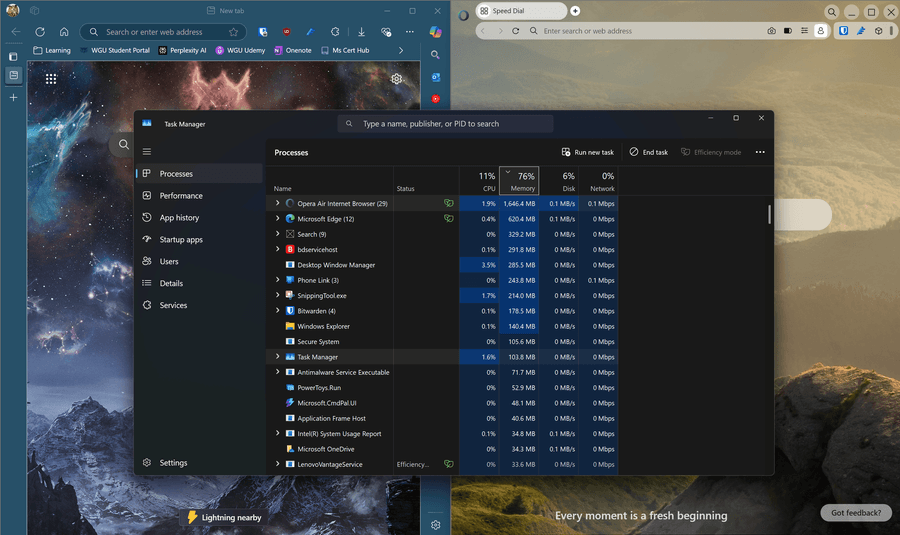
<![CDATA[ <p dir="auto"><img src="/assets/uploads/files/1743472172734-image_2025-03-31_214839268-resized.png" alt="image_2025-03-31_214839268.png" class=" img-responsive img-markdown" /></p>
<p dir="auto">I'm having an issue on a new laptop that I just purchased. Laptop is the Lenovo Yoga Slim 7i Aura w/ Ultra core i7 256v, 16gb ram.</p>
<p dir="auto">Im seeing very high Ram usage on Opera Air compared to Edge. I have included a side by side screenshot for comparison. Both have the same extensions installed and have no tabs open. As you can see from the task Manager Opera is using about 1.6gb of ram at idle where edge only uses around 500mb.</p>
<p dir="auto">This is a clean install of opera with my bookmarks synced from edge.</p>
]]>
</description>
<link>https://forums.opera.com/topic/84004/opera-air-high-ram-usage</link>
<generator>RSS for Node</generator>
<lastBuildDate>Sun, 13 Apr 2025 18:14:07 GMT</lastBuildDate>
<atom:link href="https://forums.opera.com/topic/84004.rss" rel="self" type="application/rss+xml"/>
<pubDate>Tue, 01 Apr 2025 01:55:20 GMT</pubDate>
<ttl>60</ttl>
<item>
<title>
<![CDATA[ Reply to Opera Air high ram usage on Wed, 02 Apr 2025 04:09:59 GMT ]]>
</title>
<description>
<![CDATA[ <p dir="auto"><a class="plugin-mentions-user plugin-mentions-a" href="https://forums.opera.com/uid/73">@leocg</a> Appears that the GPU process and browser itself are roughly 1gb. Boosts and takes a break features are 500mb and everything else like zen media, aria, background workers etc are around 50 - 70mb each.</p>
<p dir="auto">Seems like the browser is just going to be very heavy on resource usage. Hope to see improvements in the future. Will keep checking back when updates occur</p>
]]>
</description>
<link>https://forums.opera.com/post/381665</link>
<guid isPermaLink="true">https://forums.opera.com/post/381665</guid>
<dc:creator>
...</dc:creator>
<pubDate>Wed, 02 Apr 2025 04:09:59 GMT</pubDate>
</item>
<item>
<title>
<![CDATA[ Reply to Opera Air high ram usage on Wed, 02 Apr 2025 02:37:25 GMT ]]>
</title>
<description>
<![CDATA[ <p dir="auto"><a class="plugin-mentions-user plugin-mentions-a" href="https://forums.opera.com/uid/948265">@scrapefour</a> Now check that path or the shortcut in Opera.</p>
]]>
</description>
<link>https://forums.opera.com/post/381664</link>
<guid isPermaLink="true">https://forums.opera.com/post/381664</guid>
<dc:creator>
...</dc:creator>
<pubDate>Wed, 02 Apr 2025 02:37:25 GMT</pubDate>
</item>
<item>
<title>
<![CDATA[ Reply to Opera Air high ram usage on Wed, 02 Apr 2025 00:55:30 GMT ]]>
</title>
<description>
<![CDATA[ <p dir="auto"><a class="plugin-mentions-user plugin-mentions-a" href="https://forums.opera.com/uid/73">@leocg</a> Task Manager does not show what processes are running on opera just that it is opera air. The high ram usage looks like its also affecting the take a break and Boosts features. When using opera air. Enabling any of mindful features causes stuttering scrolling and loading issues.</p>
<p dir="auto">Since I work remotely and pretty much everything I do is web based, Opera Air just cannot handle the tabs and workload. Its just too RAM intensive.</p>
<p dir="auto">Will have to switch back to edge for the time being till this is fixed. Ashamed because the take a break and boosts features were nice for work.</p>
]]>
</description>
<link>https://forums.opera.com/post/381662</link>
<guid isPermaLink="true">https://forums.opera.com/post/381662</guid>
<dc:creator>
...</dc:creator>
<pubDate>Wed, 02 Apr 2025 00:55:30 GMT</pubDate>
</item>
<item>
<title>
<![CDATA[ Reply to Opera Air high ram usage on Tue, 01 Apr 2025 16:42:58 GMT ]]>
</title>
<description>
<![CDATA[ <p dir="auto"><a class="plugin-mentions-user plugin-mentions-a" href="https://forums.opera.com/uid/948265">@scrapefour</a> Menu > Developer > Task Manager. Or just use Shift Escape.</p>
<p dir="auto">Opera starts with 10+ processes running because all of its features.</p>
]]>
</description>
<link>https://forums.opera.com/post/381634</link>
<guid isPermaLink="true">https://forums.opera.com/post/381634</guid>
<dc:creator>
...</dc:creator>
<pubDate>Tue, 01 Apr 2025 16:42:58 GMT</pubDate>
</item>
<item>
<title>
<![CDATA[ Reply to Opera Air high ram usage on Tue, 01 Apr 2025 15:55:48 GMT ]]>
</title>
<description>
<![CDATA[ <p dir="auto"><a class="plugin-mentions-user plugin-mentions-a" href="https://forums.opera.com/uid/73">@leocg</a> The only thing thats concerning is this is a fresh install with only 2 extensions opened. it should not have that many running processes? Is that the background mindfulness stuff running?</p>
<p dir="auto">When I expand and look at the processes they are all just labeled opera air</p>
]]>
</description>
<link>https://forums.opera.com/post/381631</link>
<guid isPermaLink="true">https://forums.opera.com/post/381631</guid>
<dc:creator>
...</dc:creator>
<pubDate>Tue, 01 Apr 2025 15:55:48 GMT</pubDate>
</item>
<item>
<title>
<![CDATA[ Reply to Opera Air high ram usage on Tue, 01 Apr 2025 15:40:21 GMT ]]>
</title>
<description>
<![CDATA[ <p dir="auto"><a class="plugin-mentions-user plugin-mentions-a" href="https://forums.opera.com/uid/948265">@scrapefour</a> For any (Opera) browser.</p>
<p dir="auto">Forget about opened tabs, check the number of running processes. It's using around 56MB per process on average, not so far from what Edge is using.</p>
]]>
</description>
<link>https://forums.opera.com/post/381621</link>
<guid isPermaLink="true">https://forums.opera.com/post/381621</guid>
<dc:creator>
...</dc:creator>
<pubDate>Tue, 01 Apr 2025 15:40:21 GMT</pubDate>
</item>
<item>
<title>
<![CDATA[ Reply to Opera Air high ram usage on Tue, 01 Apr 2025 14:47:50 GMT ]]>
</title>
<description>
<![CDATA[ <p dir="auto"><a class="plugin-mentions-user plugin-mentions-a" href="https://forums.opera.com/uid/73">@leocg</a> Are you sure for opera air? On normal opera its not that high. No tabs open using close to 2gb of ram is alot.</p>
<p dir="auto">Why is opera air so inefficient compared standard opera, opera gx and edge?</p>
]]>
</description>
<link>https://forums.opera.com/post/381620</link>
<guid isPermaLink="true">https://forums.opera.com/post/381620</guid>
<dc:creator>
...</dc:creator>
<pubDate>Tue, 01 Apr 2025 14:47:50 GMT</pubDate>
</item>
<item>
<title>
<![CDATA[ Reply to Opera Air high ram usage on Tue, 01 Apr 2025 04:00:30 GMT ]]>
</title>
<description>
<![CDATA[ <p dir="auto"><a class="plugin-mentions-user plugin-mentions-a" href="https://forums.opera.com/uid/948265">@scrapefour</a> That RAM usage is normal</p>
]]>
</description>
<link>https://forums.opera.com/post/381596</link>
<guid isPermaLink="true">https://forums.opera.com/post/381596</guid>
<dc:creator>
...</dc:creator>
<pubDate>Tue, 01 Apr 2025 04:00:30 GMT</pubDate>
</item>