<title>
<![CDATA[ Bookmarks Favicon Not Displaying Properly ]]>
</title>
<description>
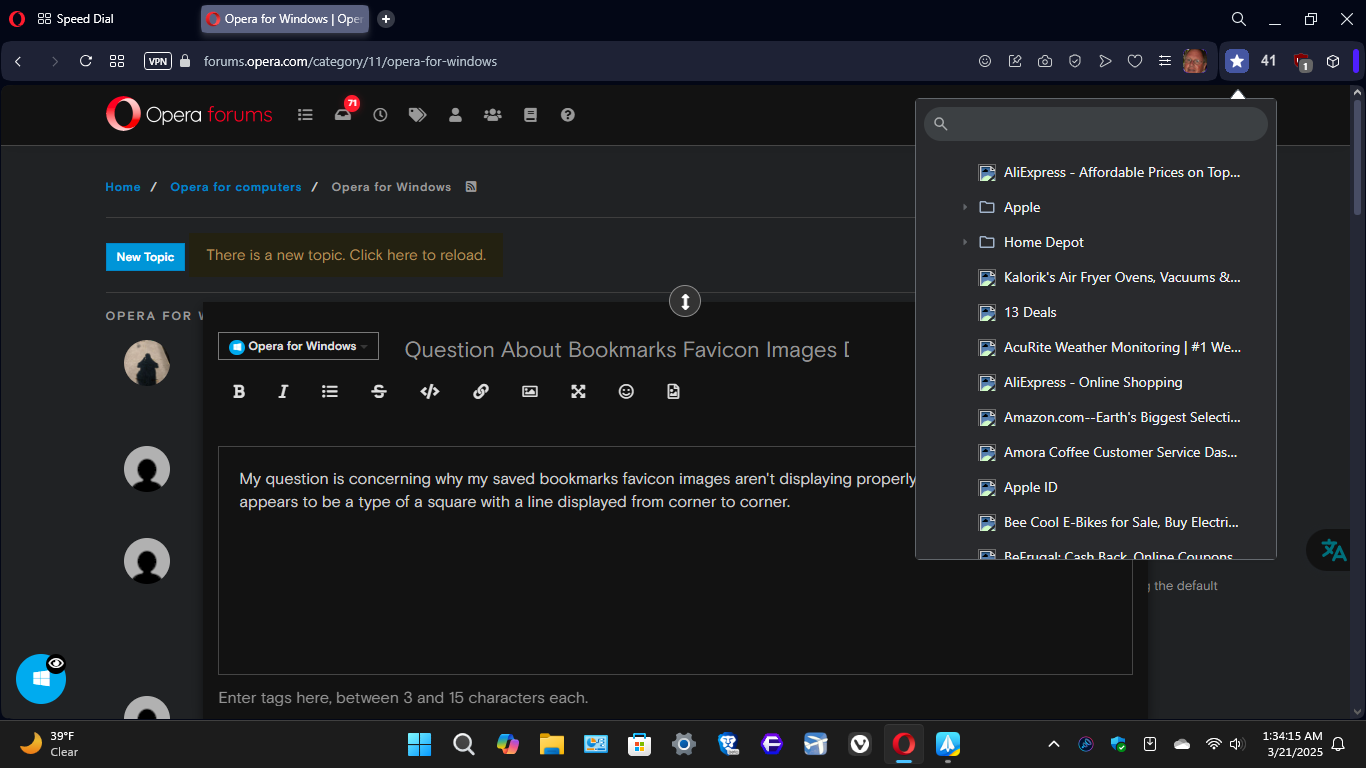
<![CDATA[ <p dir="auto">My question is concerning why my saved bookmarks favicon images aren't displaying properly, they are showing what appears to be a type of a square with a line displayed from corner to corner. I'm enclosing a screenshot of what I'm seeing.<br />
Thanks,<br />
David<img src="/assets/uploads/files/1742538942978-image_2025-03-21_013532087.png" alt="image_2025-03-21_013532087.png" class=" img-responsive img-markdown" /></p>
]]>
</description>
<link>https://forums.opera.com/topic/83834/bookmarks-favicon-not-displaying-properly</link>
<generator>RSS for Node</generator>
<lastBuildDate>Fri, 09 May 2025 00:46:22 GMT</lastBuildDate>
<atom:link href="https://forums.opera.com/topic/83834.rss" rel="self" type="application/rss+xml"/>
<pubDate>Fri, 21 Mar 2025 06:35:45 GMT</pubDate>
<ttl>60</ttl>
<item>
<title>
<![CDATA[ Reply to Bookmarks Favicon Not Displaying Properly on Fri, 21 Mar 2025 21:52:32 GMT ]]>
</title>
<description>
<![CDATA[ <p dir="auto"><a class="plugin-mentions-user plugin-mentions-a" href="https://forums.opera.com/uid/470809">@DavyP</a> See if Opera's bookmarks shows the right faxicons or not. If Opera itself doesn't show them it means Opera doesn't have them in its cache. Clearing History will also delete favicons, they would show again after you visit the sites. If Opera has the faxicons but your extension doesn't, that is something the author would need to fix.</p>
]]>
</description>
<link>https://forums.opera.com/post/380846</link>
<guid isPermaLink="true">https://forums.opera.com/post/380846</guid>
<dc:creator>
...</dc:creator>
<pubDate>Fri, 21 Mar 2025 21:52:32 GMT</pubDate>
</item>
<item>
<title>
<![CDATA[ Reply to Bookmarks Favicon Not Displaying Properly on Fri, 21 Mar 2025 09:31:11 GMT ]]>
</title>
<description>
<![CDATA[ <p dir="auto">Thanks so much for all of the replies, being perfectly honest with you I just recently started using opera again after noy having done so for quite some time, and quite frankly I'm actually enjoying it. Opera may not be as popular as some other mainstream chromium browsers but then again I thing it's got some great features. Now back to my current issue I really don't know what to try next, one of the replies mentioned it might possible be a conflict with a add-on / extension & I do for a fact have this one that I regularly use on at least one other chromium based browser so I can have instant access to my saved bookmarks: <a href="https://tinyurl.com/2bfzbsy8" target="_blank" rel="noopener noreferrer nofollow ugc">https://tinyurl.com/2bfzbsy8</a> I guess it might be possible that this could be causing my current issue.</p>
]]>
</description>
<link>https://forums.opera.com/post/380789</link>
<guid isPermaLink="true">https://forums.opera.com/post/380789</guid>
<dc:creator>
...</dc:creator>
<pubDate>Fri, 21 Mar 2025 09:31:11 GMT</pubDate>
</item>
<item>
<title>
<![CDATA[ Reply to Bookmarks Favicon Not Displaying Properly on Fri, 21 Mar 2025 08:02:11 GMT ]]>
</title>
<description>
<![CDATA[ <p dir="auto"><a class="plugin-mentions-user plugin-mentions-a" href="https://forums.opera.com/uid/470809">@DavyP</a> Being as the menu seems to be related to an extension, you'll probably have to ask that extension's author. If it was an actual Opera menu, I might try to find an answer, but I have no clue where to look for this.</p>
]]>
</description>
<link>https://forums.opera.com/post/380787</link>
<guid isPermaLink="true">https://forums.opera.com/post/380787</guid>
<dc:creator>
...</dc:creator>
<pubDate>Fri, 21 Mar 2025 08:02:11 GMT</pubDate>
</item>
<item>
<title>
<![CDATA[ Reply to Bookmarks Favicon Not Displaying Properly on Fri, 21 Mar 2025 06:49:00 GMT ]]>
</title>
<description>
<![CDATA[ <p dir="auto"><strong>favicon is pretty standard, back to HTML 4.01. If you have a <rel> link in the <head> section on each page for which you want it displayed, and the href correctly points to the file, it should show up</strong></p>
]]>
</description>
<link>https://forums.opera.com/post/380780</link>
<guid isPermaLink="true">https://forums.opera.com/post/380780</guid>
<dc:creator>
<![CDATA[ ocanseyedmond ]]>
</dc:creator>
<pubDate>Fri, 21 Mar 2025 06:49:00 GMT</pubDate>
</item>
 ]]>
]]>